そろそろ C# 12 の時期なので予習を始めなければなりません。
というわけで公式サイトを見てみると .NET 8 SDK のプレビュー版か Visual Studio の Preview 版で試せるとのこと。
learn.microsoft.com
.NET 8 SDK のプレビュー版と Visual Studio の Preview 版と普通の Visual Studio で試してみました。
rksoftware.hatenablog.com
rksoftware.hatenablog.com
rksoftware.hatenablog.com
全部のパターンで、C# 12 コードがビルド、実行できました。しかし、C# 12 の新機能のうちの一つしかコードに書いていませんでした。
そこで今回は全部の機能のコードを書いてみます。
■ .csproj の編集
インターセプターという新機能を使うには .csproj の編集が必要です。次の要素を追加します。
<Features>InterceptorsPreview</Features>
<Project Sdk="Microsoft.NET.Sdk">

  <PropertyGroup>
    <OutputType>Exe</OutputType>
    <TargetFramework>net7.0</TargetFramework>
    <ImplicitUsings>enable</ImplicitUsings>
    <Nullable>enable</Nullable>
    <LangVersion>Preview</LangVersion>
    <Features>InterceptorsPreview</Features>
  </PropertyGroup>

</Project>
■ 一通りの新機能のコードを書いてみる
雑に前述のサイトからコピペしてこんなコードが出来上がりました。
using System.Runtime.CompilerServices;

using MyType = (int x, int y);

// See https://aka.ms/new-console-template for more information
Console.WriteLine(new Test("Hello, World! 1").Name());

Console.WriteLine(new MyType(1, 2));

int[] row0 = [1, 2, 3];
int[] row1 = [4, 5, 6];
int[] row2 = [7, 8, 9];
int[] single = [.. row0, .. row1, .. row2];
foreach (var element in single)
{
    Console.Write($"{element}, ");
}

var lamda = (int a = 1) => a + a;
Console.WriteLine(lamda());

var buffer = new Buffer();
for (int i = 0; i < 10; i++)
{
    buffer[i] = i;
}

foreach (var i in buffer)
{
    Console.WriteLine(i);
}

var c = new C();
c.InterceptableMethod(1); // (L1,C1): prints "interceptor 1"
c.InterceptableMethod(1); // (L2,C2): prints "other interceptor 1"
c.InterceptableMethod(2); // (L3,C3): prints "other interceptor 2"
c.InterceptableMethod(1); // prints "interceptable 1"


    class Test(string name)
{
    public string Name() { return name; }
}

[System.Runtime.CompilerServices.InlineArray(10)]
public struct Buffer
{
    private int _element0;
}

class C
{
    public void InterceptableMethod(int param)
    {
        Console.WriteLine($"interceptable {param}");
    }
}

// generated code
static class D
{
    [InterceptsLocation(@"C:\Sample\cs12\ConsoleAppVSPreview\ConsoleAppVSPreview\Program.cs", line: 36, character: 3)] // refers to the call at (L1, C1)
    public static void InterceptorMethod(this C c, int param)
    {
        Console.WriteLine($"interceptor {param}");
    }

    [InterceptsLocation(@"C:\Sample\cs12\ConsoleAppVSPreview\ConsoleAppVSPreview\Program.cs", line: 37, character: 3)] // refers to the call at (L2, C2)
    //[InterceptsLocation(@"C:\Sample\cs12\ConsoleAppVSPreview\ConsoleAppVSPreview\Program.cs", line: 38, character: 3)] // refers to the call at (L3, C3)
    public static void OtherInterceptorMethod(this C c, int param)
    {
        Console.WriteLine($"other interceptor {param}");
    }
}

namespace System.Runtime.CompilerServices
{
    sealed class InterceptsLocationAttribute(string filePath, int line, int character) : Attribute
    {
    }
}
■ Visual Studio Preview 版でビルド、実行
実行してみます。
Hello, World! 1
(1, 2)
1, 2, 3, 4, 5, 6, 7, 8, 9, 2
0
1
2
3
4
5
6
7
8
9
interceptable 1
interceptable 1
interceptor 2
other interceptor 1

ビルド、実行できました!
■ .NET でビルド、実行
> dotnet run
C:\Sample\cs12\ConsoleAppVSPreview\ConsoleAppVSPreview\Program.cs(79,53): warning CS9113: パラメーター 'filePath' は未読です。 [C:\
Sample\cs12\ConsoleAppVSPreview\ConsoleAppVSPreview\ConsoleAppVSPreview.csproj]
C:\Sample\cs12\ConsoleAppVSPreview\ConsoleAppVSPreview\Program.cs(79,67): warning CS9113: パラメーター 'line' は未読です。 [C:\Samp
le\cs12\ConsoleAppVSPreview\ConsoleAppVSPreview\ConsoleAppVSPreview.csproj]
C:\Sample\cs12\ConsoleAppVSPreview\ConsoleAppVSPreview\Program.cs(79,77): warning CS9113: パラメーター 'character' は未 読です。 [C:
\Sample\cs12\ConsoleAppVSPreview\ConsoleAppVSPreview\ConsoleAppVSPreview.csproj]
Hello, World! 1
(1, 2)
1, 2, 3, 4, 5, 6, 7, 8, 9, 2
0
1
2
3
4
5
6
7
8
9
interceptable 1
interceptable 1
interceptor 2
other interceptor 1
ビルド、実行できました!
■ Visual Studio 普通版
前述のプロジェクトを Preview 版でない普通の Visual Studio で開いてみます。
当然ですが、.NET 8.0 の指定で怒られが発生します。
重大度レベル   コード   説明  プロジェクト  ファイル    行 抑制状態
エラー   NETSDK1209  現在の Visual Studio バージョンは、ターゲット .NET 8.0 をサポートしていません。 ターゲット .NET 7.0 以下、または Visual Studio バージョン 17.8 以上を使用してください
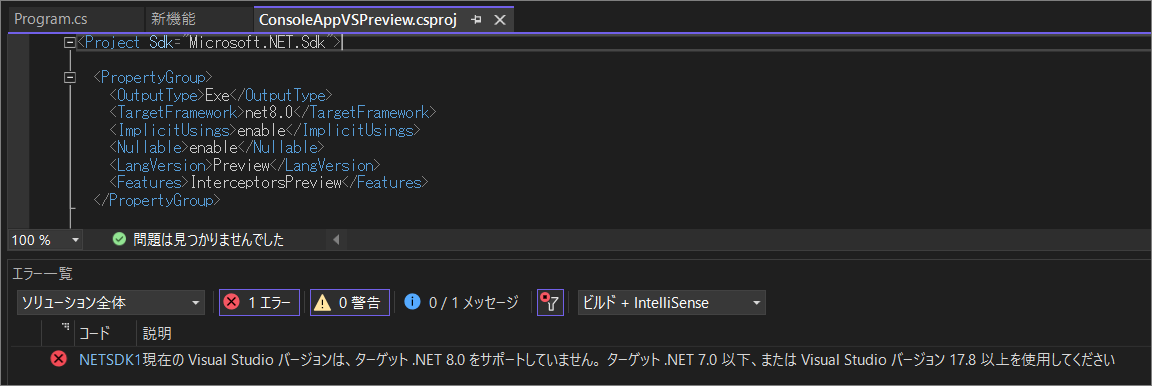
というわけで、.NET 7.0 にします。前回機能ひとつだけ書いたコードではこれで動きました。今回は......?
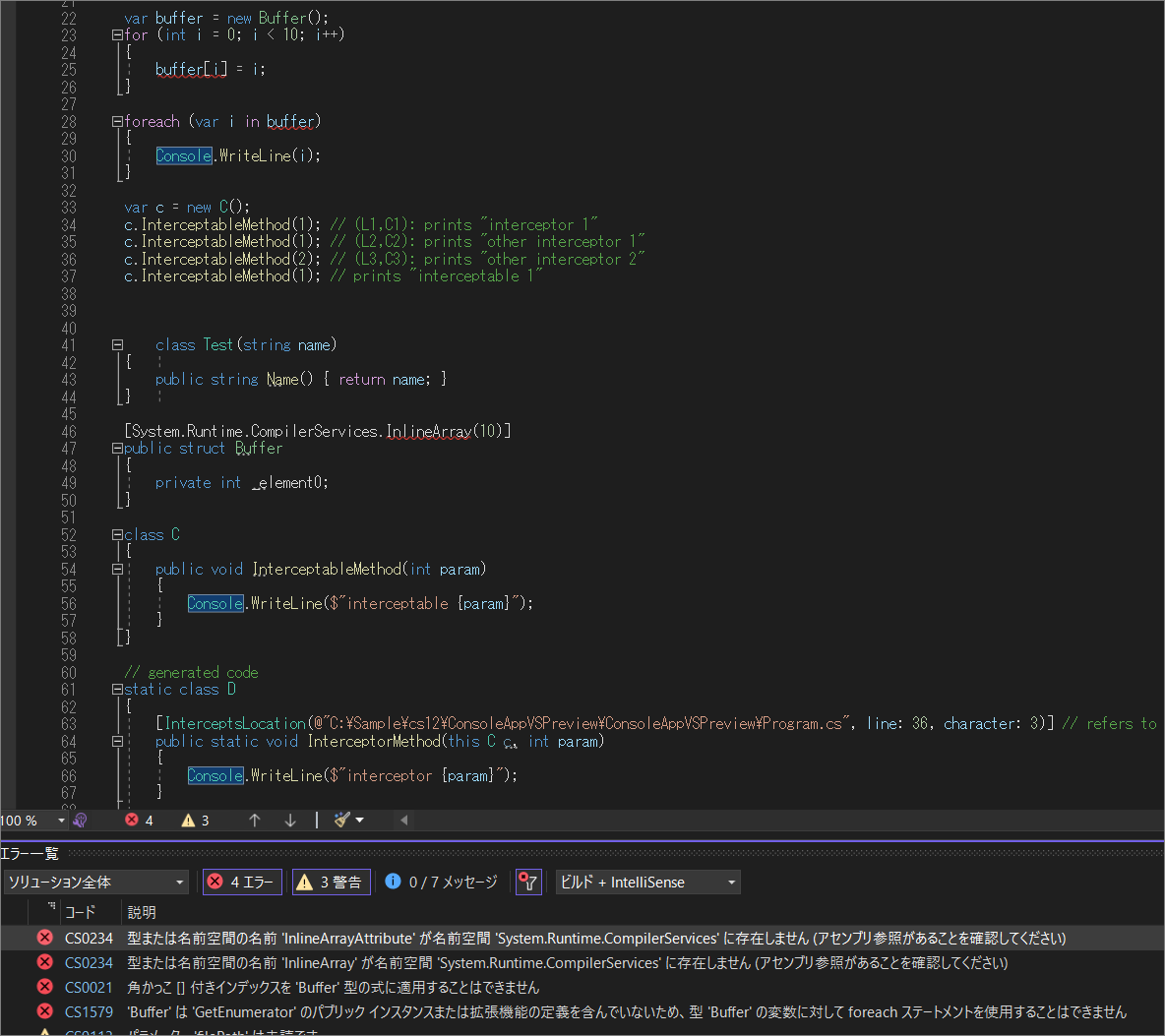
おこられました。
重大度レベル   コード   説明  プロジェクト  ファイル    行 抑制状態
エラー   CS0234  型または名前空間の名前 'InlineArrayAttribute' が名前空間 'System.Runtime.CompilerServices' に存在しません (アセンブリ参照があることを確認してください)
■ 属性を作ってみる
属性がないなら作ってしまえばいい。作ってみます。
namespace System.Runtime.CompilerServices
{
    sealed class InlineArrayAttribute(int length) : Attribute
    {
    }
}
ダメでした。
重大度レベル   コード   説明  プロジェクト  ファイル    行 抑制状態
エラー   CS9171  ターゲットのランタイムはインライン配列型をサポートしていません

■ インライン配列を消してみる
C# 12 の新機能の一つ 「 インライン配列 」 のコードを消してみます。
次のコードを消しました。
var buffer = new Buffer();
for (int i = 0; i < 10; i++)
{
    buffer[i] = i;
}

foreach (var i in buffer)
{
    Console.WriteLine(i);
}
[System.Runtime.CompilerServices.InlineArray(10)]
public struct Buffer
{
    private int _element0;
}

namespace System.Runtime.CompilerServices
{
    sealed class InlineArrayAttribute(int length) : Attribute
    {
    }
}
現在のコードは次のようになっています。
using System.Runtime.CompilerServices;

using MyType = (int x, int y);

// See https://aka.ms/new-console-template for more information
Console.WriteLine(new Test("Hello, World! 1").Name());

Console.WriteLine(new MyType(1, 2));

int[] row0 = [1, 2, 3];
int[] row1 = [4, 5, 6];
int[] row2 = [7, 8, 9];
int[] single = [.. row0, .. row1, .. row2];
foreach (var element in single)
{
    Console.Write($"{element}, ");
}

var lamda = (int a = 1) => a + a;
Console.WriteLine(lamda());

/*
var buffer = new Buffer();
for (int i = 0; i < 10; i++)
{
    buffer[i] = i;
}

foreach (var i in buffer)
{
    Console.WriteLine(i);
}
*/

var c = new C();
c.InterceptableMethod(1); // (L1,C1): prints "interceptor 1"
c.InterceptableMethod(1); // (L2,C2): prints "other interceptor 1"
c.InterceptableMethod(2); // (L3,C3): prints "other interceptor 2"
c.InterceptableMethod(1); // prints "interceptable 1"


class Test(string name)
{
    public string Name() { return name; }
}

/*
[System.Runtime.CompilerServices.InlineArray(10)]
public struct Buffer
{
    private int _element0;
}

namespace System.Runtime.CompilerServices
{
    sealed class InlineArrayAttribute(int length) : Attribute
    {
    }
}
*/

class C
{
    public void InterceptableMethod(int param)
    {
        Console.WriteLine($"interceptable {param}");
    }
}

// generated code
static class D
{
    [InterceptsLocation(@"C:\Sample\cs12\ConsoleAppVSPreview\ConsoleAppVSPreview\Program.cs", line: 36, character: 3)] // refers to the call at (L1, C1)
    public static void InterceptorMethod(this C c, int param)
    {
        Console.WriteLine($"interceptor {param}");
    }

    [InterceptsLocation(@"C:\Sample\cs12\ConsoleAppVSPreview\ConsoleAppVSPreview\Program.cs", line: 37, character: 3)] // refers to the call at (L2, C2)
    //[InterceptsLocation(@"C:\Sample\cs12\ConsoleAppVSPreview\ConsoleAppVSPreview\Program.cs", line: 38, character: 3)] // refers to the call at (L3, C3)
    public static void OtherInterceptorMethod(this C c, int param)
    {
        Console.WriteLine($"other interceptor {param}");
    }
}

namespace System.Runtime.CompilerServices
{
    sealed class InterceptsLocationAttribute(string filePath, int line, int character) : Attribute
    {
    }
}
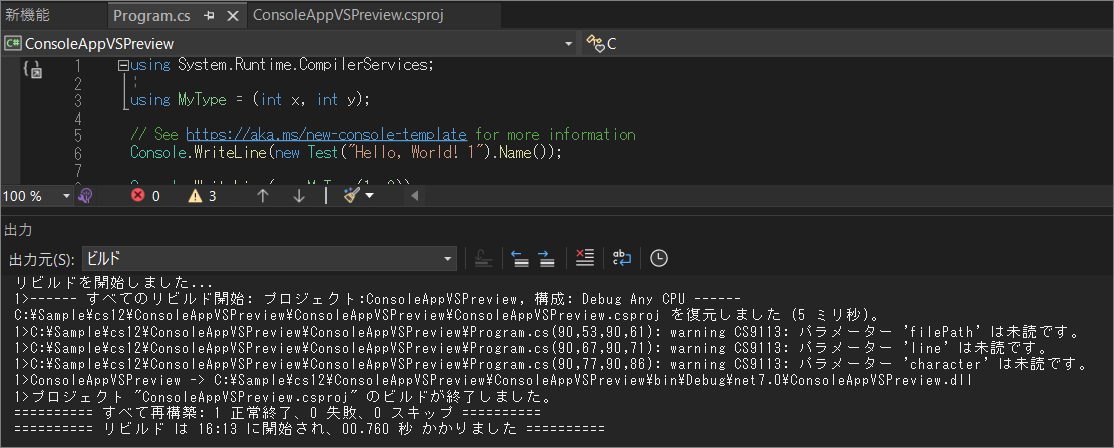
ビルド成功しました!
■ 普通の Visual Studio で実行
普通の Visual Studio で実行してみます。
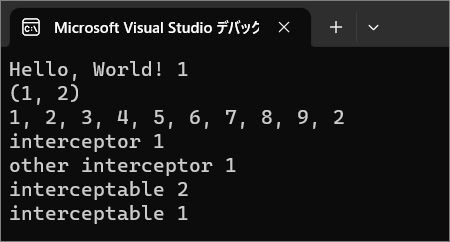
実行できました!
普通の Visual Studio でも インライン配列 を除いて使えました。なかなかやりますね。普通の Visual Studio。
■ Preview 版
というわけで普通に Preview 版の Visual Studio を使うのが良いと思います。
