本日はUnity,AI枠です。
先日OpenAIのAPIをUnityで使用する実装を行いました。
今回はスクリプトを改善して使いやすくしていきます。
〇環境
・Windows11PC
・Unity6000.0.2f
〇Jsonのレスポンスをパースする
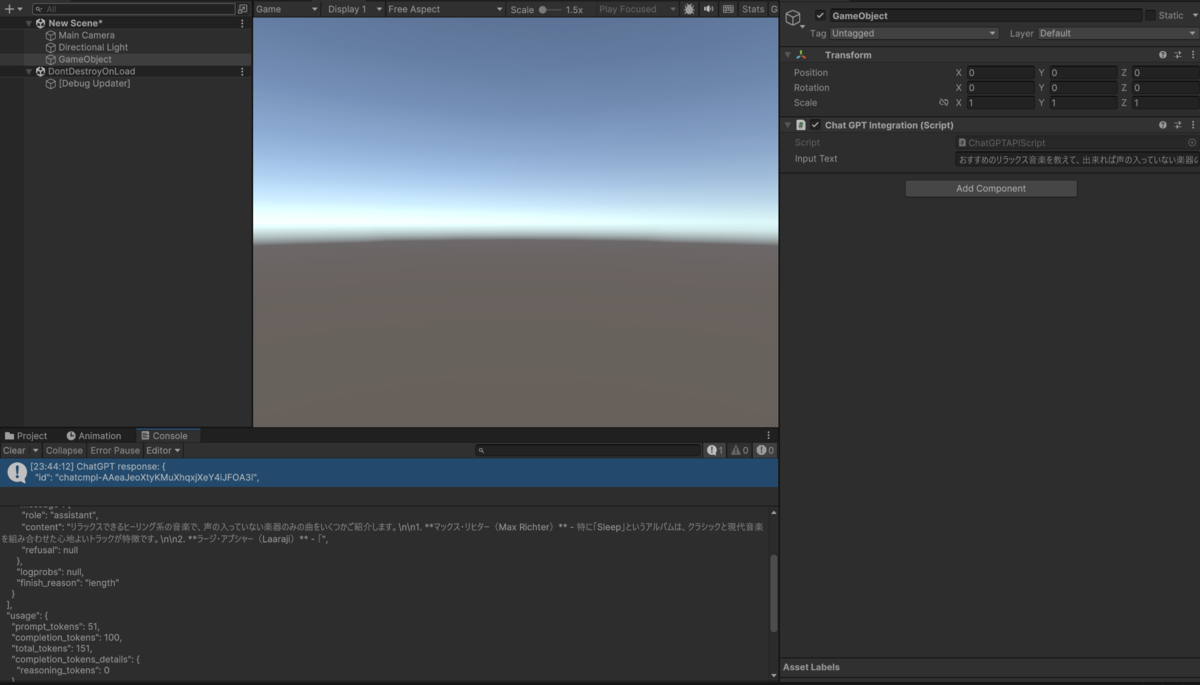
これはChatGPTに投げた後Debug.Logでそのままのレスポンスを出力しているためです。
    public async void ProcessInputText()
    {
        try
        {
            HttpClient client = new HttpClient();
            client.DefaultRequestHeaders.Add("Authorization", $"Bearer {ApiKey}");

            // 正しいJSON形式のリクエストデータ
            string jsonContent = $@"
    ・・・
            var content = new StringContent(jsonContent, Encoding.UTF8, "application/json");

            var response = await client.PostAsync(ChatGPTApiUrl, content);

            if (response.IsSuccessStatusCode)
            {
                string responseContent = await response.Content.ReadAsStringAsync();
                Debug.Log("ChatGPT response: " + responseContent);
            }
   ・・・
        }
   ・・・
    }
jsonをパースするためにNewtonsoft.Jsonを使用します。
これはUnityPackageManagerから+アイコンを選択し、Add package from git url...を選択します。

指定するURLは以下のものを使用します。
https://github.com/jilleJr/Newtonsoft.Json-for-Unity.git#upm
これによってNewtonsoft.Jsonが導入されます。

パースを行うためには次のように実装します。
   string responseContent = await response.Content.ReadAsStringAsync();
//responseが返り値のjson

  var jsonResponse = JObject.Parse(responseContent);
                var contentMessage = jsonResponse["choices"]?[0]?["message"]?["content"]?.ToString();
これによってJsonすべてが表示されるのではなく、Content部分であるChatGPTのレスポンス部のみが返されるようになります。

本日は以上です。
〇改修されたコード
using System;
using System.Net.Http;
using System.Text;
using System.Threading.Tasks;
using UnityEngine;
using Newtonsoft.Json.Linq;

public class ChatGPTIntegration : MonoBehaviour
{
    [SerializeField] private string _inputText = "Your input text here";

    private const string ChatGPTApiUrl = "https://api.openai.com/v1/chat/completions"; // Replace with your API endpoint
    private const string ApiKey = "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";  // Replace with your OpenAI API key

    public async void ProcessInputText()
    {
        try
        {
            HttpClient client = new HttpClient();
            client.DefaultRequestHeaders.Add("Authorization", $"Bearer {ApiKey}");

            // 正しいJSON形式のリクエストデータ
            string jsonContent = $@"
            {{
                ""model"": ""gpt-4o-mini"",
                ""messages"": [
                    {{""role"": ""system"", ""content"": ""You are a helpful assistant."" }},
                    {{""role"": ""user"", ""content"": ""{_inputText}"" }}
                ],
                ""max_tokens"": 100
            }}";
            var content = new StringContent(jsonContent, Encoding.UTF8, "application/json");

            var response = await client.PostAsync(ChatGPTApiUrl, content);

            if (response.IsSuccessStatusCode)
            {
                string responseContent = await response.Content.ReadAsStringAsync();

                // JSONをパースして「content」部分だけを抽出
                var jsonResponse = JObject.Parse(responseContent);
                var contentMessage = jsonResponse["choices"]?[0]?["message"]?["content"]?.ToString();

                if (contentMessage != null)
                {
                    Debug.Log("ChatGPT response content: " + contentMessage);
                }
                else
                {
                    Debug.LogError("Failed to parse content from the response.");
                }
            }
            else
            {
                Debug.LogError($"Failed to request ChatGPT API. Status code: {response.StatusCode}");
                string errorContent = await response.Content.ReadAsStringAsync();
                Debug.LogError("Error details: " + errorContent); // 追加でエラー内容をログに表示
            }
        }
        catch (Exception e)
        {
            Debug.LogError("Error processing request to ChatGPT API: " + e.Message);
        }
    }

    // For demonstration purposes, trigger the request in Update()
    void Update()
    {
        if (Input.GetKeyDown(KeyCode.Space))
        {
            ProcessInputText();
        }
    }
}
