今回はMixedRealityModelingToolsに使用するための技術検証としてBlenderのpythonでBlenderのカメラ情報にアクセスして、編集を行います。
〇Blenderのカメラ情報にアクセスする。
Blenderでカメラオブジェクトを取得するにはbpy.context.scene.cameraを使用します。
bpy.context.scene.camera.locationでカメラの位置情報を取得できます。
import bpy

# カレントシーンのカメラオブジェクトを取得
camera_object = bpy.context.scene.camera

# カメラの位置情報を取得
camera_location = camera_object.location

print("Camera Location:", camera_location)
実行するとコンソールにカメラ位置のログが出ます。

上記コードではシーン内のカメラを指定していましたが複数のカメラがある場合などはカメラの名前を指定して取得することもできます。
camera = bpy.data.objects.get("Camera")
上記のようなコードを使用します。
〇ローテーションを取得する
ローテーションを取得するコードは以下になります。
import math
import bpy

# カレントシーンのカメラオブジェクトを取得
camera_object = bpy.context.scene.camera

# カメラの位置情報を取得
camera_location = camera_object.location

print("Camera Location:", camera_location)
--------------------------------------------ここから変更点-------------------
# カメラの回転情報をラジアンから度に変換して取得
camera_rotation_rad = camera_object.rotation_euler
camera_rotation_deg = [math.degrees(angle) for angle in camera_rotation_rad]

print("Camera Rotation (degrees):", camera_rotation_deg)
回転角の変換のためにmathを使用しています。
rotation_eulerでラジアンを取得し、度数法に変換しています。

〇カメラ情報の更新
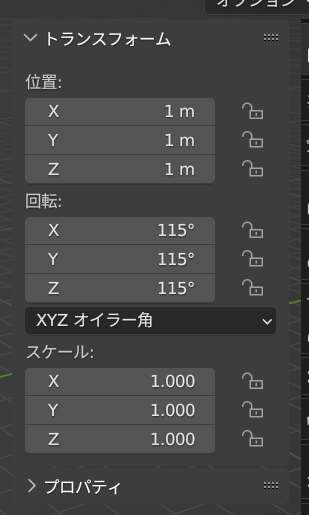
値の取得の反対にcamera_object.location = [1,1,1]のように代入することでカメラ座標の更新を行うことができます。
また回転に関しても同様にcamera_object.rotation_euler = [2,2,2]と代入することで回転を行えますが、こちらはラジアンのため注意が必要です。
import bpy
import math

# カレントシーンのカメラオブジェクトを取得
camera_object = bpy.context.scene.camera

camera_object.location = [1,1,1]
camera_object.rotation_euler = [2,2,2]
# カメラの位置情報を取得
camera_location = camera_object.location

print("Camera Location:", camera_location)

# カメラの回転情報をラジアンから度に変換して取得
camera_rotation_rad = camera_object.rotation_euler
camera_rotation_deg = [math.degrees(angle) for angle in camera_rotation_rad]

print("Camera Rotation (degrees):", camera_rotation_deg)
これを実行することでBlenderのカメラ座標を更新できます。
本日は以上です。
