本日はHoloLensのアプリ調査枠です。
HoloLensにはwebカメラが付いており写真を撮影することができます。
〇ドキュメント
ドキュメントによるとHoloLens のwebカメラで写真を撮るには[PhotoCapture API]を使用するようです。
〇サンプルコード
using UnityEngine;

using System.Linq;
using UnityEngine.XR;
using UnityEngine.Windows.WebCam;

public class HoloLensPhotoCapture : MonoBehaviour
{
    PhotoCapture PhotoCapture = null;
    Texture2D targetTexture = null;

    //初期化
    void Start()
    {
        Resolution cameraResolution = PhotoCapture.SupportedResolutions.OrderByDescending((res) => res.width * res.height).First();
        targetTexture = new Texture2D(cameraResolution.width, cameraResolution.height);

        // PhotoCapture オブジェクトを作成します
        PhotoCapture.CreateAsync(false, delegate (PhotoCapture captureObject) {
            PhotoCapture = captureObject;
            CameraParameters cameraParameters = new CameraParameters();
            cameraParameters.hologramOpacity = 0.0f;
            cameraParameters.cameraResolutionWidth = cameraResolution.width;
            cameraParameters.cameraResolutionHeight = cameraResolution.height;
            cameraParameters.pixelFormat = CapturePixelFormat.BGRA32;

            // カメラをアクティベートします
            PhotoCapture.StartPhotoModeAsync(cameraParameters, delegate (PhotoCapture.PhotoCaptureResult result) {
                // 写真を撮ります
                PhotoCapture.TakePhotoAsync(OnCapturedPhotoToMemory);
            });
        });
    }

    void OnCapturedPhotoToMemory(PhotoCapture.PhotoCaptureResult result, PhotoCaptureFrame photoCaptureFrame)
    {
        // ターゲットテクスチャに RAW 画像データをコピーします
        photoCaptureFrame.UploadImageDataToTexture(targetTexture);

        // テクスチャが適用されるゲームオブジェクトを作成
        GameObject quad = GameObject.CreatePrimitive(PrimitiveType.Quad);
        Renderer quadRenderer = quad.GetComponent<Renderer>() as Renderer;
        quadRenderer.material = new Material(Shader.Find("Custom/Unlit/UnlitTexture"));

        quad.transform.parent = this.transform;
        quad.transform.localPosition = new Vector3(0.0f, 0.0f, 3.0f);

        quadRenderer.material.SetTexture("_MainTex", targetTexture);

        // カメラを非アクティブにします
        PhotoCapture.StopPhotoModeAsync(OnStoppedPhotoMode);
    }

    void OnStoppedPhotoMode(PhotoCapture.PhotoCaptureResult result)
    {
        // photo capture のリソースをシャットダウンします
        PhotoCapture.Dispose();
        PhotoCapture = null;
    }
}
これを空のゲームオブジェクトにアタッチエディタを実行します。

Unityエディタの場合使用しているPCのWebカメラにより撮影された画像がオブジェクトとして表示されました。
〇実機で確認
このままデプロイしてはアプリ実行とともにキャプチャが始まってしまうのでHoloLensPhotoCaptureクラスのStart関数をStartCaptureに変更しました。
using UnityEngine;

using System.Linq;
using UnityEngine.XR;
using UnityEngine.Windows.WebCam;

public class HoloLensPhotoCapture : MonoBehaviour
{
    PhotoCapture PhotoCapture = null;
    Texture2D targetTexture = null;

    // 初期化します
    public void StartCapture()//メソッド名を変更
    {
    ...
    }

    void OnCapturedPhotoToMemory(PhotoCapture.PhotoCaptureResult result, PhotoCaptureFrame photoCaptureFrame)
    {
         ...
    }

    void OnStoppedPhotoMode(PhotoCapture.PhotoCaptureResult result)
    {
          ...
    }
}
ボタンを追加しPressedのイベントでStartCaptureを実行するようにします。

実機にデプロイします。
この時にHoloLensのwebカメラの機能を使用するのでUnityのPlayerSettingの[Capabily]もしくはVisualStudioでデプロイする際の[Pacage.appxmanifest]で[Webカメラ]にチェックボックスを入れ機能を宣言する必要があります。

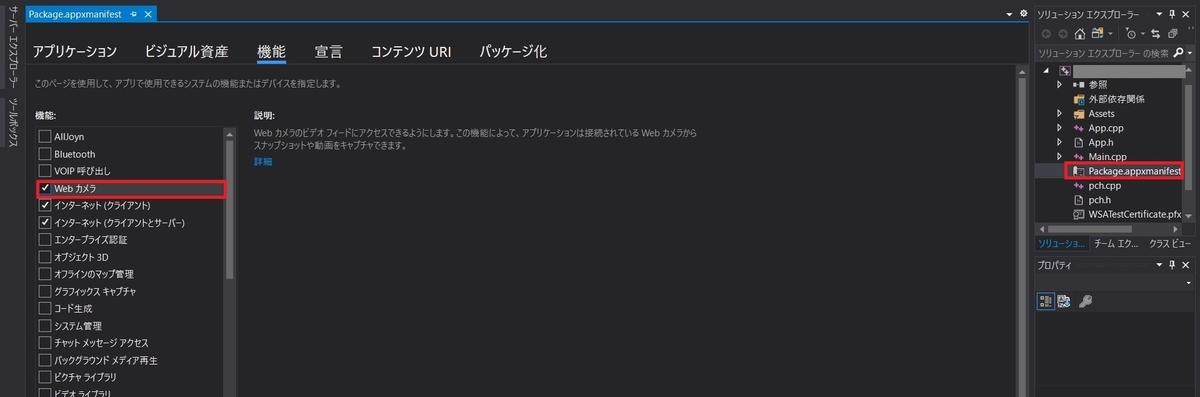
実機でも写真撮影ができました。
以上でHoloLensアプリ内で写真を撮影することができました。
