本日はMRTKStandardShaderの勉強枠です。
〇DirectionalLightの影響を受けるようにする
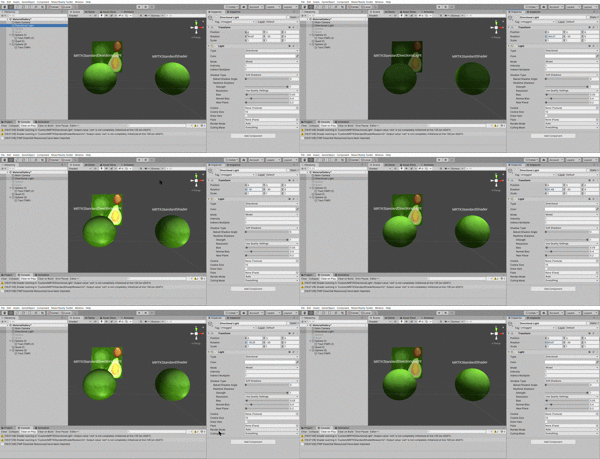
Shader "Custom/MRTKDirectionalLight"
{
    Properties
    {
        // Main maps.
        _Color("Color", Color) = (1.0, 1.0, 1.0, 1.0)
        _MainTex("Albedo", 2D) = "white" {}

        _Metallic("Metallic", Range(0.0, 1.0)) = 0.0
        _Smoothness("Smoothness", Range(0.0, 1.0)) = 0.5

          [Toggle(_DIRECTIONAL_LIGHT)] _DirectionalLight("Directional Light", Float) = 1.0
    }

        SubShader
            {
                Pass
                {
                    Name "Main"
                    Tags{ "RenderType" = "Opaque" "LightMode" = "ForwardBase" }
                    LOD 100

                    CGPROGRAM

                    #pragma vertex vert
                    #pragma fragment frag

                    #pragma shader_feature _DIRECTIONAL_LIGHT

                    #include "UnityCG.cginc"
                    #include "UnityStandardConfig.cginc"
                    #include "UnityStandardUtils.cginc"
                    #include "MixedRealityShaderUtils.cginc"

    #if defined(_DIRECTIONAL_LIGHT)
                #define _NORMAL
    #else
                #undef _NORMAL
    #endif

    #if defined(_NORMAL)
                #define _WORLD_POSITION
    #else
                #undef _WORLD_POSITION
    #endif
                #define _UV

                struct appdata_t
                {
                    float4 vertex : POSITION;
                    // The default UV channel used for texturing.
                    float2 uv : TEXCOORD0;

                    fixed3 normal : NORMAL;

                    UNITY_VERTEX_INPUT_INSTANCE_ID
                };

                struct v2f
                {
                    float4 position : SV_POSITION;

    #if defined(_UV)
                    float2 uv : TEXCOORD0;
    #endif

    #if defined(_WORLD_POSITION)

                    float3 worldPosition : TEXCOORD2;
    #endif

    #if defined(_NORMAL)

                    fixed3 worldNormal : COLOR3;
    #endif
                    UNITY_VERTEX_OUTPUT_STEREO
                };


                fixed4 _Color;

                sampler2D _MainTex;
                fixed4 _MainTex_ST;


                fixed _Metallic;
                fixed _Smoothness;

    #if defined(_DIRECTIONAL_LIGHT)
    #if defined(_LIGHTWEIGHT_RENDER_PIPELINE)
                CBUFFER_START(_LightBuffer)
                float4 _MainLightPosition;
                half4 _MainLightColor;
                CBUFFER_END
    #else
                fixed4 _LightColor0;
    #endif
    #endif

    #if defined(_DIRECTIONAL_LIGHT)
                static const fixed _MinMetallicLightContribution = 0.7;
                static const fixed _IblContribution = 0.1;
    #endif
                v2f vert(appdata_t v)
                {
                    v2f o;
                    UNITY_SETUP_INSTANCE_ID(v);
                    UNITY_INITIALIZE_VERTEX_OUTPUT_STEREO(o);

                    float4 vertexPosition = v.vertex;

                    fixed3 localNormal = v.normal;

    #if defined(_NORMAL)
                    fixed3 worldNormal = UnityObjectToWorldNormal(localNormal);
    #endif

                    o.position = UnityObjectToClipPos(vertexPosition);
    #if defined(_UV)
                    o.uv = TRANSFORM_TEX(v.uv, _MainTex);
    #endif

    #if defined(_NORMAL)

                    o.worldNormal = worldNormal;
    #endif

                    return o;
                }

                fixed4 frag(v2f i, fixed facing : VFACE) : SV_Target
                {
                    fixed4 albedo = tex2D(_MainTex, i.uv);


    #if defined(_NORMAL)
                    fixed3 worldViewDir = normalize(UnityWorldSpaceViewDir(i.worldPosition.xyz));

                    fixed3 worldNormal;


                    worldNormal = normalize(i.worldNormal) * facing;
    #endif

                    fixed pointToLight = 1.0;
                    fixed3 fluentLightColor = fixed3(0.0, 0.0, 0.0);

    #if defined(_DIRECTIONAL_LIGHT)

                    float4 directionalLightDirection = _WorldSpaceLightPos0;

                    fixed diffuse = max(0.0, dot(worldNormal, directionalLightDirection));

                    fixed specular = 0.0;
    #endif

                    // Image based lighting (attempt to mimic the Standard shader).

                    fixed3 ibl = unity_IndirectSpecColor.rgb;


                    // Fresnel lighting.

                    // Final lighting mix.
                    fixed4 output = albedo;

                    fixed3 ambient = glstate_lightmodel_ambient + fixed3(0.25, 0.25, 0.25);

                    fixed minProperty = min(_Smoothness, _Metallic);
    #if defined(_DIRECTIONAL_LIGHT)
                    fixed oneMinusMetallic = (1.0 - _Metallic);
                    output.rgb = lerp(output.rgb, ibl, minProperty);

                    fixed3 directionalLightColor = _LightColor0.rgb;
                    output.rgb *= lerp((ambient + directionalLightColor * diffuse + directionalLightColor * specular) * max(oneMinusMetallic, _MinMetallicLightContribution), albedo, minProperty);
                    output.rgb += (directionalLightColor * albedo * specular) + (directionalLightColor * specular * _Smoothness);
                    output.rgb += ibl * oneMinusMetallic * _IblContribution;
    #endif

                    return output;
                }

                ENDCG
            }
            }

            Fallback "Hidden/InternalErrorShader"
                    // CustomEditor "Microsoft.MixedReality.Toolkit.Editor.MixedRealityStandardShaderGUI"
}
追加した点は多いですが一つ一つ見ていきます。
〇プリプロセッサによる条件分岐コンパイル
MRTKStandardShaderには様々な機能が提供されていますが、そのほとんどはプリプロセッサによって条件分岐され、必要ない機能はコンパイルされません。
これによってMRTKStandardShaderは使用したい機能だけのピンポイントなコスト管理で軽量なレンダリングを実現しています。
●プリプロセッサの例
    #if defined(_DIRECTIONAL_LIGHT)
                #define _NORMAL
    #else
                #undef _NORMAL
    #endif
この部分はもしDIRECTIONAL_LIGHTが定義されているならNORMALが定義され、DIRECTIONAL_LIGHTが定義されていない場合NORMALは未定義として扱う処理をコンパイル前に行います。
〇 Properties
   Properties
    {
   ...
          [Toggle(_DIRECTIONAL_LIGHT)] _DirectionalLight("Directional Light", Float) = 1.0
    }
追加したものは一つです。
[Toggle()]アトリビュートはマテリアルのプロパティでBool型を扱うことができます。1.0の場合チェックがオンで()ないが有効になります。

〇SubShader
#pragma shader_feature _DIRECTIONAL_LIGHT
これはシェーダーバリアントと呼ばれる仕組みでわずかに細部が異なるshaderをコンパイルする仕組みのようです。
これによって_DIRECTIONAL_LIGHTが使用されていない部分をコンパイルしないようにしています。
  #if defined(_DIRECTIONAL_LIGHT)
                #define _NORMAL
    #else
                #undef _NORMAL
    #endif

    #if defined(_NORMAL)
                #define _WORLD_POSITION
    #else
                #undef _WORLD_POSITION
    #endif
                #define _UV
ここではマテリアル側でDirectionalLightがオンになっていない場合_NORMALは定義されません。
またNORMALが定義されている場合WORLD_POSITIONが定義され、_NORMALが定義されていない場合は未定義となります。
その他_UVが定義されます。
appdata_t構造体では特に追加したものはありません。
〇v2f構造体
               struct v2f
                {
                    float4 position : SV_POSITION;

    #if defined(_UV)
                    float2 uv : TEXCOORD0;
    #endif

    #if defined(_WORLD_POSITION)

                    float3 worldPosition : TEXCOORD2;
    #endif

    #if defined(_NORMAL)

                    fixed3 worldNormal : COLOR3;
    #endif
                    UNITY_VERTEX_OUTPUT_STEREO
                };
ここでもプリプロセッサによる条件分岐コンパイルが行われます。
    #if defined(_UV)
                    float2 uv : TEXCOORD0;
    #endif

    #if defined(_WORLD_POSITION)

                    float3 worldPosition : TEXCOORD2;
    #endif

    #if defined(_NORMAL)

                    fixed3 worldNormal : COLOR3;
    #endif
DirectionalLightのチェックボックスが有効化されている場合 UV、WORLD_POSITION、_NORMALがすべて定義されているためv2f構造体は以下のようになります。
          struct v2f
                {
                    float4 position : SV_POSITION;

                    float2 uv : TEXCOORD0;
                    float3 worldPosition : TEXCOORD2;

                    fixed3 worldNormal : COLOR3;
                    UNITY_VERTEX_OUTPUT_STEREO
                };
Positionはシステム上の位置、uvは一番目のUV座標、worldPositionはUV座標、worldNormalは色として扱われます。
〇頂点シェーダー
        v2f vert(appdata_t v)
                {
                    v2f o;
                    UNITY_SETUP_INSTANCE_ID(v);
                    UNITY_INITIALIZE_VERTEX_OUTPUT_STEREO(o);

                    float4 vertexPosition = v.vertex;
                    fixed3 localNormal = v.normal;

    #if defined(_NORMAL)
                    fixed3 worldNormal = UnityObjectToWorldNormal(localNormal);
    #endif
                    o.position = UnityObjectToClipPos(vertexPosition);
    #if defined(_UV)
                    o.uv = TRANSFORM_TEX(v.uv, _MainTex);
    #endif
    #if defined(_NORMAL)

                    o.worldNormal = worldNormal;
    #endif

                    return o;
                }
頂点シェーダーも頂点シェーダー同様DirectionalLightが有効の場合次のようになります。
        v2f vert(appdata_t v)
                {
                    v2f o;
                    UNITY_SETUP_INSTANCE_ID(v);
                    UNITY_INITIALIZE_VERTEX_OUTPUT_STEREO(o);

                    float4 vertexPosition = v.vertex;
                    fixed3 localNormal = v.normal;

                    fixed3 worldNormal = UnityObjectToWorldNormal(localNormal);
                    o.position = UnityObjectToClipPos(vertexPosition);
                    o.uv = TRANSFORM_TEX(v.uv, _MainTex);
                    o.worldNormal = worldNormal;
                    return o;
                }
worldNormalは頂点の持つ法線をUnity座標に変換したものが代入されます。これはそのままv2fのworldNormalに代入されます。
v2fのpositionには頂点をUnityの座標に変換したものが使用されます。
v2fのuvにはTRANSFORM_TEX()が使用されます。 TRANSFORM_TEX()はTEX2D()と同じように使用されタイリングやOffsetの計算を行う場合に使用します。
〇フラグメントシェーダー
              fixed4 frag(v2f i, fixed facing : VFACE) : SV_Target
                {
                    fixed4 albedo = tex2D(_MainTex, i.uv);
    #if defined(_NORMAL)
                    fixed3 worldViewDir = normalize(UnityWorldSpaceViewDir(i.worldPosition.xyz));
                    fixed3 worldNormal;
                    worldNormal = normalize(i.worldNormal) * facing;
    #endif

                    fixed pointToLight = 1.0;
                    fixed3 fluentLightColor = fixed3(0.0, 0.0, 0.0);

    #if defined(_DIRECTIONAL_LIGHT)

                    float4 directionalLightDirection = _WorldSpaceLightPos0;

                    fixed diffuse = max(0.0, dot(worldNormal, directionalLightDirection));

                    fixed specular = 0.0;
    #endif

                    fixed3 ibl = unity_IndirectSpecColor.rgb;

                    fixed4 output = albedo;

                    fixed3 ambient = glstate_lightmodel_ambient + fixed3(0.25, 0.25, 0.25);

                    fixed minProperty = min(_Smoothness, _Metallic);
    #if defined(_DIRECTIONAL_LIGHT)
                    fixed oneMinusMetallic = (1.0 - _Metallic);
                    output.rgb = lerp(output.rgb, ibl, minProperty);

                    fixed3 directionalLightColor = _LightColor0.rgb;
                    output.rgb *= lerp((ambient + directionalLightColor * diffuse + directionalLightColor * specular) * max(oneMinusMetallic, _MinMetallicLightContribution), albedo, minProperty);
                    output.rgb += (directionalLightColor * albedo * specular) + (directionalLightColor * specular * _Smoothness);
                    output.rgb += ibl * oneMinusMetallic * _IblContribution;
    #endif

                    return output;
                }
フラグメントシェーダーもDirectionalLightを使用している場合次のようになります。
              fixed4 frag(v2f i, fixed facing : VFACE) : SV_Target
                {
                    fixed4 albedo = tex2D(_MainTex, i.uv);

                    fixed3 worldViewDir = normalize(UnityWorldSpaceViewDir(i.worldPosition.xyz));

                    fixed3 worldNormal;
                    worldNormal = normalize(i.worldNormal) * facing;

                    fixed pointToLight = 1.0;
                    fixed3 fluentLightColor = fixed3(0.0, 0.0, 0.0);

                    float4 directionalLightDirection = _WorldSpaceLightPos0;
                    fixed diffuse = max(0.0, dot(worldNormal, directionalLightDirection));
                    fixed specular = 0.0;

                    fixed3 ibl = unity_IndirectSpecColor.rgb;

                    fixed4 output = albedo;

                    fixed3 ambient = glstate_lightmodel_ambient + fixed3(0.25, 0.25, 0.25);

                    fixed minProperty = min(_Smoothness, _Metallic);
                    fixed oneMinusMetallic = (1.0 - _Metallic);
                    output.rgb = lerp(output.rgb, ibl, minProperty);

                    fixed3 directionalLightColor = _LightColor0.rgb;
                    output.rgb *= lerp((ambient + directionalLightColor * diffuse + directionalLightColor * specular) * max(oneMinusMetallic, _MinMetallicLightContribution), albedo, minProperty);
                    output.rgb += (directionalLightColor * albedo * specular) + (directionalLightColor * specular * _Smoothness);
                    output.rgb += ibl * oneMinusMetallic * _IblContribution;
                      return output;
                }
         fixed3 worldViewDir = normalize(UnityWorldSpaceViewDir(i.worldPosition.xyz));

                    fixed3 worldNormal;
                    worldNormal = normalize(i.worldNormal) * facing;
worldViewDirにはUnityのワールド座標での頂点の位置を正規化したものが代入されます。
worldNormalには頂点の法線を正規化した値にfacingを積算したものが代入されます。 facingはメッシュの向きを意味します。
float4 directionalLightDirection = _WorldSpaceLightPos0;
directionalLightDirectionにはワールド座標系でのライトの位置が代入されます。
fixed3 ibl = unity_IndirectSpecColor.rgb;
IndirectSpecColorは調べても情報が見つからなかったのですが、間接光を指すようです。これがiblになります。
output.rgb = lerp(output.rgb, ibl, minProperty);
出力結果のRGBとシーンの間接光のパラメータをsmoothとmetallicの割合の結果でなだらかに変位させています。
メタリックの金属感やスムースの反射は周りの物体の影響を受けます。つまりこれは周囲の物体による反射光の影響を表します。
directionalLightColorにはUnityのシーン内の照明強度が入ります。
ここを以下のようにすると
fixed3 directionalLightColor = (0, 0, 0);

このように照明の影響を受けることができなくなります。
output.rgb *= lerp((ambient + directionalLightColor * diffuse + directionalLightColor * specular) * max(oneMinusMetallic, _MinMetallicLightContribution), albedo, minProperty);
影の影響を処理します。(ambient + directionalLightColor * diffuse + directionalLightColor * specular) が周囲の環境の影響を意味し、これにMetallicの影響が積算されます。
この環境の影響とalbedoとの間でなだらかに線形補完された値が出力に積算されます。
以上でDirectionalLightの影響を受けるShaderができました。
冒頭でも説明しましたが、マテリアルからDirectionalLightのチェックボックスを外すことでDirectionalLightに関するコードがコンパイルされない仕組みになっています。
