本日はMRTKのShader学習枠です。
MRTKにはHoloLensなどのMxiedRealityデバイスに特化したShaderが提供されています。
前回はテクスチャを実装しました。

〇メタリック・スムース
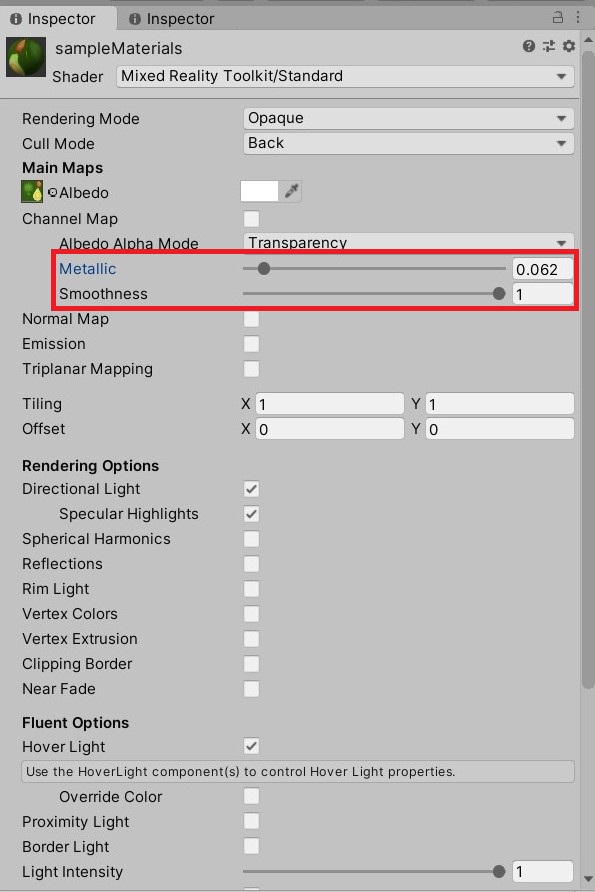
メタリックはオブジェクトに金属感を持たせます。
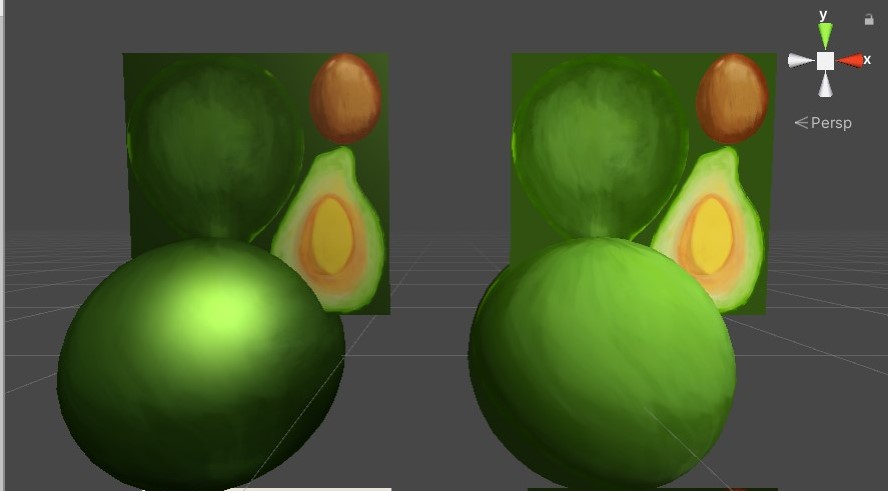
スムースは反射の滑らかさを持たせることができます。
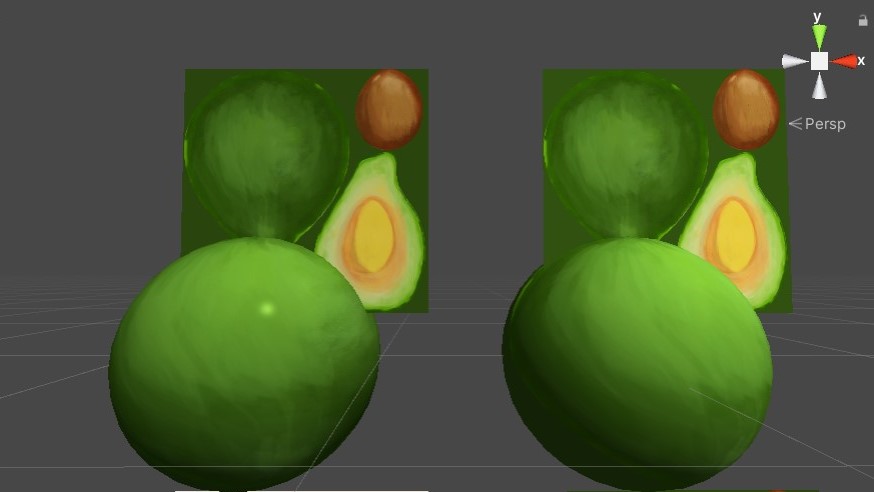
今回はこの機能を勉強します。
まずパラメータを追加する必要があります。
propertiesブロックにSmoothとMetallicに関するパラメータを追加します。
  Properties
    {
            // Main maps.
            _Color("Color", Color) = (1.0, 1.0, 1.0, 1.0)
            _MainTex("Albedo", 2D) = "white" {}

            _Metallic("Metallic", Range(0.0, 1.0)) = 0.0//追加
            _Smoothness("Smoothness", Range(0.0, 1.0)) = 0.5//追加
    }
これでマテリアル側から変数を扱うことができるようになります。
次にmetallicもsmoothもオブジェクトの法線に沿って行う処理であるため法線を扱う処理を記述します。
            struct appdata_t
            {
                float4 vertex : POSITION;

                // The default UV channel used for texturing.
                float2 uv : TEXCOORD0;
                fixed3 normal : NORMAL;//追加
                UNITY_VERTEX_INPUT_INSTANCE_ID
            };
appdata_t構造体でnormalに関して定義したので、頂点シェーダー内で使っていきます。
            v2f vert(appdata_t v)
            {
                v2f o;

                ...

                fixed3 localNormal = v.normal;//追加
                fixed3 worldNormal = UnityObjectToWorldNormal(localNormal);//追加
                o.worldNormal = worldNormal;//追加

                ...

                return o;
            }
localNormalに頂点の法線、worldNormalに頂点の法線をUnity座標に変換したものが代入されます。
このworldNormalがv2f構造体のworldNormalに渡されます。
           struct v2f
            {
                float4 position : SV_POSITION;

                float2 uv : TEXCOORD0;
                fixed3 worldNormal : COLOR3;

                UNITY_VERTEX_OUTPUT_STEREO

            };
v2f構造体では worldNormalを頂点の色として扱います。
       fixed4 frag(v2f i, fixed facing : VFACE) : SV_Target
            {
                fixed4 albedo = tex2D(_MainTex, i.uv);
                fixed minProperty = min(_Smoothness, _Metallic);//追加

                fixed4 output = albedo;
                fixed3 directionalLightColor = _LightColor0.rgb;//追加

                fixed oneMinusMetallic = (1.0 - _Metallic);//追加

                fixed specular = 0.0;//追加
                float4 directionalLightDirection = _WorldSpaceLightPos0;//追加
                fixed3 ambient = glstate_lightmodel_ambient + fixed3(0.25, 0.25, 0.25);//追加
                fixed diffuse = max(0.0, dot(worldNormal, directionalLightDirection));//追加
                output.rgb *= lerp((ambient + directionalLightColor * diffuse + directionalLightColor * specular) * max(oneMinusMetallic, _MinMetallicLightContribution), albedo, minProperty);//追加

                return output;
            }
かなり追加分が多いですが重要なものは一つです。
output.rgb *= lerp((ambient + directionalLightColor * diffuse + directionalLightColor * specular) * max(oneMinusMetallic, _MinMetallicLightContribution), albedo, minProperty);//追加
最終的にレンダリングを行うoutputのrgbに各パラメータの計算結果を線形補完したものを加算しています。
ambientは環境色を意味します。 glstate_lightmodel_ambientはGLStateに関しては詳しいドキュメントを見つけることができなかったのですがOpenGL関連で用意されているライトモデルのambientのようです。 ambientはこれに0.25が加算されています。
http://unity3d.com/support/documentation/Components/SL-BuiltinStateInPrograms.html
fixed3 directionalLightColor = _LightColor0.rgb;//追加
directionalLightColorはライティングのライトの色(RGB)です。
       float4 directionalLightDirection = _WorldSpaceLightPos0;//追加
               fixed diffuse = max(0.0, dot(worldNormal, directionalLightDirection));//追加
directionalLightDirectionはワールド座標系でのライトの位置を使用しています。
diffuseはメッシュの法線とワールド座標系でのライトの位置との内積と0との値を比較して大きいほうが代入されます。
fixed specular = 0.0;//追加
specularには0が代入されています。ここの変数はまだ追加していないMRTKStandardShaderのほかの機能によって変化します。
fixed oneMinusMetallic = (1.0 - _Metallic);//追加
oneMinusMetallicには1.0からpropertyで追加した_Metallicの値が減算され代入されます。
static const fixed _MinMetallicLightContribution = 0.7;
_MinMetallicLightContributionは0.7が代入されています。
max(oneMinusMetallic, _MinMetallicLightContribution)
ここではoneMinusMetallicが0.7以上、つまり_Mettalicが0.3以下の場合oneMinusMetallicの値、それ以外の場合は0.7が抽出されます。
albedoはテクスチャ画像を指します。
fixed minProperty = min(_Smoothness, _Metallic);//追加
minPropertyにはSmmothnessとMetallicのうち小さい値が抽出されます。
output.rgb *= lerp((ambient + directionalLightColor * diffuse + directionalLightColor * specular) * max(oneMinusMetallic, _MinMetallicLightContribution), albedo, minProperty);//追加
directionalLightColorとdiffuse、 directionalLightColorとspecularそれぞれを積算した値にambientを加算した値さらにoneMinusMetallicが0.7以上、つまりMettalicが0.3以下の場合oneMinusMetallicの値、それ以外の場合は0.7が積算された値とalbedoとの範囲の間でminPropertyにはSmmothnessと_Metallicのうち小さい値で線形補完されます。
〇今回追加したShader全体
// Copyright (c) Microsoft Corporation. All rights reserved.
// Licensed under the MIT License.

Shader "Custom/MRTKStandardShaderResearch"
{
    Properties
    {
            // Main maps.
            _Color("Color", Color) = (1.0, 1.0, 1.0, 1.0)
            _MainTex("Albedo", 2D) = "white" {}

            _Metallic("Metallic", Range(0.0, 1.0)) = 0.0
            _Smoothness("Smoothness", Range(0.0, 1.0)) = 0.5

           [Enum(RenderingMode)] _Mode("Rendering Mode", Float) = 0                                     // "Opaque"
        [Enum(CustomRenderingMode)] _CustomMode("Mode", Float) = 0                                   // "Opaque"
    }

    SubShader
    {
   Pass
            {
                Name "Main"
                Tags{ "RenderType" = "Opaque" "LightMode" = "ForwardBase" }
                LOD 100

                CGPROGRAM
                #pragma vertex vert
                #pragma fragment frag

                #include "UnityCG.cginc"
                #include "UnityStandardConfig.cginc"
                #include "UnityStandardUtils.cginc"
                #include "MixedRealityShaderUtils.cginc"


            struct appdata_t
            {
                float4 vertex : POSITION;

                // The default UV channel used for texturing.
                float2 uv : TEXCOORD0;
                fixed3 normal : NORMAL;//追加
                UNITY_VERTEX_INPUT_INSTANCE_ID
            };

            struct v2f
            {
                float4 position : SV_POSITION;
                //追加
                float2 uv : TEXCOORD0;
                fixed3 worldNormal : COLOR3;

                UNITY_VERTEX_OUTPUT_STEREO

            };

            static const fixed _MinMetallicLightContribution = 0.7;

            v2f vert(appdata_t v)
            {
                v2f o;
                UNITY_SETUP_INSTANCE_ID(v);
                UNITY_INITIALIZE_VERTEX_OUTPUT_STEREO(o);
                float4 vertexPosition = v.vertex;

                o.uv = v.uv;

                fixed3 localNormal = v.normal;//追加
                fixed3 worldNormal = UnityObjectToWorldNormal(localNormal);//追加
                o.worldNormal = worldNormal;//追加

                o.position = UnityObjectToClipPos(vertexPosition);


                return o;
            }
            fixed4 _Color;
            sampler2D _MainTex;
            fixed _Metallic;
            fixed _Smoothness;
            fixed4 _LightColor0;
            fixed3 worldNormal;

            fixed4 frag(v2f i, fixed facing : VFACE) : SV_Target
            {
                //追加
                fixed4 albedo = tex2D(_MainTex, i.uv);
                fixed minProperty = min(_Smoothness, _Metallic);

                fixed4 output = albedo;
                fixed3 directionalLightColor = _LightColor0.rgb;

                fixed oneMinusMetallic = (1.0 - _Metallic);

                fixed specular = 0.0;
                float4 directionalLightDirection = _WorldSpaceLightPos0;
                fixed3 ambient = glstate_lightmodel_ambient + fixed3(0.25, 0.25, 0.25);
                fixed diffuse = max(0.0, dot(worldNormal, directionalLightDirection));
                output.rgb *= lerp((ambient + directionalLightColor * diffuse + directionalLightColor * specular) * max(oneMinusMetallic, _MinMetallicLightContribution), albedo, minProperty);

                return output;
            }

            ENDCG
        }
    }

    Fallback "Hidden/InternalErrorShader"
   // CustomEditor "Microsoft.MixedReality.Toolkit.Editor.MixedRealityStandardShaderGUI"
}
