はじめに
どうも、最近みんな AI がどうのという話をするようになっていかつい技術話が少なくなってきたことが悲しいけんつです。今日は MySQL ユーザが知っても 1mm ぐらいしか役に立たないであろう、mysql-test-run で valgrind と Gperftools Heap Profiler を使う方法について。
特に何かを語るわけではなく、自分がよく方法を忘れるのでそのメモだと思って雑に見てもらえれば、いっそ見てもらえなくても構わないぐらいの勢いで。
前提
MySQL は 8.4.7 を使う。
mysql-test-run、通称 mtr については解説が面倒なので以下のページに丸投げする。 Source Code Documentation のバージョンが 9.4.0 になっているが大差ないので気にしなくて良い。8.4 版を探すのが面倒だった。
dev.mysql.com
Gperftools Heap Profiler を使うということで、tcmalloc を使う。その辺が入っていない状態でビルドしようとすると怒られるが最近の MySQL ビルドは cmake 時点でのエラーメッセージがかなり丁寧なので、足りないものがあったら入れて再実行で良い。
ドキュメントはこれ。
gperftools.github.io
ビルドする
今回はいつもと違ってビルドから真面目に考える必要がある。結論からいくと以下のオプションを渡す。これが同時にやる場合の最小構成と思われる。
$ mkdir build && cd $_
build/$ cmake ../ -DCMAKE_BUILD_TYPE=Debug -DWITH_VALGRIND=1 -DWITH_TCMALLOC=BUNDLED
- CMAKE_BUILD_TYPE=Debug: これはいつもの debug ビルド
- WITH_VALGRIND=1: これがないと mtr どころか手動で valgrind を使うこともできないはず
- WITH_TCMALLOC=BUNDLED: ソースコードに同梱される*1 tcmalloc を利用する
あとはいつも通り make する。make が完了したら一応 tcmalloc があることの確認。
build$ ldd ./runtime_output_directory/mysqld | grep tcmalloc
	libtcmalloc_debug.so.4 => /lib/x86_64-linux-gnu/libtcmalloc_debug.so.4 (0x00007434a3200000)
テストケースを用意する
今回はあくまで手順の話なので、シンプルなテストケースを用意する。色々ツール走らせたりするのででかいテストケースを実行すると時間がかかって辛い。
mysql-test/suite/innodb/t/sample.test あたりに生やす。
CREATE TABLE t1(a INT NOT NULL) Engine=InnoDB;
INSERT INTO t1(a) VALUES(1), (2), (3);
COMMIT;
SELECT * FROM t1;
DROP TABLE t1;
このテストの result ファイルを作りたいので一度 record オプションをつけて普通に mtr を実行する。
build$ ./mysql-test/mtr innodb.sample --record
この実行が終わると result ファイルができているはず。
CREATE TABLE t1(a INT NOT NULL) Engine=InnoDB;
INSERT INTO t1(a) VALUES(1), (2), (3);
COMMIT;
SELECT * FROM t1;
a
1
2
3
DROP TABLE t1;
mtr で valgrind を使う
mtr に専用のオプションがあるのでそれを使うがやや難解。help をみると valgrind 関連のオプションは以下の通り。
Options for valgrind

  callgrind             Instruct valgrind to use callgrind.
  helgrind              Instruct valgrind to use helgrind.
  valgrind              Run the "mysqltest" and "mysqld" executables using
                        valgrind with default options.
  valgrind-all          Synonym for --valgrind.
  valgrind-clients      Run clients started by .test files with valgrind.
  valgrind-mysqld       Run the "mysqld" executable with valgrind.
  valgrind-mysqltest    Run the "mysqltest" and "mysql_client_test" executable
                        with valgrind.
  valgrind-option=ARGS  Option to give valgrind, replaces default option(s), can
                        be specified more then once.
  valgrind-options=ARGS Deprecated, use --valgrind-option.
  valgrind-path=<EXE>   Path to the valgrind executable.
雑に始めるなら --valgrind をつけることで手軽に利用できるがこの場合は --tool=memcheck が固定となる。また実行時におそらく SQL を投げているクライアントに関しても解析が走っているっぽい*2ので実行時間がかかることを考えるとあまりうれしくない。
というわけで --valgrind-mysqld とともに以下のように massif *3 を取得する。
$ ./mysql-test/mtr innodb.sample --valgrind-option="--tool=massif" --valgrind-option="--stacks=yes" --valgrind-option="--time-unit=B" --valgrind-mysqld
以下は雑な実行ログ
build$ ./mysql-test/mtr innodb.sample --valgrind-option="--tool=massif" --valgrind-option="--stacks=yes" --valgrind-option="--time-unit=B" --valgrind-mysqld
Logging: /home/lrf141/mysqlProject/mysql-server/mysql-test/mysql-test-run.pl  innodb.sample --valgrind-option=--tool=massif --valgrind-option=--stacks=yes --valgrind-option=--time-unit=B --valgrind-mysqld
MySQL Version 8.4.7
Turning on valgrind for all executables
Running valgrind with options " --tool=massif --stacks=yes --time-unit=B --suppressions=/home/lrf141/mysqlProject/mysql-server/mysql-test/valgrind.supp "
Turning off --check-testcases to save time when valgrinding
Checking supported features
 - Binaries are debug compiled
Using 'all' suites
Collecting tests
Checking leftover processes
Removing old var directory
Creating var directory '/home/lrf141/mysqlProject/mysql-server/build/mysql-test/var'
Installing system database
Using parallel: 1

==============================================================================
                  TEST NAME                       RESULT  TIME (ms) COMMENT
------------------------------------------------------------------------------
[ 33%] innodb.sample                             [ pass ]  11978
[ 66%] shutdown_report                           [ pass ]
[100%] valgrind_report                           [ pass ]
------------------------------------------------------------------------------
The servers were restarted 0 times
The servers were reinitialized 0 times
Spent 11.978 of 610 seconds executing testcases

Completed: All 3 tests were successful.
そうすると mysql-test 直下の var/log/ 以下に massif ファイルが生成される
build$ ll mysql-test/var/log/
total 1304
drwxrwxr-x 2 lrf141 lrf141   4096 Dec 27 10:13 ./
drwxrwxr-x 8 lrf141 lrf141   4096 Dec 27 10:08 ../
-rw-rw-r-- 1 lrf141 lrf141   2769 Dec 27 10:08 bootstrap.log
-rw-r--r-- 1 lrf141 lrf141  19165 Dec 27 10:13 mysqld.1.err
-rw-r--r-- 1 lrf141 lrf141   1958 Dec 27 10:12 mysqld.1.err.warnings
-rw-r----- 1 lrf141 lrf141 463928 Dec 27 10:13 mysqld.1_massif.out.229134
-rw-r--r-- 1 lrf141 lrf141   1033 Dec 27 10:12 mysqltest.log
-rw-r--r-- 1 lrf141 lrf141 819628 Dec 27 10:12 mysqltest_massif.out.229186
-rw-r----- 1 lrf141 lrf141      5 Dec 27 10:12 timer
ので、ms_print などで見れば OK
--------------------------------------------------------------------------------
Command:            /home/lrf141/mysqlProject/mysql-server/build/runtime_output_directory/mysqld --defaults-group-suffix=.1 --defaults-file=/home/lrf141/mysqlProject/mysql
-server/build/mysql-test/var/my.cnf --log-output=file --explain-format=TRADITIONAL_STRICT --loose-debug-sync-timeout=6000 --core-file
Massif arguments:   --massif-out-file=/home/lrf141/mysqlProject/mysql-server/build/mysql-test/var/log/mysqld.1_massif.out.%p --stacks=yes --time-unit=B
ms_print arguments: mysql-test/var/log/mysqld.1_massif.out.229134
--------------------------------------------------------------------------------


    MB
337.2^                                                    #
     |                                            @:::::::#       :::::@::::::
     |      @   @:::::::@::@::::::::::::::::@:::::@:::::: #::::::@:::::@::::::
     |      @::@@: :::::@::@: :::: :::::::: @: :::@:::::: #::::::@:::::@::::::
     |  ::::@: @@: :::::@::@: :::: :::::::: @: :::@:::::: #::::::@:::::@::::::
     |  : ::@: @@: :::::@::@: :::: :::::::: @: :::@:::::: #::::::@:::::@::::::
     |  : ::@: @@: :::::@::@: :::: :::::::: @: :::@:::::: #::::::@:::::@::::::
     |  : ::@: @@: :::::@::@: :::: :::::::: @: :::@:::::: #::::::@:::::@::::::
     |  : ::@: @@: :::::@::@: :::: :::::::: @: :::@:::::: #::::::@:::::@::::::
     |  : ::@: @@: :::::@::@: :::: :::::::: @: :::@:::::: #::::::@:::::@::::::
     |  : ::@: @@: :::::@::@: :::: :::::::: @: :::@:::::: #::::::@:::::@::::::
     |  : ::@: @@: :::::@::@: :::: :::::::: @: :::@:::::: #::::::@:::::@::::::
     | @: ::@: @@: :::::@::@: :::: :::::::: @: :::@:::::: #::::::@:::::@::::::
     | @: ::@: @@: :::::@::@: :::: :::::::: @: :::@:::::: #::::::@:::::@::::::
     | @: ::@: @@: :::::@::@: :::: :::::::: @: :::@:::::: #::::::@:::::@::::::
     | @: ::@: @@: :::::@::@: :::: :::::::: @: :::@:::::: #::::::@:::::@::::::
     | @: ::@: @@: :::::@::@: :::: :::::::: @: :::@:::::: #::::::@:::::@::::::
     | @: ::@: @@: :::::@::@: :::: :::::::: @: :::@:::::: #::::::@:::::@::::::
     | @: ::@: @@: :::::@::@: :::: :::::::: @: :::@:::::: #::::::@:::::@::::::
     | @: ::@: @@: :::::@::@: :::: :::::::: @: :::@:::::: #::::::@:::::@::::::
   0 +----------------------------------------------------------------------->GB
     0                                                                   66.04

Number of snapshots: 80
 Detailed snapshots: [1, 7, 9, 10, 17, 20, 35, 41, 50 (peak), 60, 70]

--------------------------------------------------------------------------------
  n        time(B)         total(B)   useful-heap(B) extra-heap(B)    stacks(B)
--------------------------------------------------------------------------------
  0              0                0                0             0            0
  1  1,227,783,424      157,753,360      157,473,853       268,075       11,432
mtr で Gperftools Heap Profiler
プロファイルを取得するにはディレクトリを環境変数で指定して実行するか、実装にプロファイル取得を足すかの二択だが後者は面倒なので前者で行う。
そして mtr 実施時につけるとそれは mtr のもの全てを取得してしまいかねないので*4なので mtr 実施時に起動される mysqld に対して追加で環境変数を与える方法をとる。それには --mysqld-env オプションを使えば良い。
build$ ./mysql-test/mtr innodb.sample --mysqld-env=HEAPPROFILE=/tmp/mysql-test
Logging: /home/lrf141/mysqlProject/mysql-server/mysql-test/mysql-test-run.pl  innodb.sample --mysqld-env=HEAPPROFILE=/tmp/mysql-test
MySQL Version 8.4.7
Checking supported features
 - Binaries are debug compiled
Using 'all' suites
Collecting tests
Checking leftover processes
Removing old var directory
Creating var directory '/home/lrf141/mysqlProject/mysql-server/build/mysql-test/var'
Installing system database
Using parallel: 1

==============================================================================
                  TEST NAME                       RESULT  TIME (ms) COMMENT
------------------------------------------------------------------------------
[ 50%] innodb.sample                             [ pass ]   3428
[100%] shutdown_report                           [ pass ]
------------------------------------------------------------------------------
The servers were restarted 0 times
The servers were reinitialized 0 times
Spent 3.428 of 435 seconds executing testcases

Completed: All 2 tests were successful.
すると結果のファイルが出力されている
$ ll /tmp | grep mysql-test
drwxrwxr-x  2 lrf141 lrf141    4096 Dec 27 12:49 mysql-test/
-rw-r--r--  1 lrf141 lrf141  395204 Dec 27 13:03 mysql-test.0001.heap
-rw-rw----  1 lrf141 lrf141 1048560 Dec 27 13:03 mysql-test.0002.heap
-rw-rw----  1 lrf141 lrf141 1048572 Dec 27 13:03 mysql-test.0003.heap
-rw-rw----  1 lrf141 lrf141 1048573 Dec 27 13:05 mysql-test.0004.heap
なので順当に変換すれば OK
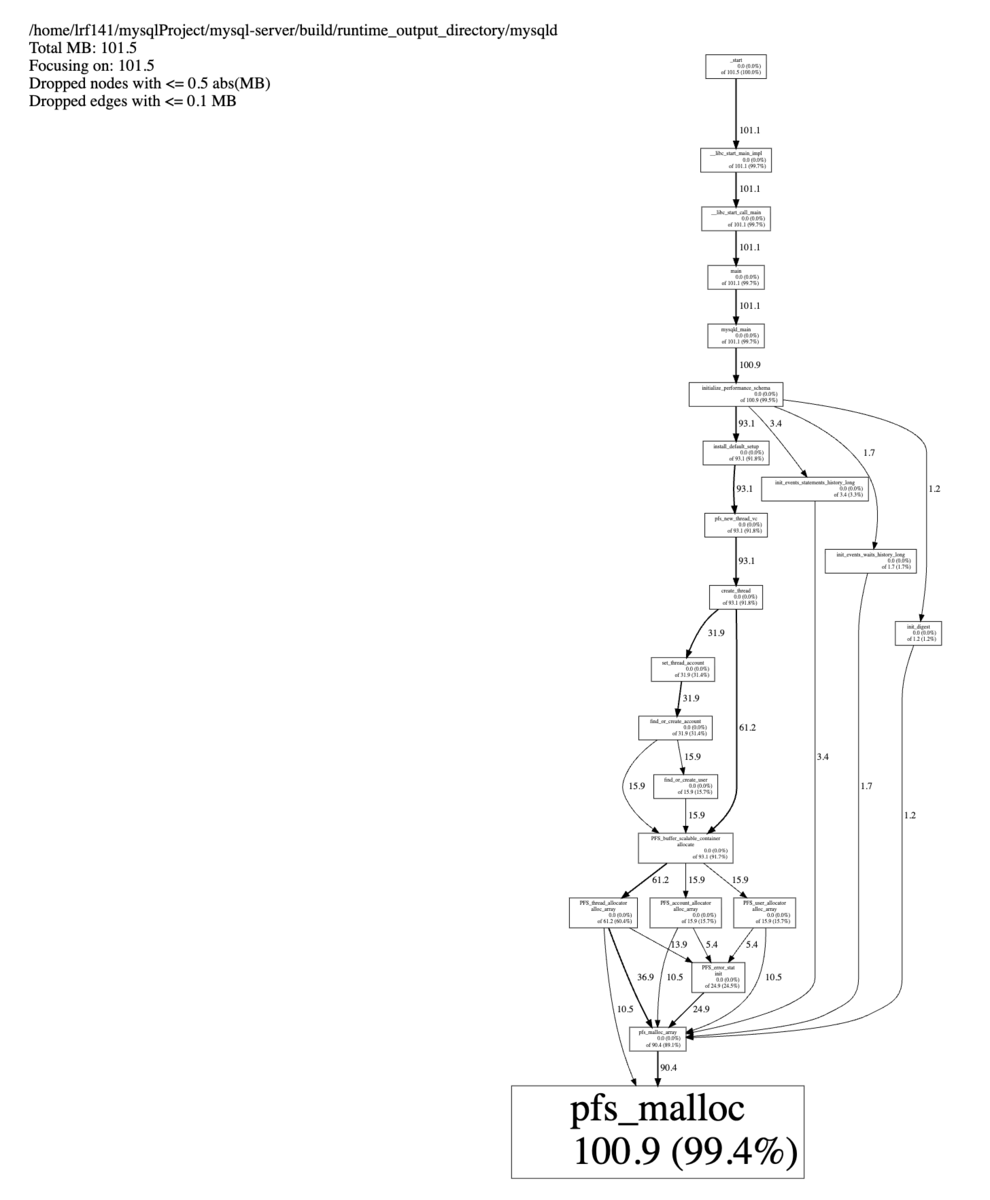
$ pprof-symbolize --svg ~/mysqlProject/mysql-server/build/runtime_output_directory/mysqld /tmp/mysql-test.0001.heap > mysql-test.svg
Using local file /home/lrf141/mysqlProject/mysql-server/build/runtime_output_directory/mysqld.
Using local file /tmp/mysql-test.0001.heap.
Dropping nodes with <= 0.5 MB; edges with <= 0.1 abs(MB)
svg はこんな感じで生成できる↓
おわりに
というわけでざっくりまとめたわけですが、まとめてみてこれを参考にする人が現れることがあるのかという気持ちになってきました
