はじめに
- 前回、TwitterのAPIキーが発行されるのに数日かかることがわかり、首を長くしてまっていたら約1週間後に取得できた。 px-wing.hatenablog.com
実装に向けての課題
APIの制約を確認する developer.twitter.com ※1ページあたりに返されるツイートの数は最大100です。デフォルトは15です。
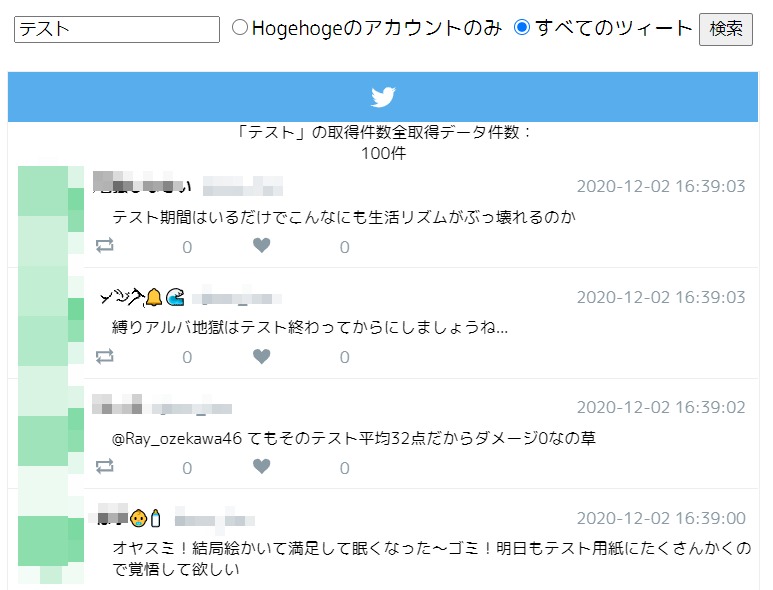
APIでデータを取得するがTwitterのガジェットのようにデザインしたいと思い、いろいろと調べてみたところ下記の参考になるサイトをみつけて参考にさせて頂いた。 nakox.jp
実装時に発生したエラー①
- 実装したところ下記のエラーが発生していたので、Nginxの設定を修正する
Abraham\TwitterOAuth\TwitterOAuth->http('GET', 'https://api" while reading response header from upstream, client: xxx.xxxxxx.xx, server: _, request: "GET /example/ HTTP/1.1", upstream: "fastcgi://unix:/var/run/php-fpm/www.sock:", host: "example.com"
解決方法
- nginxのnginx.confファイルに下記の記述追加してサーバを再起動することで解決できた。
        proxy_buffer_size          128k;
        proxy_buffers              4 256k;
        proxy_busy_buffers_size    256k;
実装時に発生したエラー②
- 実装したところ下記のエラーが発生していたので、twitterのlibraryをcomposerを利用してインストールすることで解決できた
Uncaught Error: Class 'Composer\CaBundle\CaBundle' not found
解決方法
- composer.jsonを下記のように作成する
{
    "require": {
        "php": ">=5.4.0",
        "abraham/twitteroauth": "0.5.0"
    }
}
- 下記のコマンドを実行したところ解消できた
composer install
- 参考URL github.com
サンプルコード
            <link rel='stylesheet' href='css/twitter.css' type='text/css' media='all' />
            <form action="./index.php" method="get">
                    <input type="text" name="q" value="<?php print isset($_GET['q']) ? $_GET['q'] : 'おっすおら' ?>">
                    <?php if (($_GET['s'] === "1") || ($_GET['s'] === "")) { ?>
                        <input type="radio" name="s" value="1" checked>○○○のアカウントのみ
                        <input type="radio" name="s" value="2">すべてのツィート
                    <?php } else { ?>
                        <input type="radio" name="s" value="1">○○○のアカウントのみ
                        <input type="radio" name="s" value="2" checked>すべてのツィート
                    <?php } ?>
                    <input type="submit" value="検索">
            </form>
            <!-- ▼twitter風ここから -->
            <div class="twitter__container">
                <!-- タイトル -->
                <div class="twitter__title">
                    <span class="twitter-logo"></span>
                </div>

                <!-- ▼タイムラインエリア scrollを外すと高さ固定解除 -->
                <div class="twitter__contents scroll">

 <?php
                    $quary = isset($_GET['q']) ? $_GET['q'] : 'おっすおら';
                    $statuses = $connection->get('search/tweets',['q' => $quary, 'count' => 100, 'tweet_mode' => 'extended']);
                    if(isset($statuses->errors)) {
                        //取得失敗
                        echo 'Error occurred. ';
                        echo 'Error message: ' . $statuses->errors[0]->message;
                    } else {
                        if(count($statuses->statuses)==0)echo '「'.$quary.'」で該当するツイートはありませんでした。';
                        $target_count = 0;
                        print '「'.$quary.'」の取得件数全取得データ件数:<br>' . count($statuses->statuses).'件<br>';
                        foreach($statuses->statuses as $tweet){

                            if (($tweet->user->screen_name === "HogeHoge") || ($_GET['s']=== "2")){
                                echo '<div class="twitter__block">';
                                echo '    <figure>';
                                echo '        <img src="img/hogehoge.png" />';
                                echo '    </figure>';
                                echo '    <div class="twitter__block-text">';
                                echo '       <div class="name" style="text-align: left">'.$tweet->user->name.'<span class="name_reply">hogehoge</span></div>';
                                echo '       <div class="date">'. date('Y-m-d H:i:s', strtotime($tweet->created_at)) . '</div>';
                                echo '       <div class="text" style="text-align: left">';
                                $text;  //対象のテキスト
                                $pattern = '/((?:https?|ftp):\/\/[-_.!~*\'()a-zA-Z0-9;\/?:@&=+$,%#]+)/';
                                $replace = '<a href="$1">$1</a>';
                                echo '<table><tr>';
                                foreach($tweet->extended_entities->media as $key => $media) {
                                    if (isset($tweet->extended_entities->media[$key])) {
                                        print '<td><img src="' . $tweet->extended_entities->media[$key]->media_url.':thumb"></td>';
                                    }
                                }
                                $text    = preg_replace( $pattern, $replace, $tweet->full_text );
                                echo '<td style="vertical-align:top;"><div style="margin-left: 10px;">';
                                echo $text;
                                echo '</div></td></tr></table>';
                                echo '       </div>';
                                echo '       <div class="twitter__icon">';
                                echo '           <span class="twitter-loop">'.$tweet->retweet_count.'</span>';
                                echo '           <span class="twitter-heart">'.$tweet->favorite_count.'</span>';
                                echo '       </div>';
                                echo '    </div>';
                                echo '</div>';
                                $target_count = $target_count + 1;
                            }
                        }
                        if($target_count==0)echo '「'.$quary.'」で該当するツイートはありませんでした。';;
                    }
?>
                </div>
                <!-- ▲タイムラインエリア ここまで -->
            </div>
            <!-- ▲twitter風ここまで -->
実装結果