はじめに
- 下記のサイトを参考にElectronの環境を構築してみる。 www.electronjs.org
インストールするもの
環境構築に必要なものは下記の2つのみ
nodejs
- 下記のサイトからダウンロードしてインストールする
nodejs.org
electron
- nodeインストール後下記のコマンドを実行する
mkdir test && cd test
npm init -y
npm i --save-dev electron
必要なファイル
下記の3つのファイルを用意するだけで作成できる
- package.json
{
  "name": "my-electron-app",
  "version": "0.1.0",
  "main": "main.js",
  "scripts": {
    "start": "electron."
  }
}
- index.html
<!DOCTYPE html>
<html>
<head>
    <meta charset="UTF-8">
    <title>Hello World!</title>
    <meta http-equiv="Content-Security-Policy" content="script-src 'self' 'unsafe-inline';" />
</head>
<body>
    <h1>Hello World!</h1>
    We are using node <script>document.write(process.versions.node)</script>,
    Chrome <script>document.write(process.versions.chrome)</script>,
    and Electron <script>document.write(process.versions.electron)</script>.
</body>
</html>
- main.js
const { app, BrowserWindow } = require('electron')

function createWindow () {
  const win = new BrowserWindow({
    width: 800,
    height: 600,
    webPreferences: {
      nodeIntegration: true
    }
  })

  win.loadFile('index.html')
  win.webContents.openDevTools()
}

app.whenReady().then(createWindow)

app.on('window-all-closed', () => {
  if (process.platform !== 'darwin') {
    app.quit()
  }
})

app.on('activate', () => {
  if (BrowserWindow.getAllWindows().length === 0) {
    createWindow()
  }
})
実行
- 下記のエラーが発生して起動しない
npm start

npm ERR! code ELIFECYCLE
npm ERR! errno 1
npm ERR! my-electron-app@0.1.0 start: `electron.`
npm ERR! Exit status 1
npm ERR!
npm ERR! Failed at the my-electron-app@0.1.0 start script.
npm ERR! This is probably not a problem with npm. There is likely additional logging output above.

npm ERR! A complete log of this run can be found in:
npm ERR!     C:\Users\owner\AppData\Roaming\npm-cache\_logs\2020-11-22T23_31_20_399Z-debug.log
解決方法
- グローバルでelectronをインストールを行い
npm i -g electron
- 下記のコマンドで実行したところ起動することができた
electron <main.js/index.htmlファイルが格納されているフォルダ名を指定する>

ex)
electron test
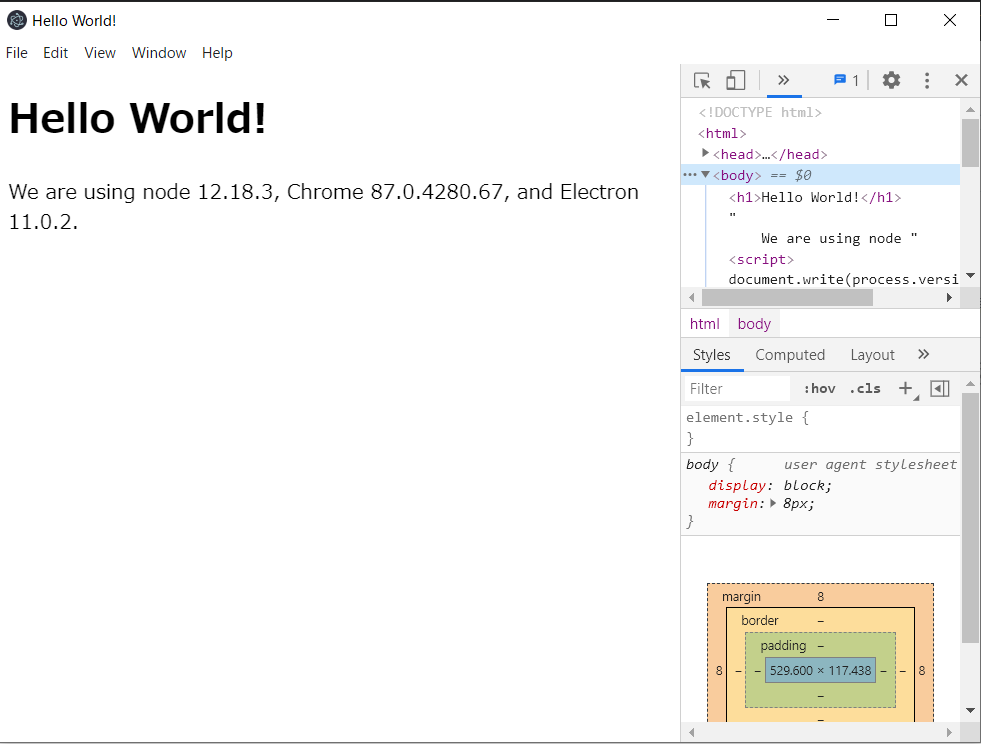
実行結果