はじめに
Laravel Adminで簡単にCRUDを作成してしまうと実際のユーザー側の画面の作成イメージがわかないので、コントローラーやフォームを作成して登録フォームを作成してみる
モデルの作成やデータベースの接続は過去の記事を参照 px-wing.hatenablog.com
コントローラーの作成
- 次のコマンドを使用してフォームコントローラーを作成します。
$ php artisan make:controller CategoryController
- コントローラー側のコード
<?php

namespace App\Http\Controllers;

use Illuminate\Http\Request;
use App\Models\Category;

class CategoryController extends Controller
{
    public function index()
    {
        return view('add-category-form');
    }

    public function store(Request $request)
    {
        $category = new Category;
        $category->name = $request->name;
        $category->save();
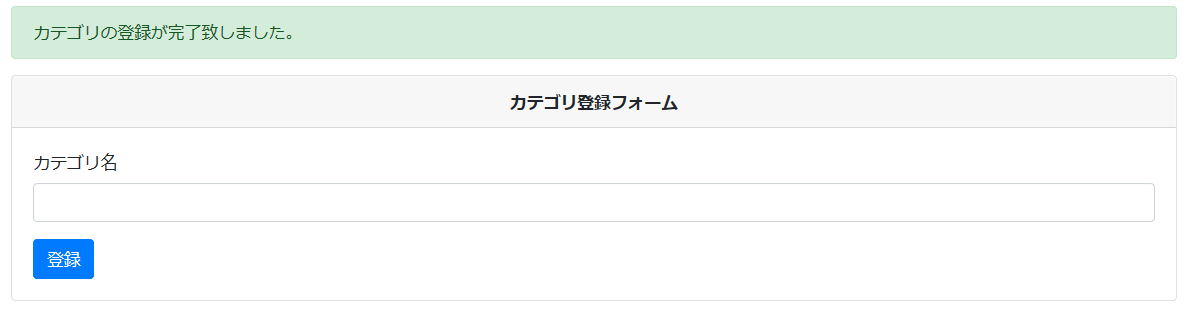
        return redirect('add-category-form')->with('status', 'カテゴリの登録が完了致しました。');
    }

}
フォームのブレードファイルを作成する
- カテゴリを追加するために、resources/viewsディレクトリ内にadd-category-form.blade.phpという名前の新しいブレードビューファイルを作成します。 次に、次のhtmlフォームコードをadd-category-form.blade.phpに追加します。
<!DOCTYPE html>
<html>
<head>
    <title>カテゴリ登録フォーム</title>
    <meta name="csrf-token" content="{{ csrf_token() }}">
    <link rel="stylesheet" href="https://stackpath.bootstrapcdn.com/bootstrap/4.5.2/css/bootstrap.min.css">
</head>
<body>
<div class="container mt-4">
  @if(session('status'))
    <div class="alert alert-success">
        {{ session('status') }}
    </div>
  @endif
  <div class="card">
    <div class="card-header text-center font-weight-bold">
      カテゴリ登録フォーム
    </div>
    <div class="card-body">
      <form name="add-blog-post-form" id="add-blog-post-form" method="post" action="{{url('store-form')}}">
       @csrf
        <div class="form-group">
          <label for="exampleInputEmail1">カテゴリ名</label>
          <input type="text" id="name" name="name" class="form-control" required="">
        </div>
        <button type="submit" class="btn btn-primary">登録</button>
      </form>
    </div>
  </div>
</div>
</body>
</html>
ルーティングの設定
<?php

use Illuminate\Support\Facades\Route;
use App\Http\Controllers\CategoryController;

/*
|--------------------------------------------------------------------------
| Web Routes
|--------------------------------------------------------------------------
|
| Here is where you can register web routes for your application. These
| routes are loaded by the RouteServiceProvider within a group which
| contains the "web" middleware group. Now create something great!
|
*/

Route::get('/', function () {
    return view('welcome');
});

Route::get('/add-category-form', [CategoryController::class, 'index']);
Route::post('/store-form', [CategoryController::class, 'store']);
実際の画面