はじめに
-ReactからPDFを出力できないか調査したところ、Reactから出力できるパッケージをみつけたので、試しに使ってみる stackoverflow.com
- テキストや画像は利用できるが、表形式のコンポーネントがないため、CSSを駆使したサンプルが提供されていた。 react-pdf.org
サンプルコード
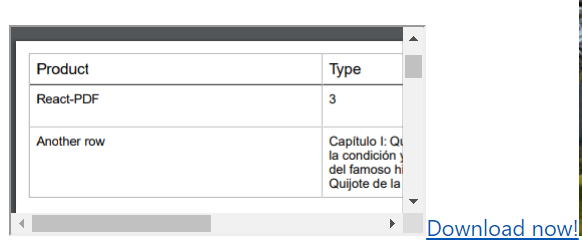
- PDFをブラウザ上に表示させて、PDFファイルをダウンロードするサンプル
import React from 'react'
import { PDFDownloadLink, PDFViewer, Page, Text, View, Document, StyleSheet } from '@react-pdf/renderer';

const Pdf = () => {
  const BORDER_COLOR = '#bfbfbf'
  const BORDER_STYLE = 'solid'
  const COL1_WIDTH = 40
  const COLN_WIDTH = (100 - COL1_WIDTH) / 3
  const styles = StyleSheet.create({
  body: {
    padding: 10
  },
  table: {
    display: "table",
    width: "auto",
    borderStyle: BORDER_STYLE,
    borderColor: BORDER_COLOR,
    borderWidth: 1,
    borderRightWidth: 0,
    borderBottomWidth: 0
  },
  tableRow: {
    margin: "auto",
    flexDirection: "row"
  },
  tableCol1Header: {
    width: COL1_WIDTH + '%',
    borderStyle: BORDER_STYLE,
    borderColor: BORDER_COLOR,
    borderBottomColor: '#000',
    borderWidth: 1,
    borderLeftWidth: 0,
    borderTopWidth: 0
  },
  tableColHeader: {
    width: COLN_WIDTH + "%",
    borderStyle: BORDER_STYLE,
    borderColor: BORDER_COLOR,
    borderBottomColor: '#000',
    borderWidth: 1,
    borderLeftWidth: 0,
    borderTopWidth: 0
  },
  tableCol1: {
    width: COL1_WIDTH + '%',
    borderStyle: BORDER_STYLE,
    borderColor: BORDER_COLOR,
    borderWidth: 1,
    borderLeftWidth: 0,
    borderTopWidth: 0
  },
  tableCol: {
    width: COLN_WIDTH + "%",
    borderStyle: BORDER_STYLE,
    borderColor: BORDER_COLOR,
    borderWidth: 1,
    borderLeftWidth: 0,
    borderTopWidth: 0
  },
  tableCellHeader: {
    margin: 5,
    fontSize: 12,
    fontWeight: 500
  },
  tableCell: {
    margin: 5,
    fontSize: 10
  }
});

  const MyDoc = () => {
    return (
      <Document>
      <Page size="A4" style={styles.body}>
      <View style={styles.table}>
        <View style={styles.tableRow}>
          <View style={styles.tableCol1Header}>
            <Text style={styles.tableCellHeader}>Product</Text>
          </View>
          <View style={styles.tableColHeader}>
            <Text style={styles.tableCellHeader}>Type</Text>
          </View>
          <View style={styles.tableColHeader}>
            <Text style={styles.tableCellHeader}>Period</Text>
          </View>
          <View style={styles.tableColHeader}>
            <Text style={styles.tableCellHeader}>Price</Text>
          </View>
        </View>
        <View style={styles.tableRow}>
          <View style={styles.tableCol1}>
            <Text style={styles.tableCell}>React-PDF</Text>
          </View>
          <View style={styles.tableCol}>
            <Text style={styles.tableCell}>3</Text>
          </View>
          <View style={styles.tableCol}>
            <Text style={styles.tableCell}>2019-02-20 - 2020-02-19</Text>
          </View>
          <View style={styles.tableCol}>
            <Text style={styles.tableCell}>5€</Text>
          </View>
        </View>
        <View style={styles.tableRow}>
          <View style={styles.tableCol1}>
            <Text style={styles.tableCell}>Another row</Text>
          </View>
          <View style={styles.tableCol}>
            <Text style={styles.tableCell}>Capítulo I: Que trata de la condición y ejercicio del famoso hidalgo D.
        Quijote de la Mancha</Text>
          </View>
          <View style={styles.tableCol}>
            <Text style={styles.tableCell}>2019-05-20 - 2020-07-19</Text>
          </View>
          <View style={styles.tableCol}>
            <Text style={styles.tableCell}>25€</Text>
          </View>
        </View>
      </View>
    </Page>
    </Document>
    )
  }

  return (
    <>
    <PDFViewer>
      <MyDoc />
    </PDFViewer>
    <PDFDownloadLink document={<MyDoc />} fileName="somename.pdf">
      {({ blob, url, loading, error }) => (loading ? 'Loading document...' : 'Download now!')}
    </PDFDownloadLink>
    </>
  )

}

export default Pdf
出力したPDFファイル
その他のライブラリ
- jspdfというパッケージを利用するとJSだけでPDFを出力することもできそう parall.ax www.npmjs.com
