chainerでAuto Encoder(自己符号化器)を作成し,MNISTの手書き文字を学習させてみた.
Auto Encoderは,目標出力を伴わない,入力だけの訓練データを使った教師なし学習により,データをよく表す特徴を獲得し,ひいてはデータのよい表現方法を得ることを目標とするニューラルネットである. ( より引用)
ここではMNISTの手書き文字2000個を入力とし,1層のhidden layerを通じて,入力と同じイメージに近い画像を出力するニューラルネットワークを作成した.
import json, sys, glob, datetime, math, random, pickle, gzip
import numpy as np
import matplotlib.pyplot as plt
import matplotlib.cm as cm

import chainer
from chainer import computational_graph as c
from chainer import cuda
import chainer.functions as F
from chainer import optimizers

class AutoEncoder:
    def __init__(self, n_units=64):
        self.n_units = n_units

    def load(self, train_x):
        self.N = len(train_x[0])
        self.x_train = train_x
        #
        self.model = chainer.FunctionSet(encode=F.Linear(self.N, self.n_units),
                                        decode=F.Linear(self.n_units, self.N))
        print("Network: encode({}-{}), decode({}-{})".format(self.N, self.n_units, self.n_units, self.N))
        #
        self.optimizer = optimizers.Adam()
        self.optimizer.setup(self.model.collect_parameters())


    def forward(self, x_data, train=True):
        x = chainer.Variable(x_data)
        t = chainer.Variable(x_data)
        h = F.relu(self.model.encode(x))
        y = F.relu(self.model.decode(h))
        return F.mean_squared_error(y, t), y

    def calc(self, n_epoch):
        for epoch in range(n_epoch):
            self.optimizer.zero_grads()
            loss, y = self.forward(self.x_train)
            loss.backward()
            self.optimizer.update()
            #
            print('epoch = {}, train mean loss={}'.format(epoch, loss.data))

    def getY(self, test_x):
        self.test_x = test_x
        loss, y = self.forward(x_test, train=False)
        return y.data

    def getEncodeW(self):
        return self.model.encode.W


def load_mnist():
    with open('mnist.pkl', 'rb') as mnist_pickle:
        mnist = pickle.load(mnist_pickle)
    return mnist

def save_mnist(s,l=28,prefix=""):
    n = len(s)
    print("exporting {} images.".format(n))
    plt.clf()
    plt.figure(1)
    for i,bi in enumerate(s):
        plt.subplot(math.floor(n/6),6,i+1)
        bi = bi.reshape((l,l))
        plt.imshow(bi, cmap=cm.Greys_r) #Needs to be in row,col order
        plt.axis('off')
    plt.savefig("output/{}.png".format(prefix))

if __name__=="__main__":
    rf = AutoEncoder(n_units=64)
    mnist = load_mnist()
    mnist['data'] = mnist['data'].astype(np.float32)
    mnist['data'] /= 255
    x_train = mnist['data'][0:2000]
    x_test  = mnist['data'][2000:2036]
    rf.load(x_train)
    save_mnist(x_test,prefix="test")
    for k in [1,9,90,400,1000,4000]:
        rf.calc(k) # epoch
        yy = rf.getY(x_test)
        ww = rf.getEncodeW()
        save_mnist(yy,prefix="ae-{}".format(k))
    print("\ndone.")
load_mnist()で呼び出しているmnist.pklは,chainerのexamplesのmnistのdata.pyを実行することで出力されるファイルである.hidden layerのユニットの数を10,16,64と変化させ,epochを1,9,90,400,1000,4000と変化させて,出力される画像がどのように変化するのかを計算させた.
元の画像

Unit 64個
epoch=1

epoch=10

epoch=100

epoch=500

epoch=1500

epoch=5500

epochが増えるにつれ,元の画像に近い画像が出力されているのが分かる.数字の2の学習が不完全のようではあるが,数字の形の特徴が64個のユニットで表現されているのは素晴らしい.
Unit 16個
epoch=1

epoch=10

epoch=100

epoch=500

epoch=1500

epoch=5500

ユニット数が16だと少し学習が難しいかなと思ったが,意外にいい感じな結果が得られた.
Unit 10個
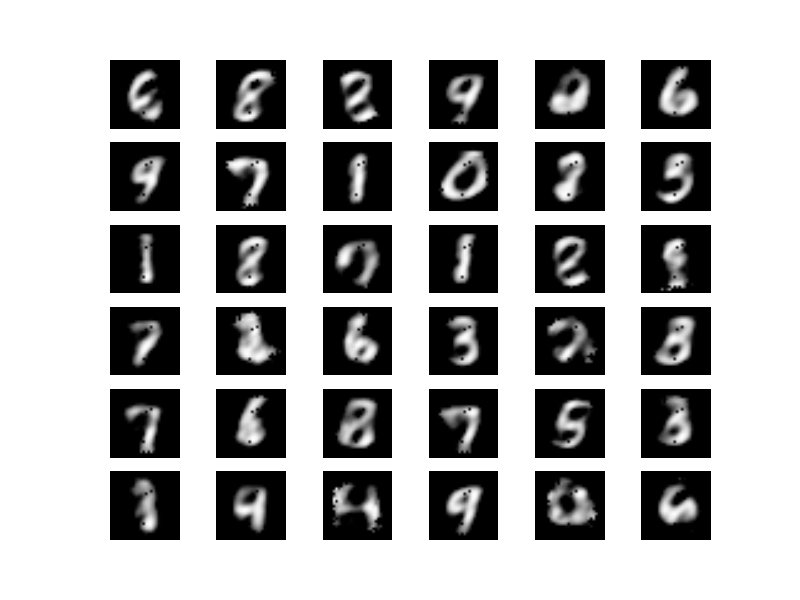
ユニット数が10だと学習は難しいようだ.epoch=5500で以下のような画像が得られたが,これ以上の改善は得られなかった.
まとめ
ということで,Auto Encoderが作れた.いい感じ.
