この記事はLambdaのデプロイを目的としてtemplate.yamlの内容を解説したものです。
こんにちは!らびです。今回はLambdaを自由自在にデプロイするためにtemplate.yamlの内容を勉強していきます。
template.yamlを理解してSAM CLIをフル活用しちゃいましょう!
SAMとCloudFormation
本記事はAWS SAMを使ったLambdaのデプロイを対象としています。早速ですが、AWS SAMについて公式のWebサイトにはこのような説明が書かれています。
AWS SAM は AWS CloudFormation の拡張であるため、AWS CloudFormation の信頼性の高いデプロイ機能を利用できます。
docs.aws.amazon.com
AWS SAM テンプレートの構造分析
まずは分析対象のLambdaを用意します。SAM CLIのsam initコマンドでLambdのテンプレートを作成します。
$sam init

Which template source would you like to use?
        1 - AWS Quick Start Templates
        2 - Custom Template Location
Choice: 1

Cloning from https://github.com/aws/aws-sam-cli-app-templates

Choose an AWS Quick Start application template
        1 - Hello World Example
        2 - Multi-step workflow
        3 - Serverless API
        4 - Scheduled task
        5 - Standalone function
        6 - Data processing
        7 - Infrastructure event management
        8 - Machine Learning
Template: 1

 Use the most popular runtime and package type? (Nodejs and zip) [y/N]: N

Which runtime would you like to use?
        1 - dotnet5.0
        2 - dotnetcore3.1
        3 - dotnetcore2.1
        4 - go1.x
        5 - java11
        6 - java8.al2
        7 - java8
        8 - nodejs14.x
        9 - nodejs12.x
        10 - nodejs10.x
        11 - python3.9
        12 - python3.8
        13 - python3.7
        14 - python3.6
        15 - python2.7
        16 - ruby2.7
        17 - ruby2.5
Runtime: 11

What package type would you like to use?
        1 - Zip
        2 - Image
Package type: 1

Based on your selections, the only dependency manager available is pip.
We will proceed copying the template using pip.

Project name [sam-app]: myapp-demo-20220118

    -----------------------
    Generating application:
    -----------------------
    Name: myapp-demo-20220118
    Runtime: python3.9
    Architectures: x86_64
    Dependency Manager: pip
    Application Template: hello-world
    Output Directory: .

    Next steps can be found in the README file at ./myapp-demo-20220118/README.md


    Commands you can use next
    =========================
    [*] Create pipeline: cd myapp-demo-20220118 && sam pipeline init --bootstrap
    [*] Test Function in the Cloud: sam sync --stack-name {stack-name} --watch
Hello World Exampleテンプレートを使ってpython3.9のLambdaを作成しています。
IDEで開くとこのような構成のテンプレートが確認できます。このとき生成されるtemplate.yamlが今回のターゲットです。
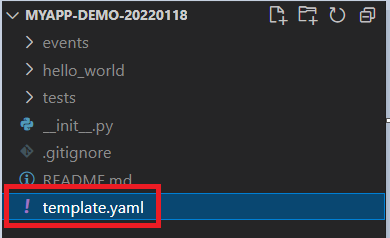
template.yaml
template.yamlの中身を見てみると大きくAWSTemplateFormatVersion、Transform、Description、Globals、Resources、Outputsの6つの項目で構成されています。
AWSTemplateFormatVersion: '2010-09-09'
Transform: AWS::Serverless-2016-10-31
Description: >
  myapp-demo-20220118

  Sample SAM Template for myapp-demo-20220118

# More info about Globals: https://github.com/awslabs/serverless-application-model/blob/master/docs/globals.rst
Globals:
  Function:
    Timeout: 3

Resources:
  HelloWorldFunction:
    Type: AWS::Serverless::Function # More info about Function Resource: https://github.com/awslabs/serverless-application-model/blob/master/versions/2016-10-31.md#awsserverlessfunction
    Properties:
      CodeUri: hello_world/
      Handler: app.lambda_handler
      Runtime: python3.9
      Architectures:
        - x86_64
      Events:
        HelloWorld:
          Type: Api # More info about API Event Source: https://github.com/awslabs/serverless-application-model/blob/master/versions/2016-10-31.md#api
          Properties:
            Path: /hello
            Method: get

Outputs:
  # ServerlessRestApi is an implicit API created out of Events key under Serverless::Function
  # Find out more about other implicit resources you can reference within SAM
  # https://github.com/awslabs/serverless-application-model/blob/master/docs/internals/generated_resources.rst#api
  HelloWorldApi:
    Description: "API Gateway endpoint URL for Prod stage for Hello World function"
    Value: !Sub "https://${ServerlessRestApi}.execute-api.${AWS::Region}.amazonaws.com/Prod/hello/"
  HelloWorldFunction:
    Description: "Hello World Lambda Function ARN"
    Value: !GetAtt HelloWorldFunction.Arn
  HelloWorldFunctionIamRole:
    Description: "Implicit IAM Role created for Hello World function"
    Value: !GetAtt HelloWorldFunctionRole.Arn
項目をそれぞれ解説していくジョ。
- AWSTemplateFormatVersion(任意)
フォーマットのバージョンです。
- Transform(必須)
AWS CloudFormation テンプレートファイルを AWS SAM テンプレートファイルとして認識させるための項目です。
- Description(任意)
テンプレートの概要を記載する項目です。
- Globals(任意)
テンプレートで共通する設定を記載する項目です。
- Resources(必須)
AWS Lambda 関数やトリガーなどに関する情報を記載できます。
作成したtemplate.yamlを見ると、RuntimeでPython3.9を指定したりEventsでAPI Gatewayと紐づけているのがわかりますね。
- Outputs(任意)
スタックのプロパティを表示するたびに返される値です。このあとで実行するsam deployコマンドの結果を見てみると、Outputsの内容が変数が展開された形で出力されているのがわかります。
例えば下記のOutputsを記述したテンプレートだと、${ServerlessRestApi}や${AWS::Region}が展開されて出力されるジョ。
HelloWorldApi:
  Description: "API Gateway endpoint URL for Prod stage for Hello World function"
  Value: !Sub "https://${ServerlessRestApi}.execute-api.${AWS::Region}.amazonaws.com/Prod/hello/"
Outputsを使ってデプロイの過程で作られたRoleのARNを確認できたりもします。
ビルドとデプロイ
template.yamlの内容が確認できたところでいよいよデプロイしてみましょう。コマンドは下記の通り、ビルド→デプロイの順に実行します。
$sam build

$sam deploy --guided
ビルド時のパラメータはこんな感じだジョ。
Configuring SAM deploy
======================

        Looking for config file [samconfig.toml] :  Not found

        Setting default arguments for 'sam deploy'
        =========================================
        Stack Name [sam-app]: sam-app-20220118
        AWS Region [ap-northeast-1]: ap-northeast-1
        #Shows you resources changes to be deployed and require a 'Y' to initiate deploy
        Confirm changes before deploy [y/N]: Y
        #SAM needs permission to be able to create roles to connect to the resources in your template
        Allow SAM CLI IAM role creation [Y/n]: Y
        #Preserves the state of previously provisioned resources when an operation fails
        Disable rollback [y/N]:
        HelloWorldFunction may not have authorization defined, Is this okay? [y/N]: Y
        Save arguments to configuration file [Y/n]:
        SAM configuration file [samconfig.toml]:
        SAM configuration environment [default]:
ここまでの操作によってtemplate.yamlの内容に沿ってデプロイされます。デプロイの過程では下記のような手順が実行されます。
template.yamlの内容を変えることでデプロイの手順を操作できるわけですね。
まとめ
というわけで、今回はtemplate.yamlの内容を解説してみましたが、いかがでしたでしょうか?
デプロイが思い通りにできると本業のプログラム開発もはかどりますね!
次回もぜひご覧ください。では!
