こちらのUnity公式のサンプルが正にXperia Playのサンプルなので参考になります。
Astro Dude by Unity Technologies -- Unity Asset Store
http://u3d.as/content/unity-technologies/astro-dude/24Y
Xperia Playのキーは以下の様な対応になっています。矢印が引いてある部分は背面に配置してあるL/Rボタンについての説明です。
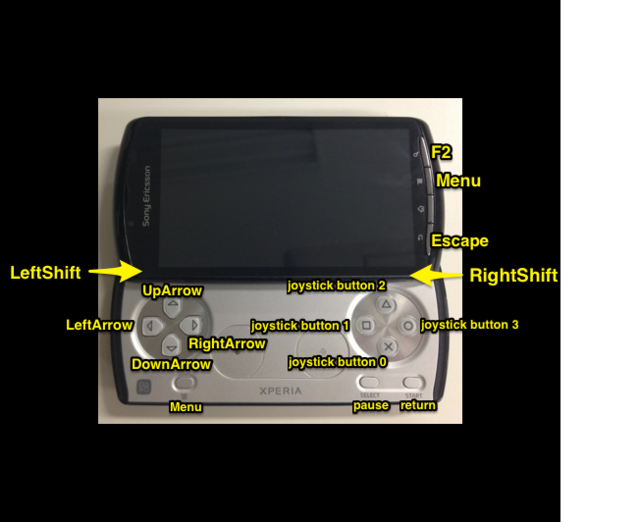
【ゲームパッド部分についているボタン】
| ボタン | 対応するコード |
|---|---|
| ↑ | Input.GetKey (KeyCode.UpArrow) |
| ↓ | Input.GetKey (KeyCode.DownArrow) |
| ← | Input.GetKey (KeyCode.LeftArrow) |
| → | Input.GetKey (KeyCode.RightArrow) |
| ×ボタン | Input.GetKey ("joystick button 0") |
| □ボタン | Input.GetKey ("joystick button 1") |
| △ボタン | Input.GetKey ("joystick button 2") |
| ◯ボタン | Input.GetKey ("joystick button 3") |
| Lボタン | Input.GetKey (KeyCode.LeftShift) |
| Rボタン | Input.GetKey (KeyCode.RightShift) |
| メニュー | Input.GetKey (KeyCode.Menu) |
| SELECTボタン | Input.GetKey (KeyCode.Pause) |
| STARTボタン | Input.GetKey (KeyCode.Return) |
【画面部分に付いているボタン】
| ボタン | 対応するコード |
|---|---|
| 検索 | Input.GetKey (KeyCode.F2) |
| メニュー | Input.GetKey (KeyCode.Menu) |
| Backボタン | Input.GetKey (KeyCode.Escape) |
中央に有る2つのアナログパッド部分のデータを取得するコードは以下の様にちょっと変わったコードに成っていました。
		for (int i = 0; i < AndroidInput.touchCountSecondary; ++i)
		{
			Touch touch = AndroidInput.GetSecondaryTouch(i);
			// normalize
			float x = touch.position.x / pad_w;
			float y = touch.position.y / pad_h;
			GUILayout.Label (string.Format (
				"GetSecondaryTouch ({0}) : ({1:f2}, {2:f2})", i, x, y
			));

			// center on screen
			x = scr_w * (0.25f + x * 0.5f);
			y = scr_h * (0.25f + y * 0.5f);
			GUI.Button(new Rect((x - 120.0f), (y - 85.0f), 150.0f, 20.0f), "GetSecondaryTouch (" + i + ")");
		}
