以前書いたこちらの記事はこのサンプルは今回のサンプルを作る為の作業の途中の成果物だったりします。
マウスでクリックした位置に三角形ポリゴンを作成するサンプル - 強火で進め
http://d.hatena.ne.jp/nakamura001/20130304/1362416482
今回のサンプルはUnify Community Wikiに書かれているこちらの記事を参考に作成。
Triangulator - Unify Community Wiki
http://wiki.unity3d.com/index.php?title=Triangulator
この記事は指定した頂点を三角形ポリゴンに分割してくれるサンプルが書かれています。
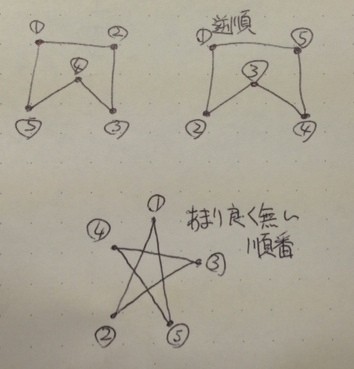
しかし、このサンプルでは以下の様な順番の頂点をした時にポリゴンがカメラと逆向きに作成されるものも発生した為、一部のコードを修正をしました。
実際にサンプルを実行している所。右側ではワイヤーフレームで表示しています。
プロジェクトファイルはこちらからダウンロード出来ます。
操作方法
マウスの左クリックで頂点を打ち、最後の頂点の位置で右クリックするとポリゴンが生成されます。頂点は10個まで打てます。
修正したファイル
【Triangulator.cs】
using UnityEngine;
using System.Collections.Generic;

public class Triangulator
{
    private List<Vector2> m_points = new List<Vector2>();
	private Vector3 m_cameraPosition;

    public Triangulator (Vector2[] points, Vector3 cameraPosition)
	{
		m_points = new List<Vector2> (points);
		m_cameraPosition = cameraPosition;
    }

    public int[] Triangulate ()
	{
		List<int> indices = new List<int> ();

		int n = m_points.Count;
		if (n < 3)
			return indices.ToArray ();

		int[] V = new int[n];
		if (Area () > 0) {
			for (int v = 0; v < n; v++)
				V [v] = v;
		} else {
			for (int v = 0; v < n; v++)
				V [v] = (n - 1) - v;
		}

		int nv = n;
		int count = 2 * nv;
		for (int m = 0, v = nv - 1; nv > 2;) {
			if ((count--) <= 0)
				break;

			int u = v;
			if (nv <= u)
				u = 0;
			v = u + 1;
			if (nv <= v)
				v = 0;
			int w = v + 1;
			if (nv <= w)
				w = 0;

			if (Snip (u, v, w, nv, V)) {
				int a, b, c, s, t;
				a = V [u];
				b = V [v];
				c = V [w];
				indices.Add (a);
				indices.Add (b);
				indices.Add (c);
				m++;
				for (s = v, t = v + 1; t < nv; s++, t++)
					V [s] = V [t];
				nv--;
				count = 2 * nv;
			}
		}

		bool reversFlag = true;
		int i0 = indices [0];
		int i1 = indices [1];
		int i2 = indices [2];
		Vector3 pos0 = new Vector3 (m_points [i0].x, m_points [i0].y, 0f);
		Vector3 pos1 = new Vector3 (m_points [i1].x, m_points [i1].y, 0f);
		Vector3 pos2 = new Vector3 (m_points [i2].x, m_points [i2].y, 0f);
		Vector3 v1 = pos1 - pos0;
		Vector3 v2 = pos2 - pos1;
		Vector3 crossVec = Vector3.Cross (v1, v2);
		Debug.Log(Vector3.Dot (m_cameraPosition, crossVec));
		if (Vector3.Dot (m_cameraPosition, crossVec) > 0) {
			reversFlag = false;
		}
		if (reversFlag) {
			indices.Reverse ();
		}

		return indices.ToArray ();
	}

    private float Area () {
        int n = m_points.Count;
        float A = 0.0f;
        for (int p = n - 1, q = 0; q < n; p = q++) {
            Vector2 pval = m_points[p];
            Vector2 qval = m_points[q];
            A += pval.x * qval.y - qval.x * pval.y;
        }
        return (A * 0.5f);
    }

    private bool Snip (int u, int v, int w, int n, int[] V) {
        int p;
        Vector2 A = m_points[V[u]];
        Vector2 B = m_points[V[v]];
        Vector2 C = m_points[V[w]];
        if (Mathf.Epsilon > (((B.x - A.x) * (C.y - A.y)) - ((B.y - A.y) * (C.x - A.x))))
            return false;
        for (p = 0; p < n; p++) {
            if ((p == u) || (p == v) || (p == w))
                continue;
            Vector2 P = m_points[V[p]];
            if (InsideTriangle(A, B, C, P))
                return false;
        }
        return true;
    }

    private bool InsideTriangle (Vector2 A, Vector2 B, Vector2 C, Vector2 P) {
        float ax, ay, bx, by, cx, cy, apx, apy, bpx, bpy, cpx, cpy;
        float cCROSSap, bCROSScp, aCROSSbp;

        ax = C.x - B.x; ay = C.y - B.y;
        bx = A.x - C.x; by = A.y - C.y;
        cx = B.x - A.x; cy = B.y - A.y;
        apx = P.x - A.x; apy = P.y - A.y;
        bpx = P.x - B.x; bpy = P.y - B.y;
        cpx = P.x - C.x; cpy = P.y - C.y;

        aCROSSbp = ax * bpy - ay * bpx;
        cCROSSap = cx * apy - cy * apx;
        bCROSScp = bx * cpy - by * cpx;

        return ((aCROSSbp >= 0.0f) && (bCROSScp >= 0.0f) && (cCROSSap >= 0.0f));
    }
}
関連情報
Simple Concave 2D Triangulator for Unity Jasper Stocker
http://www.jasperstocker.com/2013/02/21/simple-concave-2d-triangulator-for-unity/
ポリゴンの三角形への分割についてのアルゴリズムを調べたい時は「triangulation algorithm」なんてワードで検索すると良さげ。
Polygon triangulation - Wikipedia, the free encyclopedia
http://en.wikipedia.org/wiki/Polygon_triangulation
