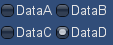
プログラム
以下の様なプログラムで作成出来ます。
【example.cs】
using UnityEngine;
using System.Collections;

public class example : MonoBehaviour {
	private int selGridInt = 0;
	private string[] selCaptions = new string[] {
		"DataA",
		"DataB",
		"DataC",
		"DataD",
	};

	void OnGUI() {
		selGridInt = GUILayout.SelectionGrid(selGridInt, selCaptions, 2, "Toggle");
    }
}
解説
主の部分はこちら。
GUILayout.SelectionGrid(selGridInt, selCaptions, 2, "toggle");
引数はこの様になっています。
- selGridInt:選択されているオブジェクトの要素番号(一番先頭のものが0)
- selCaptions:キャプション(説明文)として表示するテキスト
- 2:横に並べる数。この数を超えると一つ下に並べられます
- "Toggle":要素の種類。選択可能なものはこちらを参照。
関連情報
Unity Script Reference – GUILayout.SelectionGrid
http://docs.unity3d.com/Documentation/ScriptReference/GUILayout.SelectionGrid.html
