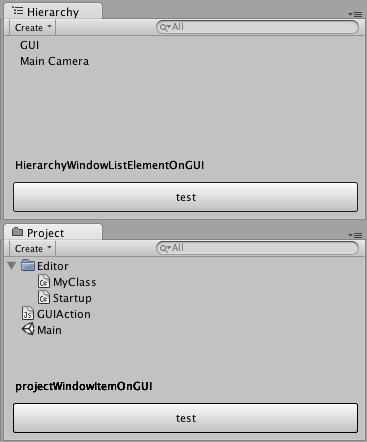
C#のプログラムの場合、こんな記述で拡張可能です。 MyClass という名前で作成し、 Editor フォルダに置いて下さい。
using UnityEditor;
using UnityEngine;

[InitializeOnLoad]
class MyClass
{
    static MyClass ()
    {
		EditorApplication.update += Update;
		EditorApplication.projectWindowItemOnGUI += ProjectWindowListElementOnGUI;
		EditorApplication.hierarchyWindowItemOnGUI += HierarchyWindowListElementOnGUI;
    }

	static void ProjectWindowListElementOnGUI (string guid, Rect selectionRect)
	{
		GUI.Label(new Rect(10, Screen.height-100, Screen.width-20, 30), "projectWindowItemOnGUI");
		if (GUI.Button(new Rect(10, Screen.height-75, Screen.width-20, 30), "test")) {
			Debug.Log("hoge");
		}
	}

	static void HierarchyWindowListElementOnGUI(int instanceID, Rect selectionRect)
	{
		GUI.Label(new Rect(10, Screen.height-100, Screen.width-20, 30), "HierarchyWindowListElementOnGUI");
		if (GUI.Button(new Rect(10, Screen.height-75, Screen.width-20, 30), "test")) {
			Debug.Log("fuga");
		}
	}

    static void Update ()
    {
		if(EditorApplication.isPlaying) {
	       Debug.Log("isPlaying:" + Time.time);
		}
    }
}
関連情報
Unity - Running Editor Script Code on Launch
http://unity3d.com/support/documentation/Manual/RunningEditorCodeOnLaunch.html
/UnitySVN/branches/MultipleBackends/Assets/Editor/GUI/VCSStatusIcons.cs のコードが参考になりました。
Kjems / UVersionControl / overview — Bitbucket
https://bitbucket.org/Kjems/uversioncontrol
