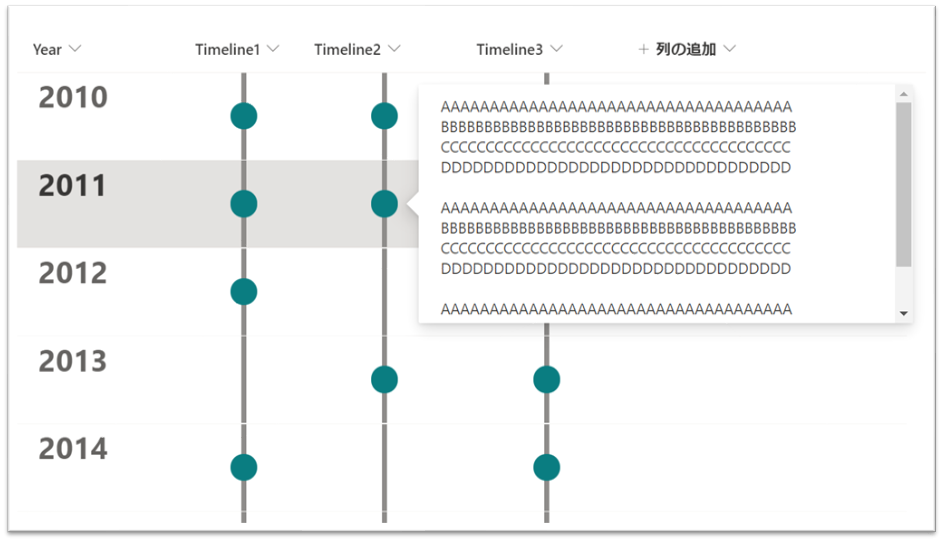
上図のような列にタイムラインを表示する書式設定を作成してみました。
作成した書式設定の JSON は次の通りです。
複数行テキスト(書式なし)などに適用し、利用ください。
列の書式設定
{
  "$schema": "https://developer.microsoft.com/json-schemas/sp/v2/column-formatting.schema.json",
  "elmType": "div",
  "style": {
    "position": "relative",
    "width": "100%",
    "height": "80px"
  },
  "children": [
    {
      "elmType": "div",
      "style": {
        "position": "absolute",
        "display": "flex",
        "align-items": "center",
        "justify-content": "center",
        "width": "100%",
        "height": "100%"
      },
      "children": [
        {
          "elmType": "div",
          "style": {
            "width": "5px",
            "height": "100%"
          },
          "attributes": {
            "class": "ms-bgColor-neutralSecondaryAlt"
          }
        }
      ]
    },
    {
      "elmType": "div",
      "style": {
        "position": "absolute",
        "display": "=if(@currentField == '' , 'none' , 'flex')",
        "align-items": "center",
        "justify-content": "center",
        "width": "100%",
        "height": "100%"
      },
      "children": [
        {
          "elmType": "div",
          "style": {
            "width": "25px",
            "height": "25px",
            "border-radius": "50%",
            "cursor": "pointer"
          },
          "attributes": {
            "class": "ms-bgColor-themePrimary"
          },
          "customCardProps": {
            "directionalHint": "rightCenter",
            "openOnEvent": "click",
            "isBeakVisible": true,
            "formatter": {
              "elmType": "div",
              "style": {
                "width": "400px",
                "height": "200px",
                "padding": "10px 20px 10px 20px"
              },
              "children": [
                {
                  "elmType": "div",
                  "txtContent": "@currentField",
                  "style": {
                    "width": "100%",
                    "height": "100%"
                  }
                }
              ]
            }
          }
        }
      ]
    }
  ]
}
※ビュー全体をタイムラインにカスタマイズしたい場合は、次のリンク先を参照ください。
