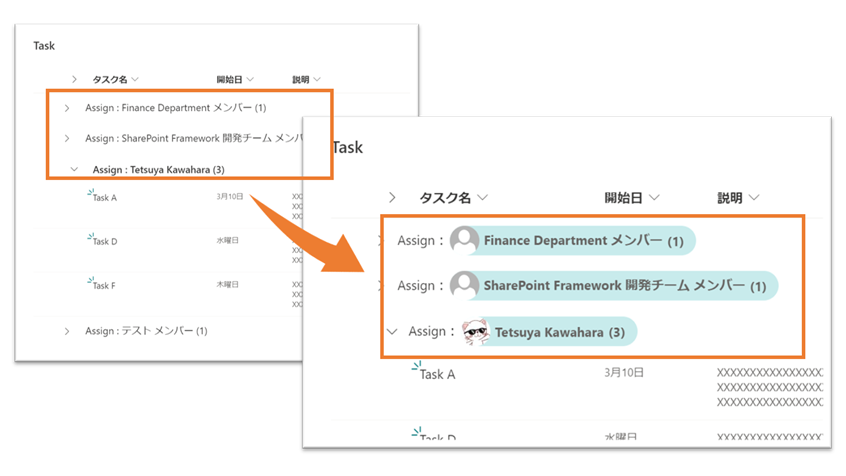
アップデートにより、SharePoint リストで グループ化したときに表示される「グループのヘッダー」および 「グループのフッター」の見た目をカスタマイズきるようになりました。
※カスタマイズ方法の詳細、カスタマイズのサンプルについては、 こちら を参照ください。
そこで上図のように、ユーザー列でグループ化したときの「グループのヘッダー」をカスタマイズしてみました。
書式設定の JSON は、次の通りです。ご自由にご利用ください。
※グループ化した列を、ビューに表示する必要があります。
{
  "$schema": "https://developer.microsoft.com/json-schemas/sp/v2/row-formatting.schema.json",
  "groupProps": {
    "headerFormatter": {
      "elmType": "div",
      "style": {
        "flex-direction": "row",
        "width": "100%",
        "overflow": "hidden"
      },
      "children": [
        {
          "elmType": "div",
          "children": [
            {
              "elmType": "span",
              "txtContent": "= @group.columnDisplayName + ':'"
            }
          ]
        },
        {
          "elmType": "div",
          "attributes": {
            "class": "ms-bgColor-themeLighter ms-fontColor-neutralSecondary"
          },
          "style": {
            "display": "inline-flex",
            "align-items": "center",
            "height": "32px",
            "overflow": "hidden",
            "border-radius": "19px",
            "padding-right": "8px",
            "margin": "2px"
          },
          "children": [
            {
              "elmType": "img",
              "attributes": {
                "src": "='/_layouts/15/userphoto.aspx?size=S&accountname=' + @group.fieldData.email",
                "title": "@group.fieldData.title"
              },
              "style": {
                "width": "32px",
                "height": "32px",
                "display": "block",
                "border-radius": "50%"
              }
            },
            {
              "elmType": "div",
              "txtContent": "@group.fieldData.title",
              "attributes": {
                "title": "@group.fieldData.title",
                "class": "ms-fontWeight-bold"
              },
              "style": {
                "padding-left": "5px",
                "white-space": "nowrap"
              }
            },
            {
              "elmType": "div",
              "style": {
                "padding-left": "5px",
                "padding-right": "5px"
              },
              "attributes": {
                "class": "ms-fontWeight-bold"
              },
              "txtContent": "= '(' + @group.count + ')'"
            }
          ]
        }
      ]
    }
  }
}
ユーザー列でグルーピングしているときとか、アイコン表示すると分かりやすくなっていいかも😆✨ #SharePoint #MicrosoftLists #ListFormatting https://t.co/JM3D3u7WQd pic.twitter.com/0YENpvX5qW
— てっちゃん (@techan_k) 2021年3月29日
