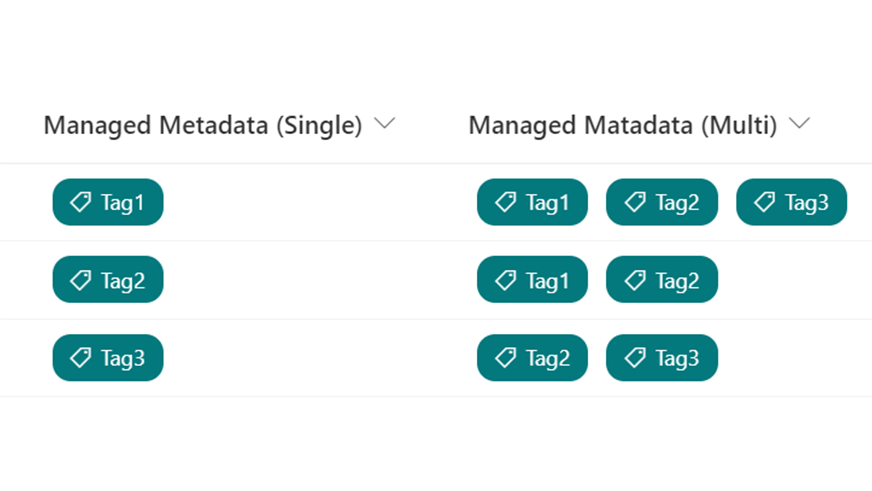
SharePoint リストの 管理されたメタデータ列 を書式設定できるようになりました!
ので、管理されたメタデータ列を上図のようにカスタマイズをしてみました。
カスタマイズに利用した JSON を以下に掲載します。ご自由に利用ください。
単一選択の書式設定
{
  "$schema": "https://developer.microsoft.com/json-schemas/sp/v2/column-formatting.schema.json",
  "elmType": "div",
  "style": {
    "display": "=if(length(@currentField)>0,'flex','none')",
    "flex-wrap": "wrap",
    "width": "100%"
  },
  "children": [
    {
      "elmType": "div",
      "style": {
        "margin": "5px",
        "padding": "5px 10px 5px 10px",
        "border-radius": "10px"
      },
      "attributes": {
        "class": "ms-bgColor-themePrimary"
      },
      "children": [
        {
          "elmType": "div",
          "style": {
            "vertical-align": "middle",
            "white-space": "nowrap",
            "width": "auto"
          },
          "attributes": {
            "class": "ms-fontColor-white ms-font-s"
          },
          "children": [
            {
              "elmType": "span",
              "style": {
                "position": "relative",
                "top": "2px"
              },
              "attributes": {
                "iconName": "Tag"
              }
            },
            {
              "elmType": "span",
              "style": {
                "padding-left": "5px"
              },
              "txtContent": "@currentField"
            }
          ]
        }
      ]
    }
  ]
}
複数選択の書式設定
{
  "$schema": "https://developer.microsoft.com/json-schemas/sp/v2/column-formatting.schema.json",
  "elmType": "div",
  "style": {
    "display": "=if(length(@currentField)>0,'flex','none')",
    "flex-wrap": "wrap",
    "width": "100%"
  },
  "children": [
    {
      "elmType": "div",
      "style": {
        "margin": "5px",
        "padding": "5px 10px 5px 10px",
        "border-radius": "10px"
      },
      "attributes": {
        "class": "ms-bgColor-themePrimary"
      },
      "forEach": "tag in @currentField",
      "children": [
        {
          "elmType": "div",
          "style": {
            "vertical-align": "middle",
            "white-space": "nowrap",
            "width": "auto"
          },
          "attributes": {
            "class": "ms-fontColor-white ms-font-s"
          },
          "children": [
            {
              "elmType": "span",
              "style": {
                "position": "relative",
                "top": "2px"
              },
              "attributes": {
                "iconName": "Tag"
              }
            },
            {
              "elmType": "span",
              "style": {
                "padding-left": "5px"
              },
              "txtContent": "[$tag]"
            }
          ]
        }
      ]
    }
  ]
}
