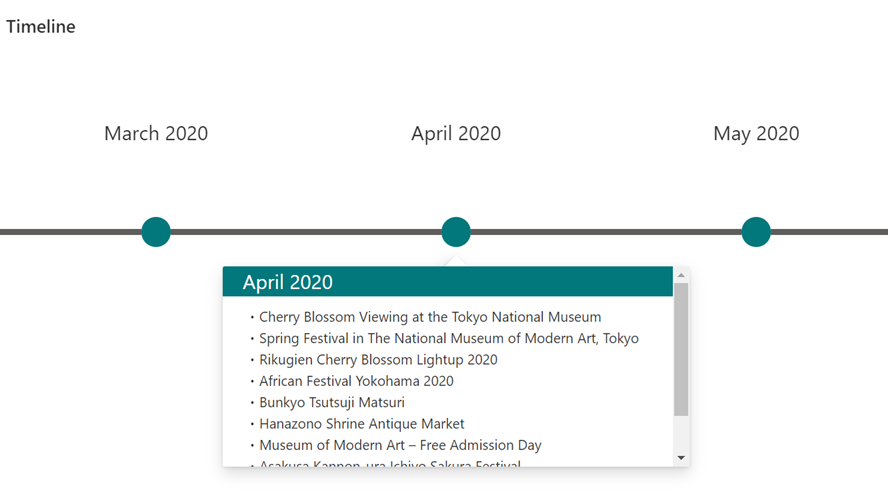
次の記事で、 ビューの書式設定でリストの一覧画面をカスタマイズし、タイムライン(縦バージョン)を表示する方法を記載しました。
今回は、次の Twitter の動画のような横バージョンのタイムラインを表示する方法を記載します。
横バージョンも見てみたいとご要望頂いたので! #SharePoint #ListFormatting https://t.co/8dnJnTMCvm pic.twitter.com/c4b3E1UvEY
— てっちゃん (@techan_k) 2020年11月10日
リスト作成
次のリストを作成します。

ビューの書式設定
作成したリストのビューの書式設定に、次の JSON を入力します。

{
  "hideColumnHeader": true,
  "hideSelection": true,
  "rowFormatter": {
    "elmType": "div",
    "style": {
      "position": "absolute",
      "left": "= @rowIndex * 300 + 'px'",
      "display": "flex",
      "flex-direction": "column",
      "width": "300px",
      "height": "200px",
      "float": "left"
    },
    "children": [
      {
        "elmType": "div",
        "txtContent": "[$Title]",
        "style": {
          "display": "flex",
          "width": "90%",
          "height": "60%",
          "align-items": "center",
          "justify-content": "center",
          "font-size": "20px"
        }
      },
      {
        "elmType": "div",
        "style": {
          "display": "flex",
          "flex-direction": "row",
          "width": "105%",
          "height": "40%",
          "align-items": "center"
        },
        "children": [
          {
            "elmType": "div",
            "style": {
              "border-width": "2px",
              "border-style": "solid",
              "height": "2px",
              "width": "45%"
            },
            "attributes": {
              "class": "ms-bgColor-neutralSecondary ms-borderColor-neutralSecondary"
            }
          },
          {
            "elmType": "div",
            "style": {
              "height": "30px",
              "width": "30px",
              "border-radius": "50%",
              "cursor": "pointer",
              "outline": "none"
            },
            "attributes": {
              "class": "ms-bgColor-themePrimary"
            },
            "customCardProps": {
              "directionalHint": "bottomCenter",
              "isBeakVisible": true,
              "openOnEvent": "click",
              "formatter": {
                "elmType": "div",
                "style": {
                  "display": "flex",
                  "flex-direction": "column",
                  "height": "200px",
                  "width": "450px"
                },
                "children": [
                  {
                    "elmType": "div",
                    "txtContent": "[$Title]",
                    "style": {
                      "height": "20%",
                      "width": "100%",
                      "color": "white",
                      "font-size": "20px",
                      "display": "flex",
                      "align-items": "center",
                      "padding-left": "40px"
                    },
                    "attributes": {
                      "class": "ms-bgColor-themePrimary"
                    }
                  },
                  {
                    "elmType": "div",
                    "txtContent": "[$Description]",
                    "style": {
                      "height": "80%",
                      "width": "90%",
                      "padding-top": "10px"
                    }
                  }
                ]
              }
            }
          },
          {
            "elmType": "div",
            "style": {
              "border-width": "2px",
              "border-style": "solid",
              "height": "2px",
              "width": "45%"
            },
            "attributes": {
              "class": "ms-bgColor-neutralSecondary ms-borderColor-neutralSecondary"
            }
          }
        ]
      }
    ]
  }
}
[保存] ボタンをクリックすると設定完了です。

別バージョンのビューの書式設定
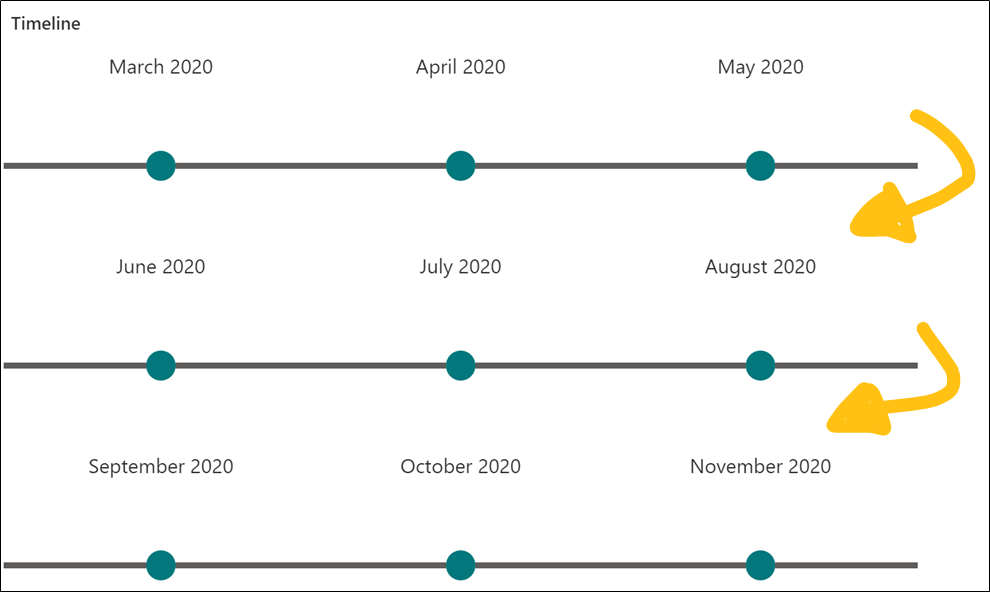
上記のビューの書式設定では、画面の幅に関わらず、横に永遠とタイムラインが表示されます。

もし、次の画像のように画面の幅にあわせてタイムラインが折り返されて欲しい場合は、次の JSON をビューの書式設定に入力してください。
{
  "hideColumnHeader": true,
  "hideSelection": true,
  "rowFormatter": {
    "elmType": "div",
    "style": {
      "display": "flex",
      "flex-direction": "column",
      "width": "300px",
      "height": "200px",
      "float": "left"
    },
    "children": [
      {
        "elmType": "div",
        "txtContent": "[$Title]",
        "style": {
          "display": "flex",
          "width": "90%",
          "height": "60%",
          "align-items": "center",
          "justify-content": "center",
          "font-size": "20px"
        }
      },
      {
        "elmType": "div",
        "style": {
          "display": "flex",
          "flex-direction": "row",
          "width": "105%",
          "height": "40%",
          "align-items": "center"
        },
        "children": [
          {
            "elmType": "div",
            "style": {
              "border-width": "2px",
              "border-style": "solid",
              "height": "2px",
              "width": "45%"
            },
            "attributes": {
              "class": "ms-bgColor-neutralSecondary ms-borderColor-neutralSecondary"
            }
          },
          {
            "elmType": "div",
            "style": {
              "height": "30px",
              "width": "30px",
              "border-radius": "50%",
              "cursor": "pointer",
              "outline": "none"
            },
            "attributes": {
              "class": "ms-bgColor-themePrimary"
            },
            "customCardProps": {
              "directionalHint": "bottomCenter",
              "isBeakVisible": true,
              "openOnEvent": "click",
              "formatter": {
                "elmType": "div",
                "style": {
                  "display": "flex",
                  "flex-direction": "column",
                  "height": "200px",
                  "width": "450px"
                },
                "children": [
                  {
                    "elmType": "div",
                    "txtContent": "[$Title]",
                    "style": {
                      "height": "20%",
                      "width": "100%",
                      "color": "white",
                      "font-size": "20px",
                      "display": "flex",
                      "align-items": "center",
                      "padding-left": "40px"
                    },
                    "attributes": {
                      "class": "ms-bgColor-themePrimary"
                    }
                  },
                  {
                    "elmType": "div",
                    "txtContent": "[$Description]",
                    "style": {
                      "height": "80%",
                      "width": "90%",
                      "padding-top": "10px"
                    }
                  }
                ]
              }
            }
          },
          {
            "elmType": "div",
            "style": {
              "border-width": "2px",
              "border-style": "solid",
              "height": "2px",
              "width": "45%"
            },
            "attributes": {
              "class": "ms-bgColor-neutralSecondary ms-borderColor-neutralSecondary"
            }
          }
        ]
      }
    ]
  }
}
