今回はPower Apps 夏の自由研究として XMLを整形するアプリを Power Appsで作ってみました。
テキストボックスに入力されたインデントなどが適切に入っていないXMLを、ボタンをクリックすることで綺麗に整形してくれます。

XMLの整形 (XML Beautifier) を行うにあたり、JavaScriptのプラグインである vkBeautify のロジックを参考にしています。
Power Apps の数式
Power Apps のボタンには以下の数式を設定しています。
With({srcXml:TextInput1.Text},//TextInput1.Text --> Source XML
    ClearCollect(tmp,{val:srcXml});
    ForAll(
        Sequence(CountRows(MatchAll(srcXml,">\s{0,}<")),1),
        Collect(tmp,{val:Substitute(Last(tmp).val,Last(FirstN(MatchAll(srcXml,">\s{0,}<"),ThisRecord.Value)).FullMatch,"><")})
    )
);
With({medXml:RenameColumns(AddColumns(Filter(Split(Substitute(Last(tmp).val,"<","~::~<"),"~::~"),!IsBlank(ThisRecord.Value)),"startElm",IsMatch(Value,"<\w",MatchOptions.Contains)&&Not(IsMatch(Value,"</",MatchOptions.Contains))&&Not(IsMatch(Value,"/>",MatchOptions.Contains)),"endElm",IsMatch(Value,"</",MatchOptions.Contains),
"oneLine",IsMatch(Value,"/>",MatchOptions.Contains)),"Value","row")},
    ClearCollect(spltLines,{val:"",withValue:false,startElm:false,endElm:false,oneLine:false});
    Clear(spltLines);
    ForAll(
        Sequence(CountRows(medXml),1),
        Collect(spltLines,
            {val:Index(medXml,Value).row,withValue:If(ThisRecord.Value<>1,IsMatch(Last(FirstN(medXml,ThisRecord.Value-1)).row,"^<\w",MatchOptions.Contains) && IsMatch(Last(FirstN(medXml,ThisRecord.Value)).row,"^</\w",MatchOptions.Contains) &&
                (Match(Last(FirstN(medXml,ThisRecord.Value-1)).row,"^<[\w:\-\.\,]+").FullMatch = Substitute(Match(Last(FirstN(medXml,ThisRecord.Value)).row,"^<\/[\w:\-\.\,]+").FullMatch,"/","")),false),startElm:Last(FirstN(medXml,ThisRecord.Value)).startElm,endElm:Last(FirstN(medXml,ThisRecord.Value)).endElm,oneLine:Last(FirstN(medXml,ThisRecord.Value)).oneLine}
        )
    )
);
With({shiftTable:Table({Index:0,shift:Char(13)},{Index:1,shift:Char(13)&"  "},{Index:2,shift:Char(13)&"  "&"  "},{Index:3,shift:Char(13)&"  "&"  "&"  "},{Index:4,shift:Char(13)&"  "&"  "&"  "&"  "},{Index:5,shift:Char(13)&"  "&"  "&"  "&"  "&"  "},{Index:6,shift:Char(13)&"  "&"  "&"  "&"  "&"  "&"
 "},{Index:7,shift:Char(13)&"  "&"  "&"  "&"  "&"  "&"  "&"  "})},
    ClearCollect(arBeautified,{str:"",depth:0});
    Clear(arBeautified);
    ForAll(
        Sequence(CountRows(spltLines),1),
        If(ThisRecord.Value=1,Collect(arBeautified,{str:First(spltLines).val,depth:1}),
        If(Index(spltLines,ThisRecord.Value).withValue,Collect(arBeautified,{str:Last(arBeautified).str&Index(spltLines,ThisRecord.Value).val,depth:Last(arBeautified).depth-1}),
        If(Index(spltLines,ThisRecord.Value).startElm,Collect(arBeautified,{str:Last(arBeautified).str&LookUp(shiftTable,Index=Last(arBeautified).depth).shift&Index(spltLines,ThisRecord.Value).val,depth:Last(arBeautified).depth+1}),
        If(Index(spltLines,ThisRecord.Value).endElm,Collect(arBeautified,{str:Last(arBeautified).str&LookUp(shiftTable,Index=Last(arBeautified).depth-1).shift&Index(spltLines,ThisRecord.Value).val,depth:Last(arBeautified).depth-1}),
        If(Index(spltLines,ThisRecord.Value).oneLine,Collect(arBeautified,{str:Last(arBeautified).str&LookUp(shiftTable,Index=Last(arBeautified).depth).shift&Index(spltLines,ThisRecord.Value).val,depth:Last(arBeautified).depth}))))
        ))
    )
);//Last(arBeautified).str --> beautified XML
vkBeautifyのロジックを見てみると、Forループを使っていることがわかります。
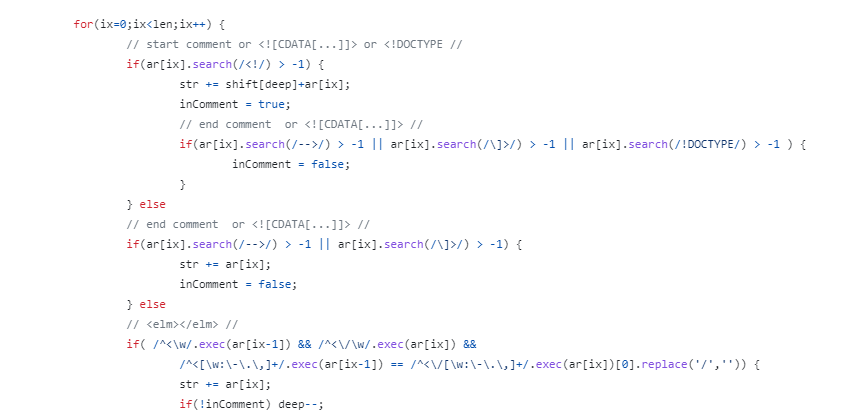
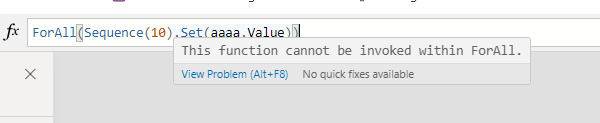
Power Appsでは ForAll関数を利用しますが、ForAll関数の中では変数の設定 ( Set関数 ) が使えないため工夫が必要です。
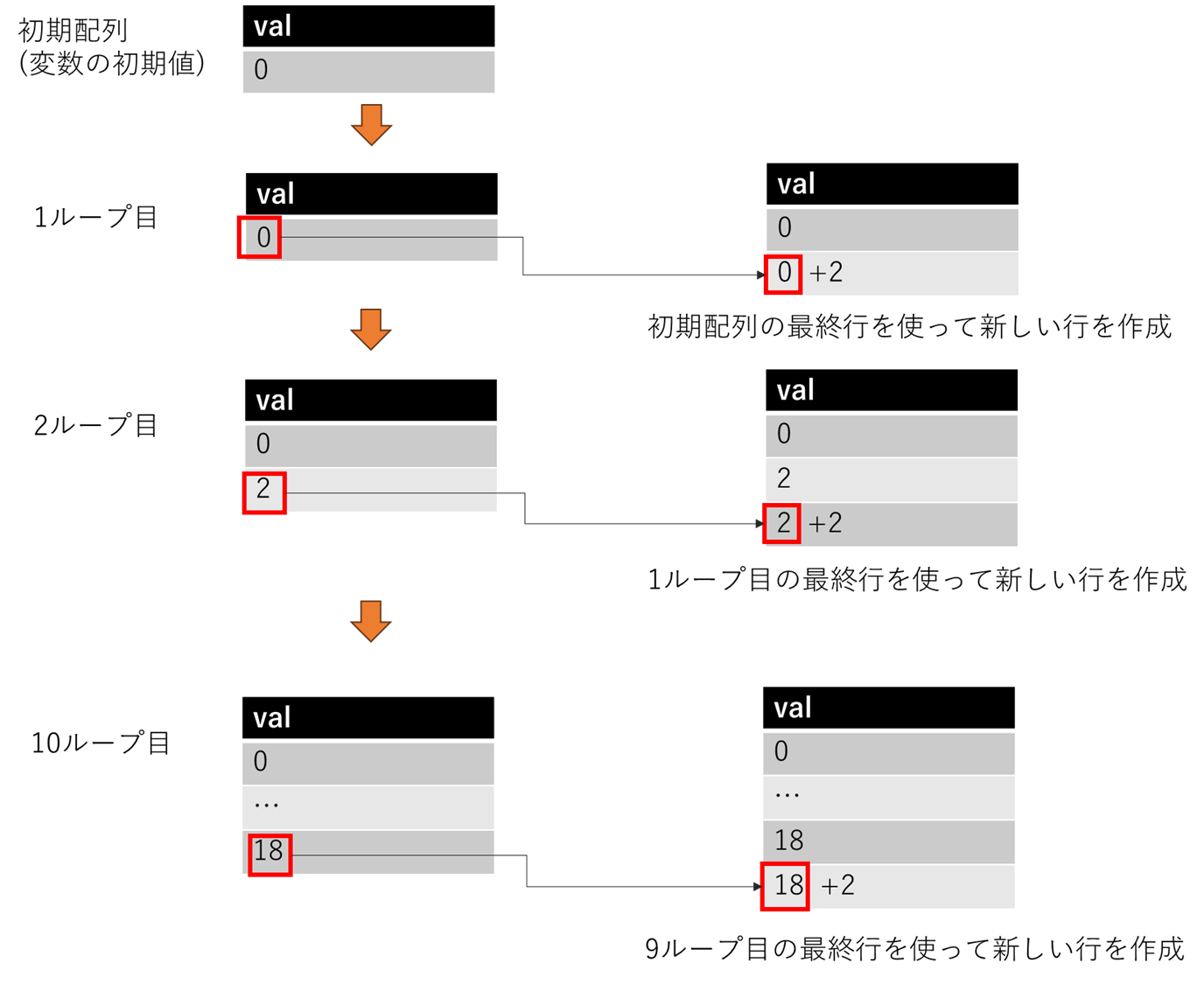
たとえば単純なForループ 、1~10までループさせて各ループで整数型の変数を2ずつふやしていくようなループでは以下のように実装します。
ClearCollect(output,{val:0});
ForAll(
    Sequence(10,1),
    Collect(output,{val:Last(output).val+2})
)
//Last(output).val -->20
ForAll内では変数の設定が使えないため、各ループ処理で得られた"変数"を格納するための配列(コレクション)を用意します。
"変数"の更新は、前のループ処理の結果(コレクションの最後)を基にして更新後の値を計算し、それをコレクションに追加することで実現します。
今回のアプリではXMLの各要素をループ処理しているようなイメージですが、その際にも疑似Forループを活用しています。
    ClearCollect(arBeautified,{str:"",depth:0});
    Clear(arBeautified);
    ForAll(
        Sequence(CountRows(spltLines),1),
        If(ThisRecord.Value=1,Collect(arBeautified,{str:First(spltLines).val,depth:1}),
        If(Index(spltLines,ThisRecord.Value).withValue,Collect(arBeautified,{str:Last(arBeautified).str&Index(spltLines,ThisRecord.Value).val,depth:Last(arBeautified).depth-1}),
このあたりです。
ということで、Power Appsの疑似Forループを利用して、XMLの整形ツールが作れたよという内容でした。
サンプルは以下からどうぞ
