調べれば CentOS 7 に MySQL 5.7 をインストールする方法は色々出てくるんだけど最近だと MySQL 8 系になってしまっているようでどこから RPM ファイルをダウンロードしたりすればいいのかよくわからなかったのでメモとして残しておく。
MySQL Community のサイトに行くと MySQL Community 版のインストールに必要な RPM ファイルを入手することが出来るが、下記の画面で入手出来るものは現状では MySQL 8 系のものだけとなる。(YUM リポジトリは mysql80-community)
sudo yum-config-manager --disable mysql80-community
sudo yum-config-manager --enable  mysql57-community
参考: https://dev.mysql.com/doc/mysql-yum-repo-quick-guide/en/
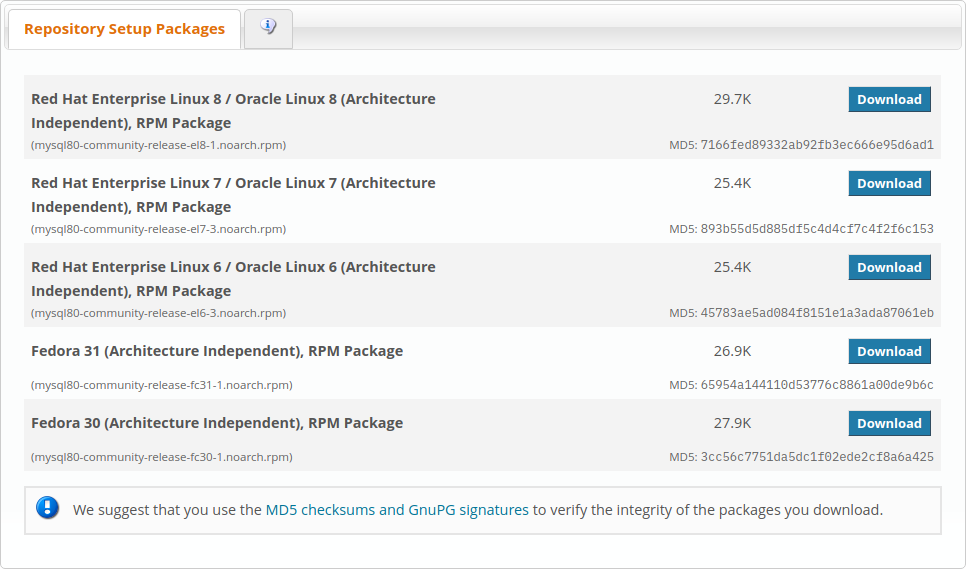
では MySQL 5 系のものはどうしたらいいのか?となるが、まずは吹き出しアイコンをクリックして「A Quick Guide to Using the MySQL Yum Repository」のページを開く。
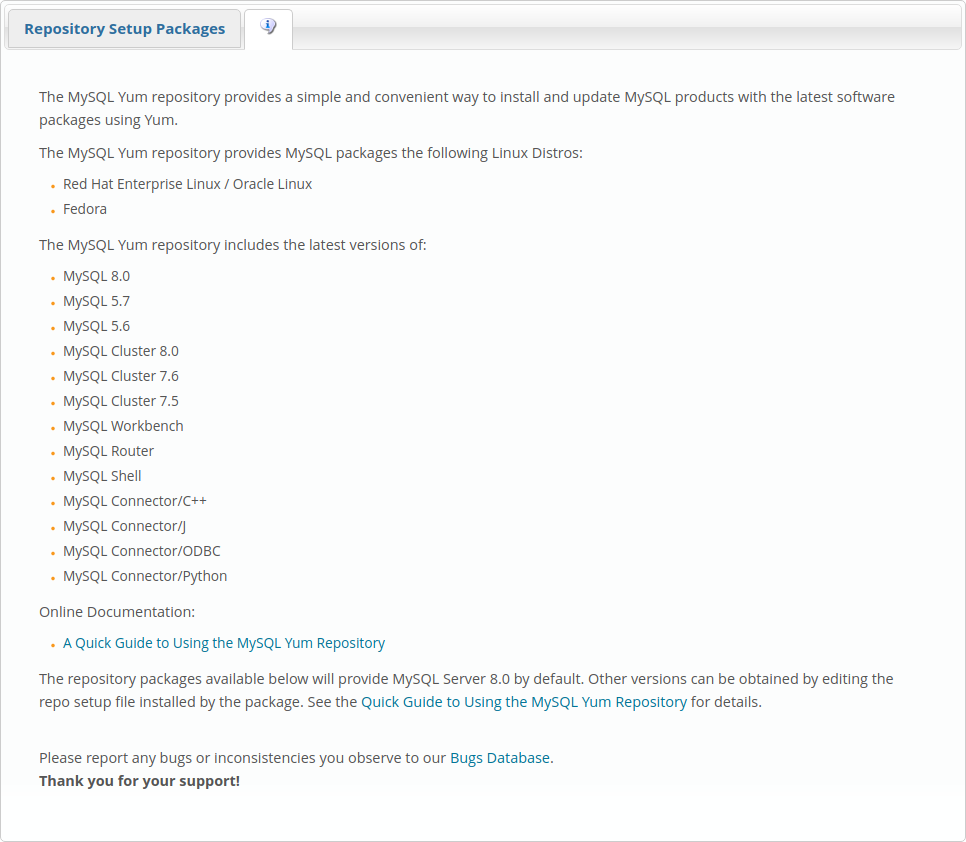
で、開いたページの途中に https://repo.mysql.com/yum/ へのリンクがあるので開く。
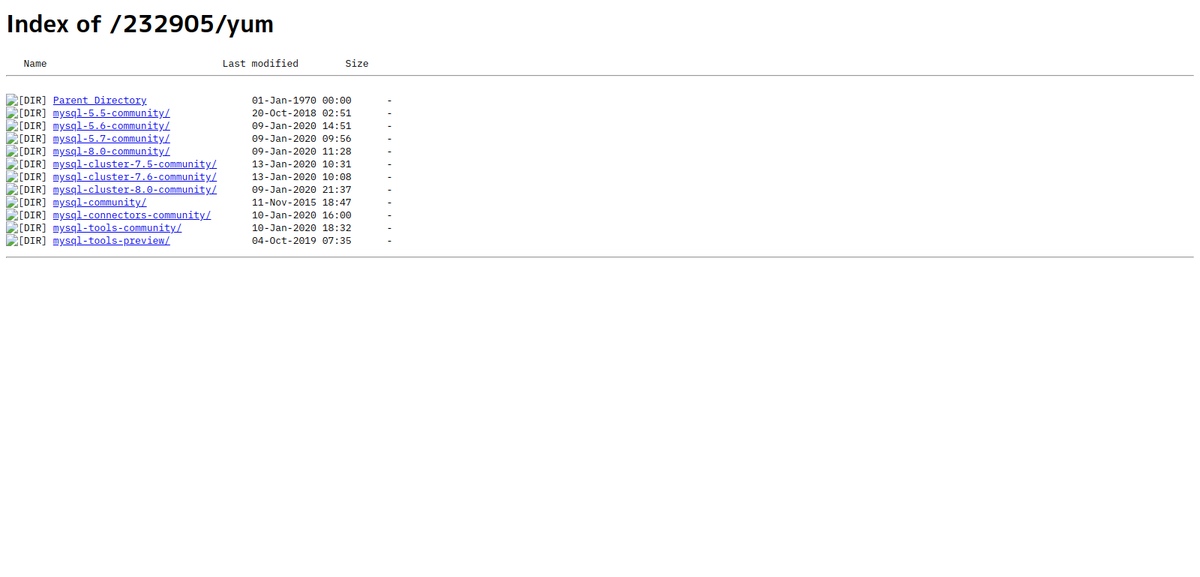
あとはディレクトリを辿っていき、https://repo.mysql.com/yum/mysql-5.7-community/el/7/x86_64/ にある mysql-community-release 系の RPM パッケージ(現時点では https://repo.mysql.com/yum/mysql-5.7-community/el/7/x86_64/mysql-community-release-el7-7.noarch.rpm)を探す。
MySQL 5.7 リポジトリの有効化
MySQL 5.7 をインストールする場合、YUM リポジトリの操作が必要になる。これは yum-config-manager を使うので yum-utils をインストールしておく。(手でリポジトリファイルを編集する場合は不要)
[root@localhost ~]# yum install yum-utils
RPM ファイルをインストールする。
[root@localhost ~]# yum install https://repo.mysql.com/yum/mysql-5.7-community/el/7/x86_64/mysql-community-release-el7-7.noarch.rpm
全リポジトリのリストを確認するとデフォルトでは mysql56-community が有効になっているのでまずはこれを無効にし、mysql57-community を有効にする必要がある。
[root@localhost ~]# yum repolist all
repo id                           repo name                       status
AppStream                         CentOS-8 - AppStream            enabled: 5,103
AppStream-source                  CentOS-8 - AppStream Sources    disabled
BaseOS                            CentOS-8 - Base                 enabled: 2,107
BaseOS-source                     CentOS-8 - BaseOS Sources       disabled
HighAvailability                  CentOS-8 - HA                   disabled
PowerTools                        CentOS-8 - PowerTools           disabled
base-debuginfo                    CentOS-8 - Debuginfo            disabled
c8-media-AppStream                CentOS-AppStream-8 - Media      disabled
c8-media-BaseOS                   CentOS-BaseOS-8 - Media         disabled
centosplus                        CentOS-8 - Plus                 disabled
centosplus-source                 CentOS-8 - Plus Sources         disabled
cr                                CentOS-8 - cr                   disabled
extras                            CentOS-8 - Extras               enabled:     3
extras-source                     CentOS-8 - Extras Sources       disabled
fasttrack                         CentOS-8 - fasttrack            disabled
mysql-connectors-community        MySQL Connectors Community      enabled:   141
mysql-connectors-community-source MySQL Connectors Community - So disabled
mysql-tools-community             MySQL Tools Community           enabled:   105
mysql-tools-community-source      MySQL Tools Community - Source  disabled
mysql55-community                 MySQL 5.5 Community Server      disabled
mysql55-community-source          MySQL 5.5 Community Server - So disabled
mysql56-community                 MySQL 5.6 Community Server      enabled:   183
mysql56-community-source          MySQL 5.6 Community Server - So disabled
mysql57-community                 MySQL 5.7 Community Server      disabled
mysql57-community-source          MySQL 5.7 Community Server - So disabled
mysql56-community リポジトリを無効にして mysql57-community リポジトリを有効にする。
[root@localhost ~]# yum-config-manager --disable mysql56-community
[root@localhost ~]# yum-config-manager --enable mysql57-community
mysql57-community リポジトリが有効になっているか確認する。
[root@localhost ~]# yum repolist enabled
repo id                              repo name                            status
AppStream                            CentOS-8 - AppStream                 5,103
BaseOS                               CentOS-8 - Base                      2,107
extras                               CentOS-8 - Extras                        3
mysql-connectors-community           MySQL Connectors Community             141
mysql-tools-community                MySQL Tools Community                  105
mysql57-community                    MySQL 5.7 Community Server             194
mysql モジュールと mariadb モジュールの無効化
この時点で mysql-server パッケージを見てみると CentOS の AppStream リポジトリのものが生きていて、mysql-community-server は見つからない。
[root@localhost ~]# yum info mysql-server
Available Packages
Name         : mysql-server
Version      : 8.0.17
Release      : 3.module_el8.0.0+181+899d6349
Architecture : x86_64
Size         : 22 M
Source       : mysql-8.0.17-3.module_el8.0.0+181+899d6349.src.rpm
Repository   : AppStream
Summary      : The MySQL server and related files
URL          : http://www.mysql.com
License      : GPLv2 with exceptions and LGPLv2 and BSD
Description  : MySQL is a multi-user, multi-threaded SQL database server. MySQL is a
             : client/server implementation consisting of a server daemon (mysqld)
             : and many different client programs and libraries. This package contains
             : the MySQL server and some accompanying files and directories.

[root@localhost ~]# yum info mysql-community-server
Error: No matching Packages to list
mysql と mariadb モジュールの状態を確認してみると [d] なので有効になっている。
[root@localhost ~]# yum module list mysql mariadb
Name    Stream   Profiles                   Summary
mariadb 10.3 [d] client, server [d], galera MariaDB Module
mysql   8.0 [d]  client, server [d]         MySQL Module

Hint: [d]efault, [e]nabled, [x]disabled, [i]nstalled
mysql と mariadb モジュールを無効にする。
[root@localhost ~]# yum module disable mysql mariadb
[root@localhost ~]# yum module list mysql mariadb
Name    Stream      Profiles                   Summary
mariadb 10.3 [d][x] client, server [d], galera MariaDB Module
mysql   8.0 [d][x]  client, server [d]         MySQL Module

Hint: [d]efault, [e]nabled, [x]disabled, [i]nstalled
この設定は /etc/dnf/modules.d に保管されている。
[root@localhost ~]# ll /etc/dnf/modules.d
total 8
-rw-r--r--. 1 root root 56  3月 10 23:35 mariadb.module
-rw-r--r--. 1 root root 52  3月 10 23:35 mysql.module

[root@localhost ~]# cat /etc/dnf/modules.d/*
[mariadb]
name=mariadb
stream=
profiles=
state=disabled
[mysql]
name=mysql
stream=
profiles=
state=disabled
例えば以下のように php のモジュールが二つ存在した場合。
[root@localhost ~]# yum module list php
Name Stream  Profiles                   Summary
php  7.2 [d] common [d], devel, minimal PHP scripting language
php  7.3     common, devel, minimal     PHP scripting language

Hint: [d]efault, [e]nabled, [x]disabled, [i]nstalled
この部分の書式は yum module list <module-spac> となっており、<module-spec> は NAME:STREAM/PROFILE で指定する。(詳しくは man dnf の SPECIFYING MODULES の項を参照)
下記のようにすることで有効にする php モジュールのストリームを切り替えることが出来る。
[root@localhost ~]# yum module disable php:7.2
[root@localhost ~]# yum module enable php:7.3
[root@localhost ~]# yum module list php
Name Stream  Profiles                   Summary
php  7.2 [d] common [d], devel, minimal PHP scripting language
php  7.3 [e] common, devel, minimal     PHP scripting language

Hint: [d]efault, [e]nabled, [x]disabled, [i]nstalled
モジュール切り替え前(PHP 7.2)

[root@localhost ~]# yum info php
Available Packages
Name         : php
Version      : 7.2.11
Release      : 2.module_el8.1.0+209+03b9a8ff
Architecture : x86_64
Size         : 1.5 M
Source       : php-7.2.11-2.module_el8.1.0+209+03b9a8ff.src.rpm
Repository   : AppStream
Summary      : PHP scripting language for creating dynamic web sites
URL          : http://www.php.net/
License      : PHP and Zend and BSD and MIT and ASL 1.0
Description  : PHP is an HTML-embedded scripting language. PHP attempts to make it
             : easy for developers to write dynamically generated web pages. PHP also
             : offers built-in database integration for several commercial and
             : non-commercial database management systems, so writing a
             : database-enabled webpage with PHP is fairly simple. The most common
             : use of PHP coding is probably as a replacement for CGI scripts.
             :
             : The php package contains the module (often referred to as mod_php)
             : which adds support for the PHP language to Apache HTTP Server.

モジュール切り替え後(PHP 7.3)

[root@localhost ~]# yum info php
Available Packages
Name         : php
Version      : 7.3.5
Release      : 3.module_el8.1.0+252+0d4e049c
Architecture : x86_64
Size         : 1.5 M
Source       : php-7.3.5-3.module_el8.1.0+252+0d4e049c.src.rpm
Repository   : AppStream
Summary      : PHP scripting language for creating dynamic web sites
URL          : http://www.php.net/
License      : PHP and Zend and BSD and MIT and ASL 1.0 and NCSA
Description  : PHP is an HTML-embedded scripting language. PHP attempts to make it
             : easy for developers to write dynamically generated web pages. PHP also
             : offers built-in database integration for several commercial and
             : non-commercial database management systems, so writing a
             : database-enabled webpage with PHP is fairly simple. The most common
             : use of PHP coding is probably as a replacement for CGI scripts.
             :
             : The php package contains the module (often referred to as mod_php)
             : which adds support for the PHP language to Apache HTTP Server.
改めて mysql-community-server の情報を確認してみるとmysql-community-server も存在し、MySQL 5.7 が有効になっている。
[root@localhost ~]# yum info mysql-community-server
Last metadata expiration check: 0:08:19 ago on 2020年03月10日 23時29分12秒.
Available Packages
Name         : mysql-community-server
Version      : 5.7.29
Release      : 1.el7
Architecture : x86_64
Size         : 175 M
Source       : mysql-community-5.7.29-1.el7.src.rpm
Repository   : mysql57-community
Summary      : A very fast and reliable SQL database server
URL          : http://www.mysql.com/
License      : Copyright (c) 2000, 2019, Oracle and/or its affiliates. All rights reserved. Under GPLv2 license as shown in the Description field.
Description  : The MySQL(TM) software delivers a very fast, multi-threaded, multi-user,
             : and robust SQL (Structured Query Language) database server. MySQL Server
             : is intended for mission-critical, heavy-load production systems as well
             : as for embedding into mass-deployed software. MySQL is a trademark of
             : Oracle and/or its affiliates
             :
             : The MySQL software has Dual Licensing, which means you can use the MySQL
             : software free of charge under the GNU General Public License
             : (http://www.gnu.org/licenses/). You can also purchase commercial MySQL
             : licenses from Oracle and/or its affiliates if you do not wish to be bound by the terms of
             : the GPL. See the chapter "Licensing and Support" in the manual for
             : further info.
             :
             : The MySQL web site (http://www.mysql.com/) provides the latest news and
             : information about the MySQL software.  Also please see the documentation
             : and the manual for more information.
             :
             : This package includes the MySQL server binary as well as related utilities
             : to run and administer a MySQL server.
MySQL 5.7 のインストール
mysql-community-server(MySQL 5.7)をインストールする。
[root@localhost ~]# yum install mysql-community-server
バージョンの確認
サーバの起動と初期設定を済ませる。
[root@localhost ~]# systemctl start mysqld
[root@localhost ~]# mysql_secure_installation
root の初期パスワードは /var/log/mysqld.log に記載されている。パスワードポリシーの強度を変更する場合もまずはパスワードポリシーに従い適切なパスワードを設定する必要がある。
[root@localhost ~]# grep 'temporary password' /var/log/mysqld.log
2020-03-11T03:41:27.058314Z 1 [Note] A temporary password is generated for root@localhost: dHq*k;*3mb,Q
サーバにログインしてバージョンを確認する。
[root@localhost ~]# mysql -uroot -p -e "select version()"
Enter password:
+-----------+
| version() |
+-----------+
| 5.7.29    |
+-----------+
