言い換えれば、select要素(選択要素)のvalueにプリミティブ型以外を指定したい場合。
または、セレクトボックスに値をセットしているのに値が変わらない場合などに見ると良い記事です。
オブジェクトを指定している場合、ngValueを使わないと値が正常に切り替わりません。
解決方法
ngValueを使えば実現できます。
実際のコード
select-box-test.component.html
<form [formGroup]="testForm">
    <select id="select-test" formControlName="selectTest">
        <option>選択してください</option>
        <option *ngFor="let choice of choices" [ngValue]="choice">{{ choice.displayName }}</option>
    </select>
</form>
select-box-test.component.ts
import { Component, OnInit } from '@angular/core';
import { FormBuilder, FormControl } from '@angular/forms';

@Component({
  selector: 'app-select-box-test',
  templateUrl: './select-box-test.component.html',
  styleUrls: ['./select-box-test.component.scss']
})
export class SelectBoxTestComponent implements OnInit {

  testForm = this.formBuilder.group(
    {
      selectTest: ['', { updateOn: 'change'}]
    }
  );

  choices = [
    {name: 'A', age: 20, displayName: 'Aさん'}
    , {name: 'B', age: 21, displayName: 'Bさん'}
    , {name: 'C', age: 22, displayName: 'Cさん'}
    , {name: 'D', age: 23, displayName: 'Dさん'}
  ];

  constructor(private formBuilder: FormBuilder) { }

  get selectTest(): FormControl {
    return this.testForm.get('selectTest') as FormControl;
  }

  ngOnInit(): void {
    this.selectTest.setValue(this.choices[2]);
  }

}
実行結果(初期表示)
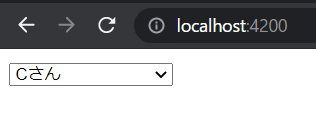
こんな感じですね。
不明点があったらコメントにてご質問ください。
リアクティブフォームについて
input要素やselect要素、textarea要素などの入力関連の要素を取得したり値をセットしたり、動的に扱いたい場合、リアクティブフォームを使う必要があります。
(色々試しましたが、ViewChildでやるものではないですね。)
上記のコード内で言うと、
FormBuilder、FormControl、formGroup、formControlName
あたりがリアクティブフォーム関連のワードになります。
詳しくは↓↓を見れば分かると思います。
Angular 日本語ドキュメンテーション
