GitHub Actions使ってみた
前からC I/CDに興味があったので、GitHub Actionsを使ってみました。
- GitHub Actionsを使って、VueのbuildとGitHub Pagesへのdeployを行う
- 使用した技術
- Vue
- GitHub Actions
- actions-gh-pages
- GitHub PagesにActionsからdeployするのに使う
- 配信ファイルのみのブランチ(gh-pages)を作っている
- 苦労したところ
GitHub Actionsとは
ymlファイルの記述
- 作り方(次のどちらか)
- repository -> Actions -> New workflow からDeploy Node.jsを選ぶ
- エディタで
.github/workflows/node.js.ymlを記述(多分これでよい)
- 今回用いたymlファイル
# This workflow will do a clean install of node dependencies, cache/restore them, build the source code and run tests across different versions of node
# For more information see: https://help.github.com/actions/language-and-framework-guides/using-nodejs-with-github-actions

name: Node.js CI

on:
  push:
    branches: [ main ]

jobs:
  build:

    runs-on: ubuntu-latest

    env:
      vue-dir: ./deploy

    strategy:
      matrix:
        node-version: [16.x]
        # See supported Node.js release schedule at https://nodejs.org/en/about/releases/

    concurrency:
      group: ${{ github.workflow }}-${{ github.ref }}

    steps:
    - uses: actions/checkout@v2
    - name: Use Node.js ${{ matrix.node-version }}
      uses: actions/setup-node@v2
      with:
        node-version: ${{ matrix.node-version }}
    - name: Cache npm dir
      uses: actions/cache@v2
      with:
        path: ~/.npm
        key: ${{ runner.os }}-node_modules-${{ hashFiles('**/package-lock.json') }}
    - run: |
        cd ${{ env.vue-dir }}
        npm ci
        npm run build --if-present
    - name: Deploy
      uses: peaceiris/actions-gh-pages@v3
      with:
        github_token: ${{ secrets.GITHUB_TOKEN }}
        publish_dir: ./deploy/dist
- やってること(上から)
- あとはpushすると自動で上のコードが走る
root ディレクトリ以外のVueファイルをdeployしたい
- Actionsの設定でrootディレクトリ以外を使うには、次の2つが考えられる
- linuxのコマンド、cdを使う
- working-directoryの設定を行う
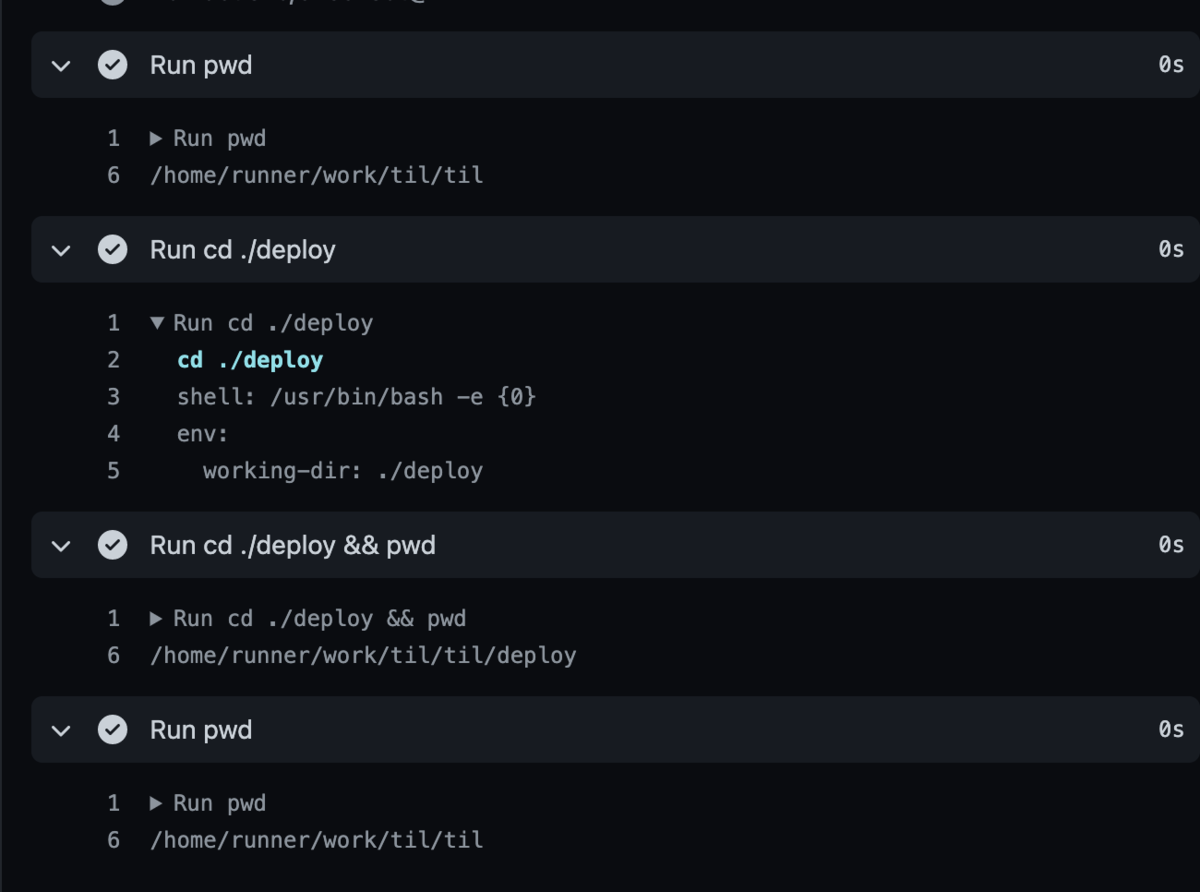
- [注意] 1回cdで移動してもrunを変えると元の場所に戻ってしまう!
- 以下は次のようなymlを記述した際の結果
steps:
~~ ~~
- run: pwd
- run: cd ${{ env.working-dir }}
- run: cd ${{ env.working-dir }} && pwd
- run: pwd
~~ ~~
Vueを作成してpushしてみる
node.jsがインストールされていることが必要。vue/cli も追加でインストールしておく。
Vueプロジェクトを作成
$ vue create deploy
deployするためにのVueの設定
packege-lock.jsonが存在しない場合
以下のコマンドで生成する
$  cd deploy
$ npm install --package-lock
このファイルが存在しないとnpm ciがこける(ここがnpm installとの違い!)
deploy/vue.config.jsが存在しない場合
以下の内容を、deploy/vue.config.js に記述
module.exports = {
    outputDir: './dist/',
    publicPath: './'
}
このファイルがを記述しないと、配信した際に真っ白になる
GitHub でPages配信の設定を行う
- リポジトリの settings -> Pages へ移動
- Sourceを以下のように設定
- Branch: gh-pages
- /(root)
- Save ボタンを押す
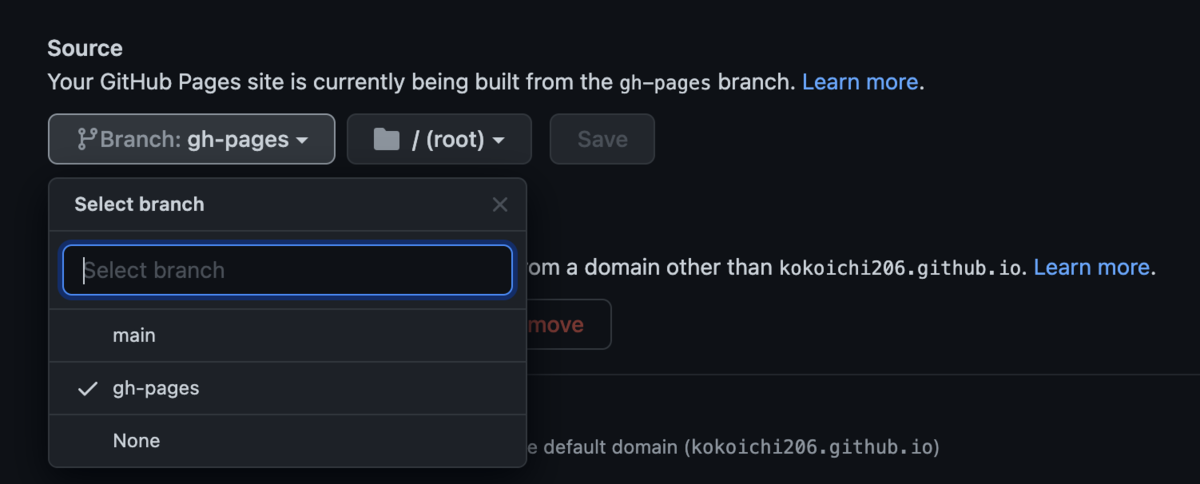
gh-pagesが表示されない場合は、Vueのpushを行った際に正しくActionが実行されてない可能性があるのでActionsから確認する
おわりに
CI/CDの機能としてテストも気になっているので次回以降やってみたいと思います
