この記事はkdnaktの1人 Advent Calendar 2020の7日目の記事です。
2020年は会社でKotlin dojoを主催して週1回30分Kotlinと戯れていました。12月はその集大成ということで、KotlinでHTTPサーバーを作ってみたいと思います。どこまでできるか、お楽しみ……。
[echo serverをビルドする]
前回はKotlinとKotlin/Nativeの違いに気づいて、Kotlin/Nativeのサンプルプロジェクトをいくつか探しました。
今回はKotlin/Nativeの理解を深めるために、JetBrains社公式のGitHubリポジトリであるkotlin-nativeにて公開されているサンプルから、echoServerをローカルで実装してみます。
echoServerプロジェクトは、以下のようにREADME.mdを除いて3ファイルとシンプルな構成となっています。
$ tree -I build
.
├── README.md
├── build.gradle.kts
├── gradle.properties
└── src
    └── echoServerMain
        └── kotlin
            └── EchoServer.kt
まずはプロジェクト用のディレクトリを作ります。
$ mkdir echoServer
$ cd echoServer
次に、gradle.propertiesファイルを作成します。元のプロジェクトのファイル内容から変更点はありません。
kotlin.code.style=official
kotlin.import.noCommonSourceSets=true
次に、src/echoServerMain/kotlin/EchoServer.ktをコピーします。
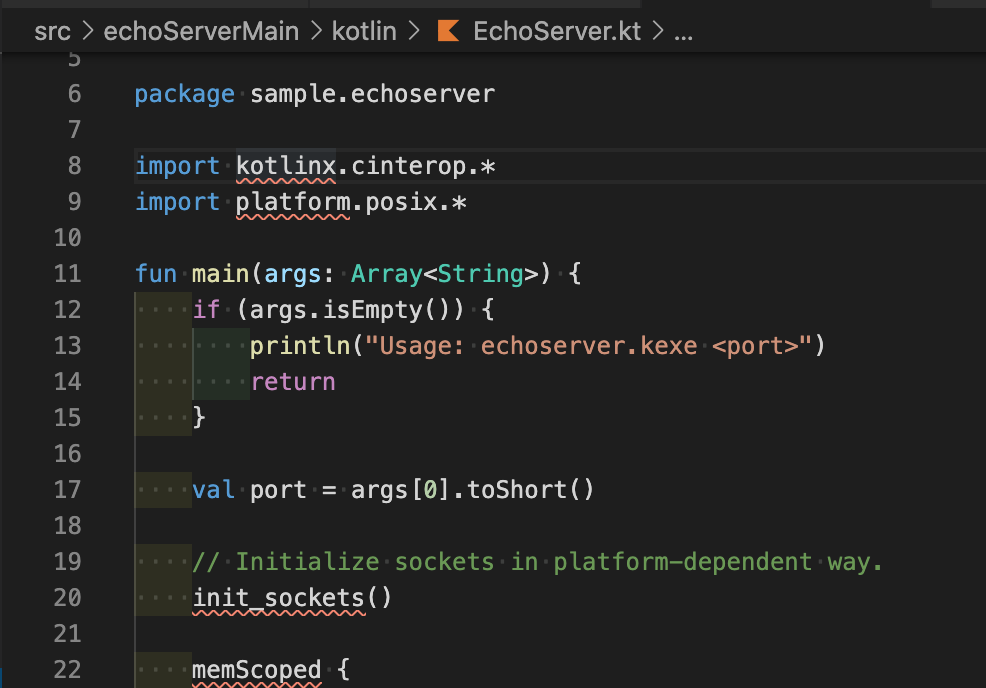
VS Code上でファイルを編集しているのですが、まだbuild.gradleファイルあるいはbuild.gradle.ktsファイルで依存関係を定義していないため、コンパイルエラーが出て赤い下線が引かれているのが分かります。
最後に、build.gradle.ktsファイルを追加します。
オリジナルのファイルは複数のプラットフォームでビルドできるように、Windows用やRaspberry Pi用の記述が含まれています。しかし、今回はmacOS上でのみビルドを予定しているので、余計な部分は削っていきます。
import org.jetbrains.kotlin.gradle.plugin.mpp.KotlinNativeTargetPreset

plugins {
    kotlin("multiplatform")
}

kotlin {
    // Configure executables
    macosX64("echoServer") {
        binaries {
            executable {
                entryPoint = "sample.echoserver.main"
                runTask?.args(3000)
            }
        }
    }

    // Enable experimental stdlib API used by the sample.
    sourceSets.all {
        languageSettings.useExperimentalAnnotation("kotlin.ExperimentalStdlibApi")
    }
}
最初にKotlin/NativeでHello worldしたときのbuild.gradle.ktsファイルと比べると、repositoryの定義がこちらのファイルに欠けている点と、KotlinNativeTargetPresetがimportされている点が主に異なっています。
README.mdに書かれていたgradle assembleコマンドでビルドしてみます。
$ gradle assemble

FAILURE: Build failed with an exception.

* Where:
Build file '/Users/akito/Develop/sandbox/echoServer2/build.gradle.kts' line: 4

* What went wrong:
Plugin [id: 'org.jetbrains.kotlin.multiplatform'] was not found in any of the following sources:

- Gradle Core Plugins (plugin is not in 'org.gradle' namespace)
- Plugin Repositories (plugin dependency must include a version number for this source)

* Try:
Run with --stacktrace option to get the stack trace. Run with --info or --debug option to get more log output. Run with --scan to get full insights.

* Get more help at https://help.gradle.org

BUILD FAILED in 9s
「plugin dependency must include a version number for this source」と書かれていることから、プラグインのバージョンを指定する必要があるようです。
Kotlin Multiplatformプラグインの最新バージョンは1.4.20のようなので、これを指定します。
Gradle - Plugin: org.jetbrains.kotlin.multiplatform
plugins {
    kotlin("multiplatform") version "1.4.20"
}
あらためてビルドを実行すると、エラーメッセージの内容が変化しました。
$ gradle assemble

> Configure project :
Kotlin Multiplatform Projects are an Alpha feature. See: https://kotlinlang.org/docs/reference/evolution/components-stability.html. To hide this message, add 'kotlin.mpp.stability.nowarn=true' to the Gradle properties.

Could not resolve compiler classpath. Check if Kotlin Gradle plugin repository is configured in root project 'echoServer2'.

FAILURE: Build failed with an exception.

* What went wrong:
Could not determine the dependencies of task ':compileKotlinMetadata'.
> Could not resolve all files for configuration ':kotlinCompilerClasspath'.
   > Cannot resolve external dependency org.jetbrains.kotlin:kotlin-compiler-embeddable:1.4.20 because no repositories are defined.
     Required by:
         project :

* Try:
Run with --stacktrace option to get the stack trace. Run with --info or --debug option to get more log output. Run with --scan to get full insights.

* Get more help at https://help.gradle.org

Deprecated Gradle features were used in this build, making it incompatible with Gradle 7.0.
Use '--warning-mode all' to show the individual deprecation warnings.
See https://docs.gradle.org/6.7.1/userguide/command_line_interface.html#sec:command_line_warnings

BUILD FAILED in 6s
「because no repositories are defined.」というエラーメッセージから、やはりHello worldプロジェクトのbuild.gradle.ktsファイルのようにrepositoriesの指定が必要であると分かります。
plugins {
    kotlin("multiplatform") version "1.4.20"
}

repositories {
    mavenCentral()
}
上記のように、pluginsの定義のあとに、repositoriesを追加してビルドを実行すると、今度はビルドが成功しました。
$ gradle assemble > Configure project : Kotlin Multiplatform Projects are an Alpha feature. See: https://kotlinlang.org/docs/reference/evolution/components-stability.html. To hide this message, add 'kotlin.mpp.stability.nowarn=true' to the Gradle properties. > Task :compileKotlinEchoServer w: /Users/akito/Develop/sandbox/echoServer2/src/echoServerMain/kotlin/EchoServer.kt: (32, 33): 'companion object of sockaddr_in' is deprecated. Use sizeOf() or alignOf () instead. w: /Users/akito/Develop/sandbox/echoServer2/src/echoServerMain/kotlin/EchoServer.kt: (37, 54): 'companion object of sockaddr_in' is deprecated. Use sizeOf () or alignOf () instead. Deprecated Gradle features were used in this build, making it incompatible with Gradle 7.0. Use '--warning-mode all' to show the individual deprecation warnings. See https://docs.gradle.org/6.7.1/userguide/command_line_interface.html#sec:command_line_warnings BUILD SUCCESSFUL in 42s 4 actionable tasks: 4 executed
ビルドした成果物は以下のようになっています。
$ tree build
build
├── bin
│   └── echoServer
│       ├── debugExecutable
│       │   ├── echoServer.kexe
│       │   └── echoServer.kexe.dSYM
│       │       └── Contents
│       │           ├── Info.plist
│       │           └── Resources
│       │               └── DWARF
│       │                   └── echoServer.kexe
│       └── releaseExecutable
│           ├── echoServer.kexe
│           └── echoServer.kexe.dSYM
│               └── Contents
│                   ├── Info.plist
│                   └── Resources
│                       └── DWARF
│                           └── echoServer.kexe
├── classes
│   └── kotlin
│       └── echoServer
│           └── main
│               └── echoServer.klib
├── libs
│   └── echoServer-metadata.jar
└── tmp
    └── metadataJar
        └── MANIFEST.MF
ビルドは問題ないようですが、やはりVS Code上では引き続きコンパイルエラーが出ています。VS Codeの拡張機能がKotlin/Nativeに対応していないことが原因のようです。追加で使えそうな拡張機能がないかどうか探してみたのですが、目ぼしいものはありませんでした。
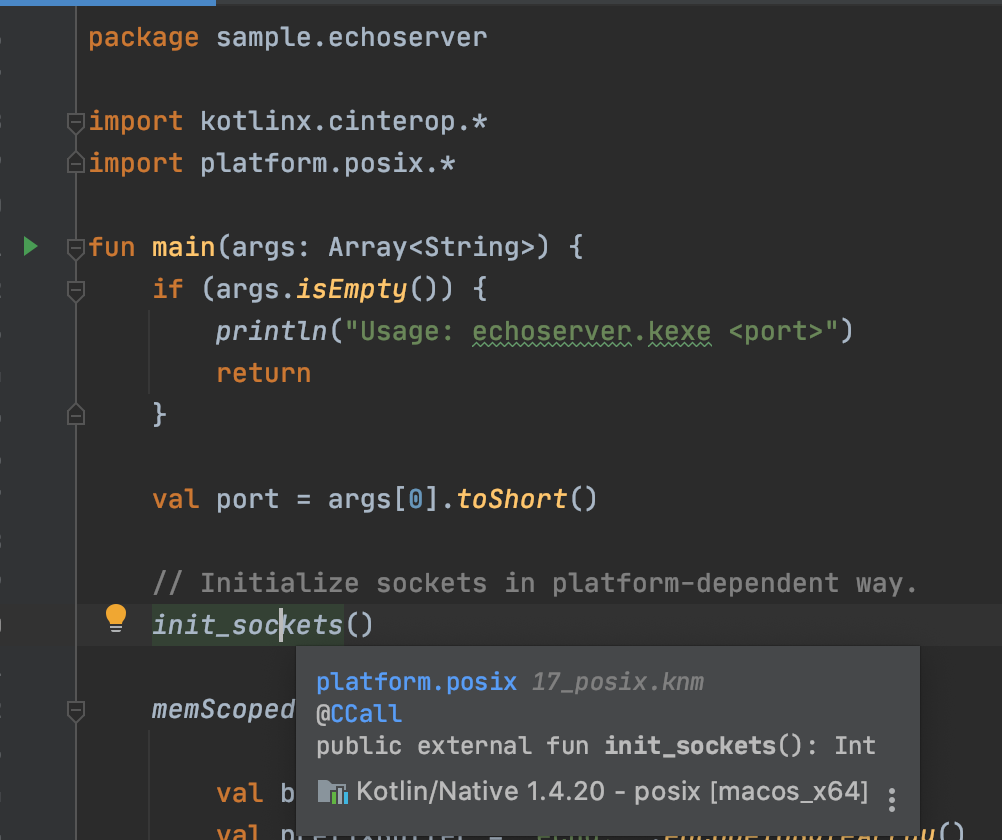
ためしに、同じプロジェクトをJetBrains社が提供しているIntelliJ IDEA Communityエディションで開いてみると、こちらはコンパイルエラーがでませんでした。
また、以下の画像のように、利用している関数の定義なども参照できます。
Kotlin/Nativeの開発時には、IntelliJを利用する方が良さそうです。
