Dockerコンテナーのアクションを作成するチュートリアルを試してみた。
[きっかけ]
最近、Learning GitHub Actions: Automation and Integration of CI/CD with GitHub (English Edition)を読んでいる。
IPUSIRONさんのツイートを見て、Humble Bundleでまとめ売りされていた本を購入した。その中に入っていたのがきっかけ(Linuxか?というと謎だけど...)。
Humble BundleからLinux本のバンドルがきています🐧
— IPUSIRON (@ipusiron) 2024年6月23日
25ドルで15冊。1ドルでも5冊。https://t.co/f3N0vrf72l #ad pic.twitter.com/D6ciVLcWUn
[action実装チュートリアル]
本を読んでいてymlファイルが出てきても全体像がよくわからないのと、全く手を動かさないのもよくないかなと思っていた。GitHubのドキュメントを探したところ、ちょうど良さそうなチュートリアルを見つけたので試してみた。
GitHub Actions用のactionを実装していく。まずは、actionのためのコードを保管するリポジトリを作成する。
続いて、actionを実行するDockerfileとactionのコードをentrypoint.shとして実装する。
# Container image that runs your code
FROM alpine:3.10# Copies your code file from your action repository to the filesystem path `/` of the container
COPY entrypoint.sh /entrypoint.sh# Code file to execute when the docker container starts up (`entrypoint.sh`)
ENTRYPOINT ["/entrypoint.sh"]
#!/bin/sh -l
echo "Hello $1"
time=$(date)
echo "time=$time" >> $GITHUB_OUTPUT
あとは、必要なメタデータを以下のようにaction.ymlにまとめる。
# action.yml
name: 'Hello World'
description: 'Greet someone and record the time'
inputs:
who-to-greet: # id of input
description: 'Who to greet'
required: true
default: 'World'
outputs:
time: # id of output
description: 'The time we greeted you'
runs:
using: 'docker'
image: 'Dockerfile'
args:
- ${{ inputs.who-to-greet }}
続いて、これを利用するワークフローを定義する。サンプルをベースに以下のような形に実装した。
# This is a basic workflow to help you get started with Actions
name: CI
# Controls when the workflow will run
on:
# Triggers the workflow on push or pull request events but only for the "main" branch
push:
branches: [ "main" ]
pull_request:
branches: [ "main" ]# Allows you to run this workflow manually from the Actions tab
workflow_dispatch:# A workflow run is made up of one or more jobs that can run sequentially or in parallel
jobs:
hello_world_job:
runs-on: ubuntu-latest
name: A job to say hello
steps:
- name: Hello world action step
id: hello
uses: kdnakt/hello-world-action@main
with:
who-to-greet: 'Mona the Octocat'
# Use the output from the `hello` step
- name: Get the output time
run: echo "The time was ${{ steps.hello.outputs.time }}"
onの中にworkflow_dispatchを設定しておくと、手動でこのジョブを実行することができ、デバッグなどの際に便利とのこと。
stepの定義の中でusesを使って今回実装したactionを「uses: kdnakt/hello-world-action@main」のように指定している。
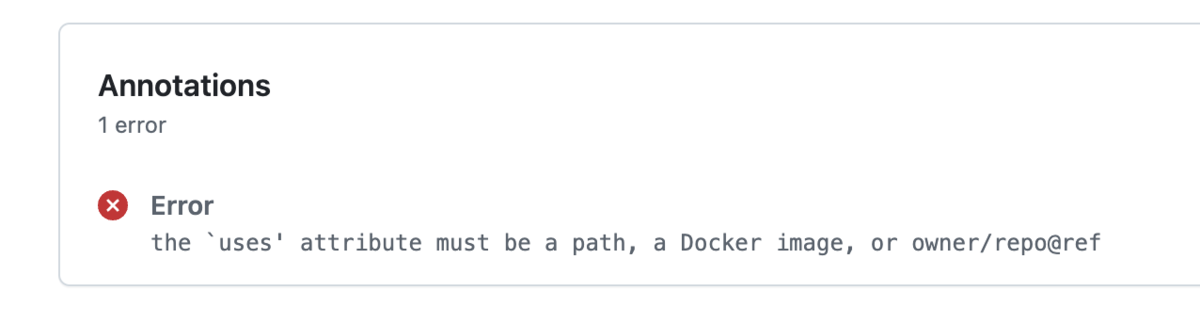
最初に実装したときは、usesでactionを指定する際に、@以降を忘れてしまって「the `uses' attribute must be a path, a Docker image, or owner/repo@ref」というエラーが表示された。mainブランチしかないので、refにmainを指定して無事エラーが解消した。
[brandingアイコン]
マーケットプレイスに公開されているアクションを見ると、様々なアイコンが設定されている。
これは、以下のような設定をaction.ymlファイルに追加することで実現できる。
branding:
icon: 'award'
color: 'green'
brandingに利用できるアイコンはGitHub Actions Branding Cheat Sheetにまとまっていて分かりやすい。
例えば、GitHub Pages actionのアイコンは次のようになっている。
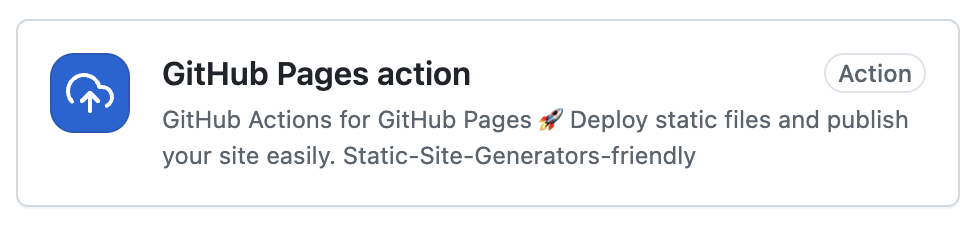
これは、以下のコードで実装されている。
branding:
icon: 'upload-cloud'
color: 'blue'
今回実装したactionでもbrandingを定義してみたが、ワークフローの実行履歴などには特に反映されなかった。残念。
[まとめ]
- Learning GitHub Actions: Automation and Integration of CI/CD with GitHub (English Edition)を読んでいる
- Docker コンテナーのアクションを作成するチュートリアルを試してみた
- brandingアイコンはマーケットプレイス用なのでマーケットプレイスに公開しない限りは関係なさそう
- 実装したコードは以下のリポジトリにまとめてある
