これは、なにをしたくて書いたもの?
AWS Step Functions Localを使ってAWS Step Functionsをローカルで動かしてみたのですが、AWS Step Functions Localだけではなくて
AWS SAMでAWS Lambdaのローカル環境を起動する必要があったり、AWS CLIでステートマシンを定義したりとやや面倒です。
LocalStackでもAWS Step Functionsを扱えるようなので、こちらも試してみましょう。
また構築はTerraformで行いたいと思います。
LocalStackのAWS Step Functions
LocalStackのAWS Step Functionsのドキュメントはこちら。
サポートしているAWSサービスと操作はこちら。
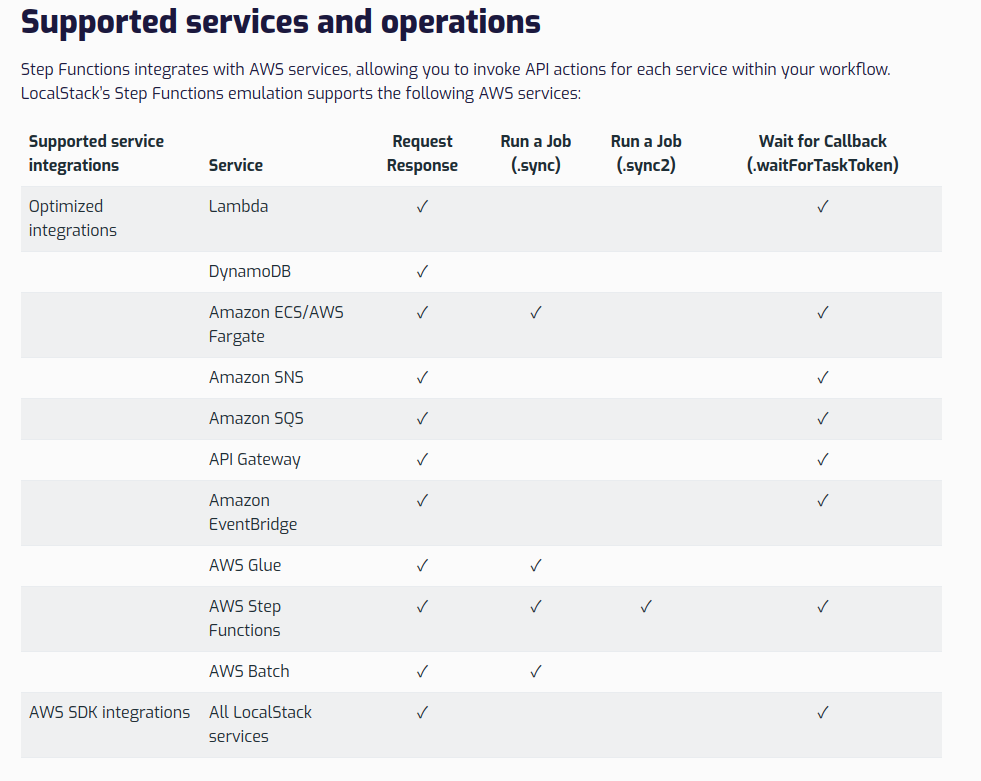
Step Functions / Supported services and operations
リクエスト - レスポンス、ジョブの実行、コールバックの待機というのはサービスのインテグレーションタイプのことですね。
Step Functions でサービス統合パターンを検出する - AWS Step Functions
LocalStackのドキュメントを見ると、サポートしているAWSサービスはさすがに少なくなるようです。
Terraformでステートマシンの定義を行うには、こちらのリソースを使えばよさそうです。
Resource: aws_sfn_state_machine
では、試していってみましょう。
余談
LocalStackのAWS Step Functionsの実装は、AWS Step Functions Localを使って実現されています。
なのですが、中身のバージョンは1.7.9で止まっています。現在のAWS Step Functions Localのバージョンは2.0.0です。
コメントに書かれているのですが、これより新しいバージョンはAWS SDKなどが含まれるため300MBを超えるサイズになるからで、
LocalStack自身でAWS Step Functionsのカスタム実装を作成するまでこのバージョンでストップしているようです。
環境
今回の環境はこちら。
$ python3 --version
Python 3.10.12


$ pip3 --version
pip 22.0.2 from /usr/lib/python3/dist-packages/pip (python 3.10)


$ terraform version
Terraform v1.9.8
on linux_amd64


$ awslocal --version
aws-cli/2.19.4 Python/3.12.6 Linux/5.15.0-125-generic exe/x86_64.ubuntu.22


$ samlocal --version
SAM CLI, version 1.127.0
$ export AWS_ACCESS_KEY_ID=dummy
$ export AWS_SECRET_ACCESS_KEY=dummy
$ export AWS_DEFAULT_REGION=us-east-1
LocalStack。
$ localstack --version
3.8.1
起動。
$ localstack start
AWS SAMを使ってAWS Lambda関数をLocalStackにデプロイする
まずはAWS SAMを使ってAWS Lambda関数を作成し、LocalStackにデプロイしましょう。
お題としてはこちらのチュートリアルを使うことにします。
Step Functions で Lambda 関数を使用してループを反復する - AWS Step Functions
AWS Lambda関数は、こちらのエントリーで書いたものを使いましょう。
AWS Step Functions LocalとAWS SAMを使って、AWS Lambdaを使ったチュートリアルを試してみる - CLOVER🍀
AWS SAMプロジェクトを作成。
$ samlocal init --name sfn-localstack-getting-started --runtime python3.10 --app-template hello-world --package-type Zip --no-tracing --no-application-insights --structured-logging
$ cd sfn-localstack-getting-started
AWS Lambda関数のコード。
loop/app.py
def lambda_handler(event, context):
    iterator = event["iterator"]
    index = iterator["index"]
    step = iterator["step"]
    count = iterator["count"]

    print(f"index = {index}, step = {step}, count = {count}, event = {event}")

    index = index + step

    return {
        "index": index,
        "step": step,
        "count": count,
        "continue": count > index
    }
テンプレート。
template.yaml
AWSTemplateFormatVersion: '2010-09-09'
Transform: AWS::Serverless-2016-10-31
Description: >
  sfn-localstack-getting-started

  Sample SAM Template for sfn-localstack-getting-started

Globals:
  Function:
    Timeout: 3
    LoggingConfig:
      LogFormat: JSON

Resources:
  LoopFunction:
    Type: AWS::Serverless::Function
    Properties:
      FunctionName: LoopFunction
      CodeUri: loop/
      Handler: app.lambda_handler
      Runtime: python3.10
      Architectures:
      - x86_64

Outputs:
  LoopFunction:
    Description: Loop Lambda Function ARN
    Value: !GetAtt LoopFunction.Arn
  LoopFunctionIamRole:
    Description: Implicit IAM Role created for Loop function
    Value: !GetAtt LoopFunctionRole.Arn
デプロイ。
$ yes | samlocal deploy --region us-east-1
結果。
CloudFormation outputs from deployed stack
----------------------------------------------------------------------------------------------------------------------------------------------------------------------------------------------
Outputs
----------------------------------------------------------------------------------------------------------------------------------------------------------------------------------------------
Key                 LoopFunction
Description         Loop Lambda Function ARN
Value               arn:aws:lambda:us-east-1:000000000000:function:LoopFunction

Key                 LoopFunctionIamRole
Description         Implicit IAM Role created for Loop function
Value               arn:aws:iam::000000000000:role/sfn-localstack-getting-started-LoopFunctionRole-04bb27f5
----------------------------------------------------------------------------------------------------------------------------------------------------------------------------------------------


Successfully created/updated stack - sfn-localstack-getting-started in us-east-1
TerraformでLocalStackにAWS Step Functionsのステートマシンを作成する
次は、TerraformでLocalStackにAWS Step Functionsのステートマシンを作成します。
このあたりを参考に。
Custom Service Endpoint Configuration / Connecting to Local AWS Compatible Solutions / LocalStack
Resource: aws_sfn_state_machine
作成したTerraformの構成ファイルはこちら。
main.tf
terraform {
  required_version = "1.9.8"

  required_providers {
    aws = {
      source  = "hashicorp/aws"
      version = "5.75.0"
    }
  }
}

provider "aws" {
  allowed_account_ids         = ["000000000000"]
  access_key                  = "dummy"
  region                      = "us-east-1"
  s3_use_path_style           = true
  secret_key                  = "dummy"
  skip_credentials_validation = true
  skip_metadata_api_check     = true
  skip_requesting_account_id  = false

  endpoints {
    apigateway     = "http://localhost:4566"
    cloudformation = "http://localhost:4566"
    cloudwatch     = "http://localhost:4566"
    dynamodb       = "http://localhost:4566"
    es             = "http://localhost:4566"
    firehose       = "http://localhost:4566"
    iam            = "http://localhost:4566"
    kinesis        = "http://localhost:4566"
    lambda         = "http://localhost:4566"
    route53        = "http://localhost:4566"
    redshift       = "http://localhost:4566"
    s3             = "http://localhost:4566"
    secretsmanager = "http://localhost:4566"
    ses            = "http://localhost:4566"
    sns            = "http://localhost:4566"
    sqs            = "http://localhost:4566"
    ssm            = "http://localhost:4566"
    stepfunctions  = "http://localhost:4566"
    sts            = "http://localhost:4566"
  }
}

data "aws_lambda_function" "loop_function" {
  function_name = "LoopFunction"
}

resource "aws_sfn_state_machine" "loop_state_machine" {
  name     = "loop-state-machine"
  role_arn = "arn:aws:iam::012345678901:role/DummyRole"
  type     = "STANDARD"

  definition = templatefile("loop-state-machine.asl.json.tftpl", {
    loop_lambda_function_arn = data.aws_lambda_function.loop_function.arn
  })
}

output "sfn_loop_state_machine_arn" {
  description = "Loop StateMachine ARN"
  value       = aws_sfn_state_machine.loop_state_machine.arn
}

output "sfn_loop_state_machine_status" {
  description = "Loop StateMachine Status"
  value = aws_sfn_state_machine.loop_state_machine.status
}
今回のポイントはこちらですね。
data "aws_lambda_function" "loop_function" {
  function_name = "LoopFunction"
}

resource "aws_sfn_state_machine" "loop_state_machine" {
  name     = "loop-state-machine"
  role_arn = "arn:aws:iam::012345678901:role/DummyRole"
  type     = "STANDARD"

  definition = templatefile("loop-state-machine.asl.json.tftpl", {
    loop_lambda_function_arn = data.aws_lambda_function.loop_function.arn
  })
}
AWS LambdaのARNはData Sourceから取得するようにしました。
ステートマシンのASLはテンプレートにして、AWS LambdaのARNは変数として渡すように作成。
ステートマシンのASLはテンプレートはこちら。
loop-state-machine.asl.json.tftpl
{
    "Comment": "Iterator State Machine Example",
    "StartAt": "ConfigureCount",
    "States": {
        "ConfigureCount": {
            "Type": "Pass",
            "Result": {
                "count": 10,
                "index": 0,
                "step": 1
            },
            "ResultPath": "$.iterator",
            "Next": "Iterator"
        },
        "Iterator": {
            "Type": "Task",
            "Resource": "${loop_lambda_function_arn}",
            "ResultPath": "$.iterator",
            "Next": "IsCountReached"
        },
        "IsCountReached": {
            "Type": "Choice",
            "Choices": [
                {
                    "Variable": "$.iterator.continue",
                    "BooleanEquals": true,
                    "Next": "ExampleWork"
                }
            ],
            "Default": "Done"
        },
        "ExampleWork": {
            "Comment": "Your application logic, to run a specific number of times",
            "Type": "Pass",
            "Result": {
              "success": true
            },
            "ResultPath": "$.result",
            "Next": "Iterator"
        },
        "Done": {
            "Type": "Pass",
            "End": true
        }
    }
}
ほぼチュートリアルのASLそのままですが、ここだけテンプレートにしてあります。
"Resource": "${loop_lambda_function_arn}",
リソース作成。
$ terraform init
$ terraform apply
できました。
Apply complete! Resources: 1 added, 0 changed, 0 destroyed.

Outputs:

sfn_loop_state_machine_arn = "arn:aws:states:us-east-1:000000000000:stateMachine:loop-state-machine"
sfn_loop_state_machine_status = "ACTIVE"
ステートマシンを実行してみる
では、ステートマシンを実行してみます。
$ awslocal stepfunctions start-execution --state-machine arn:aws:states:us-east-1:000000000000:stateMachine:loop-state-machine --name loop
{
    "executionArn": "arn:aws:states:us-east-1:000000000000:execution:loop-state-machine:loop",
    "startDate": "2024-11-09T22:36:45.508854+09:00"
}
結果。
$ awslocal stepfunctions describe-execution --execution-arn arn:aws:states:us-east-1:000000000000:execution:loop-state-machine:loop
{
    "executionArn": "arn:aws:states:us-east-1:000000000000:execution:loop-state-machine:loop",
    "stateMachineArn": "arn:aws:states:us-east-1:000000000000:stateMachine:loop-state-machine",
    "name": "loop",
    "status": "SUCCEEDED",
    "startDate": "2024-11-09T22:36:45.508854+09:00",
    "stopDate": "2024-11-09T22:36:52.071628+09:00",
    "input": "{}",
    "inputDetails": {
        "included": true
    },
    "output": "{\"iterator\":{\"index\":10,\"step\":1,\"count\":10,\"continue\":false},\"result\":{\"success\":true}}",
    "outputDetails": {
        "included": true
    }
}
ログを確認してみます。
$ awslocal logs tail /aws/lambda/LoopFunction
2024-11-09T13:36:49.866000+00:00 2024/11/09/[$LATEST]1d06ff3bcd0fe34934e072f9007be70f START RequestId: 92122a88-caac-4f73-a0e5-70a8cd5e6b4f Version: $LATEST
2024-11-09T13:36:49.964000+00:00 2024/11/09/[$LATEST]1d06ff3bcd0fe34934e072f9007be70f index = 0, step = 1, count = 10, event = {'iterator': {'count': 10, 'index': 0, 'step': 1}}
2024-11-09T13:36:50.063000+00:00 2024/11/09/[$LATEST]1d06ff3bcd0fe34934e072f9007be70f END RequestId: 92122a88-caac-4f73-a0e5-70a8cd5e6b4f
2024-11-09T13:36:50.161000+00:00 2024/11/09/[$LATEST]1d06ff3bcd0fe34934e072f9007be70f REPORT RequestId: 92122a88-caac-4f73-a0e5-70a8cd5e6b4f    Duration: 1.39 ms       Billed Duration: 2 ms   Memory Size: 128 MB      Max Memory Used: 128 MB
2024-11-09T13:36:50.367000+00:00 2024/11/09/[$LATEST]1d06ff3bcd0fe34934e072f9007be70f START RequestId: ffe293c8-06e3-4466-b811-5d7e273fbc31 Version: $LATEST
2024-11-09T13:36:50.376000+00:00 2024/11/09/[$LATEST]1d06ff3bcd0fe34934e072f9007be70f index = 1, step = 1, count = 10, event = {'iterator': {'index': 1, 'step': 1, 'count': 10, 'continue': True}, 'result': {'success': True}}
2024-11-09T13:36:50.385000+00:00 2024/11/09/[$LATEST]1d06ff3bcd0fe34934e072f9007be70f END RequestId: ffe293c8-06e3-4466-b811-5d7e273fbc31
2024-11-09T13:36:50.394000+00:00 2024/11/09/[$LATEST]1d06ff3bcd0fe34934e072f9007be70f REPORT RequestId: ffe293c8-06e3-4466-b811-5d7e273fbc31    Duration: 0.91 ms       Billed Duration: 1 ms   Memory Size: 128 MB      Max Memory Used: 128 MB
2024-11-09T13:36:50.542000+00:00 2024/11/09/[$LATEST]1d06ff3bcd0fe34934e072f9007be70f START RequestId: 3ffe44ef-e3ee-40d3-aaec-2152cdc601e9 Version: $LATEST
2024-11-09T13:36:50.545000+00:00 2024/11/09/[$LATEST]1d06ff3bcd0fe34934e072f9007be70f index = 2, step = 1, count = 10, event = {'iterator': {'index': 2, 'step': 1, 'count': 10, 'continue': True}, 'result': {'success': True}}
2024-11-09T13:36:50.548000+00:00 2024/11/09/[$LATEST]1d06ff3bcd0fe34934e072f9007be70f END RequestId: 3ffe44ef-e3ee-40d3-aaec-2152cdc601e9
2024-11-09T13:36:50.551000+00:00 2024/11/09/[$LATEST]1d06ff3bcd0fe34934e072f9007be70f REPORT RequestId: 3ffe44ef-e3ee-40d3-aaec-2152cdc601e9    Duration: 0.90 ms       Billed Duration: 1 ms   Memory Size: 128 MB      Max Memory Used: 128 MB
2024-11-09T13:36:50.821000+00:00 2024/11/09/[$LATEST]1d06ff3bcd0fe34934e072f9007be70f START RequestId: e5fc21f6-b4ba-4516-8942-b8c3f2255a14 Version: $LATEST
2024-11-09T13:36:50.824000+00:00 2024/11/09/[$LATEST]1d06ff3bcd0fe34934e072f9007be70f index = 3, step = 1, count = 10, event = {'iterator': {'index': 3, 'step': 1, 'count': 10, 'continue': True}, 'result': {'success': True}}
2024-11-09T13:36:50.827000+00:00 2024/11/09/[$LATEST]1d06ff3bcd0fe34934e072f9007be70f END RequestId: e5fc21f6-b4ba-4516-8942-b8c3f2255a14
2024-11-09T13:36:50.830000+00:00 2024/11/09/[$LATEST]1d06ff3bcd0fe34934e072f9007be70f REPORT RequestId: e5fc21f6-b4ba-4516-8942-b8c3f2255a14    Duration: 0.76 ms       Billed Duration: 1 ms   Memory Size: 128 MB      Max Memory Used: 128 MB
2024-11-09T13:36:51.020000+00:00 2024/11/09/[$LATEST]1d06ff3bcd0fe34934e072f9007be70f START RequestId: 5566f4b2-7166-4daf-9c58-33f47e2f8f59 Version: $LATEST
2024-11-09T13:36:51.023000+00:00 2024/11/09/[$LATEST]1d06ff3bcd0fe34934e072f9007be70f index = 4, step = 1, count = 10, event = {'iterator': {'index': 4, 'step': 1, 'count': 10, 'continue': True}, 'result': {'success': True}}
2024-11-09T13:36:51.027000+00:00 2024/11/09/[$LATEST]1d06ff3bcd0fe34934e072f9007be70f END RequestId: 5566f4b2-7166-4daf-9c58-33f47e2f8f59
2024-11-09T13:36:51.031000+00:00 2024/11/09/[$LATEST]1d06ff3bcd0fe34934e072f9007be70f REPORT RequestId: 5566f4b2-7166-4daf-9c58-33f47e2f8f59    Duration: 0.92 ms       Billed Duration: 1 ms   Memory Size: 128 MB      Max Memory Used: 128 MB
2024-11-09T13:36:51.197000+00:00 2024/11/09/[$LATEST]1d06ff3bcd0fe34934e072f9007be70f START RequestId: c4f31c9d-5fce-4a17-ad6b-1b746a9af93a Version: $LATEST
2024-11-09T13:36:51.200000+00:00 2024/11/09/[$LATEST]1d06ff3bcd0fe34934e072f9007be70f index = 5, step = 1, count = 10, event = {'iterator': {'index': 5, 'step': 1, 'count': 10, 'continue': True}, 'result': {'success': True}}
2024-11-09T13:36:51.204000+00:00 2024/11/09/[$LATEST]1d06ff3bcd0fe34934e072f9007be70f END RequestId: c4f31c9d-5fce-4a17-ad6b-1b746a9af93a
2024-11-09T13:36:51.208000+00:00 2024/11/09/[$LATEST]1d06ff3bcd0fe34934e072f9007be70f REPORT RequestId: c4f31c9d-5fce-4a17-ad6b-1b746a9af93a    Duration: 1.09 ms       Billed Duration: 2 ms   Memory Size: 128 MB      Max Memory Used: 128 MB
2024-11-09T13:36:51.378000+00:00 2024/11/09/[$LATEST]1d06ff3bcd0fe34934e072f9007be70f START RequestId: a14375da-01aa-453d-a3dc-5c37ca2d5170 Version: $LATEST
2024-11-09T13:36:51.381000+00:00 2024/11/09/[$LATEST]1d06ff3bcd0fe34934e072f9007be70f index = 6, step = 1, count = 10, event = {'iterator': {'index': 6, 'step': 1, 'count': 10, 'continue': True}, 'result': {'success': True}}
2024-11-09T13:36:51.384000+00:00 2024/11/09/[$LATEST]1d06ff3bcd0fe34934e072f9007be70f END RequestId: a14375da-01aa-453d-a3dc-5c37ca2d5170
2024-11-09T13:36:51.388000+00:00 2024/11/09/[$LATEST]1d06ff3bcd0fe34934e072f9007be70f REPORT RequestId: a14375da-01aa-453d-a3dc-5c37ca2d5170    Duration: 0.84 ms       Billed Duration: 1 ms   Memory Size: 128 MB      Max Memory Used: 128 MB
2024-11-09T13:36:51.558000+00:00 2024/11/09/[$LATEST]1d06ff3bcd0fe34934e072f9007be70f START RequestId: 6476b189-28e3-4fe8-afdf-dd9ad5cfac9e Version: $LATEST
2024-11-09T13:36:51.561000+00:00 2024/11/09/[$LATEST]1d06ff3bcd0fe34934e072f9007be70f index = 7, step = 1, count = 10, event = {'iterator': {'index': 7, 'step': 1, 'count': 10, 'continue': True}, 'result': {'success': True}}
2024-11-09T13:36:51.564000+00:00 2024/11/09/[$LATEST]1d06ff3bcd0fe34934e072f9007be70f END RequestId: 6476b189-28e3-4fe8-afdf-dd9ad5cfac9e
2024-11-09T13:36:51.568000+00:00 2024/11/09/[$LATEST]1d06ff3bcd0fe34934e072f9007be70f REPORT RequestId: 6476b189-28e3-4fe8-afdf-dd9ad5cfac9e    Duration: 0.76 ms       Billed Duration: 1 ms   Memory Size: 128 MB      Max Memory Used: 128 MB
2024-11-09T13:36:51.744000+00:00 2024/11/09/[$LATEST]1d06ff3bcd0fe34934e072f9007be70f START RequestId: 44ad13fd-c791-43af-bb4d-0498d6d9522b Version: $LATEST
2024-11-09T13:36:51.746000+00:00 2024/11/09/[$LATEST]1d06ff3bcd0fe34934e072f9007be70f index = 8, step = 1, count = 10, event = {'iterator': {'index': 8, 'step': 1, 'count': 10, 'continue': True}, 'result': {'success': True}}
2024-11-09T13:36:51.748000+00:00 2024/11/09/[$LATEST]1d06ff3bcd0fe34934e072f9007be70f END RequestId: 44ad13fd-c791-43af-bb4d-0498d6d9522b
2024-11-09T13:36:51.751000+00:00 2024/11/09/[$LATEST]1d06ff3bcd0fe34934e072f9007be70f REPORT RequestId: 44ad13fd-c791-43af-bb4d-0498d6d9522b    Duration: 0.89 ms       Billed Duration: 1 ms   Memory Size: 128 MB      Max Memory Used: 128 MB
2024-11-09T13:36:51.916000+00:00 2024/11/09/[$LATEST]1d06ff3bcd0fe34934e072f9007be70f START RequestId: c1a104d3-8725-44cf-a62e-922fbedc2341 Version: $LATEST
2024-11-09T13:36:51.919000+00:00 2024/11/09/[$LATEST]1d06ff3bcd0fe34934e072f9007be70f index = 9, step = 1, count = 10, event = {'iterator': {'index': 9, 'step': 1, 'count': 10, 'continue': True}, 'result': {'success': True}}
2024-11-09T13:36:51.922000+00:00 2024/11/09/[$LATEST]1d06ff3bcd0fe34934e072f9007be70f END RequestId: c1a104d3-8725-44cf-a62e-922fbedc2341
2024-11-09T13:36:51.925000+00:00 2024/11/09/[$LATEST]1d06ff3bcd0fe34934e072f9007be70f REPORT RequestId: c1a104d3-8725-44cf-a62e-922fbedc2341    Duration: 0.85 ms       Billed Duration: 1 ms   Memory Size: 128 MB      Max Memory Used: 128 MB
OKですね。
おわりに
LocalStackとTerraform、そしてAWS SAMを使って、AWS Step Functionsを動かしてみました。
ステートマシンの作成をTerraformに置き換えることが目的でしたが、割とあっさり動いたのでよかったです。
テンプレートファイルが使えるのもよいので、今後はLocalStackとTerraformを使ってAWS Step Functionsを試すことも選択肢に入れましょうか。
