これは、なにをしたくて書いたもの?
Linuxでファイルの差分を見るのに長らくdiffコマンドを使っていたのですが、それ以外も知っておきたいなということで。
環境
今回の環境はこちら。Ubuntu Linux 22.04 LTSです。
$ lsb_release -a
No LSB modules are available.
Distributor ID: Ubuntu
Description:    Ubuntu 22.04.5 LTS
Release:        22.04
Codename:       jammy


$ uname -srvmpio
Linux 5.15.0-121-generic #131-Ubuntu SMP Fri Aug 9 08:29:53 UTC 2024 x86_64 x86_64 x86_64 GNU/Linux
比較サンプル
ファイルの差分を見るということで、比較対象のファイルがないと始まりません。
今回はこんなファイルを用意。
sample1.py
import sys

def get_simple_message(text: str) -> str:
    return f"Hello {text}!!"

print(get_simple_message("Python"))
sample2.py
import os
import sys

def get_plain_message() -> str:
    return "Hello World!"

print(get_plain_message())
diff
まずはdiffコマンドから。
$ diff --version
diff (GNU diffutils) 3.8
Copyright (C) 2021 Free Software Foundation, Inc.
License GPLv3+: GNU GPL version 3 or later <https://gnu.org/licenses/gpl.html>.
This is free software: you are free to change and redistribute it.
There is NO WARRANTY, to the extent permitted by law.

作者 Paul Eggert、 Mike Haertel、 David Hayes、
Richard Stallman、および Len Tower。
結果。
$ diff sample1.py sample2.py
0a1
> import os
3,4c4,5
< def get_simple_message(text: str) -> str:
<     return f"Hello {text}!!"
---
> def get_plain_message() -> str:
>     return "Hello World!"
6c7
< print(get_simple_message("Python"))
---
> print(get_plain_message())
ユニファイド形式。
$ diff -u sample1.py sample2.py
--- sample1.py  2024-09-14 15:07:11.094534590 +0900
+++ sample2.py  2024-09-14 15:10:41.449314515 +0900
@@ -1,6 +1,7 @@
+import os
 import sys

-def get_simple_message(text: str) -> str:
-    return f"Hello {text}!!"
+def get_plain_message() -> str:
+    return "Hello World!"

-print(get_simple_message("Python"))
+print(get_plain_message())
コンテキスト形式。
$ diff -c sample1.py sample2.py
*** sample1.py  2024-09-14 15:07:11.094534590 +0900
--- sample2.py  2024-09-14 15:10:41.449314515 +0900
***************
*** 1,6 ****
  import sys

! def get_simple_message(text: str) -> str:
!     return f"Hello {text}!!"

! print(get_simple_message("Python"))
--- 1,7 ----
+ import os
  import sys

! def get_plain_message() -> str:
!     return "Hello World!"

! print(get_plain_message())
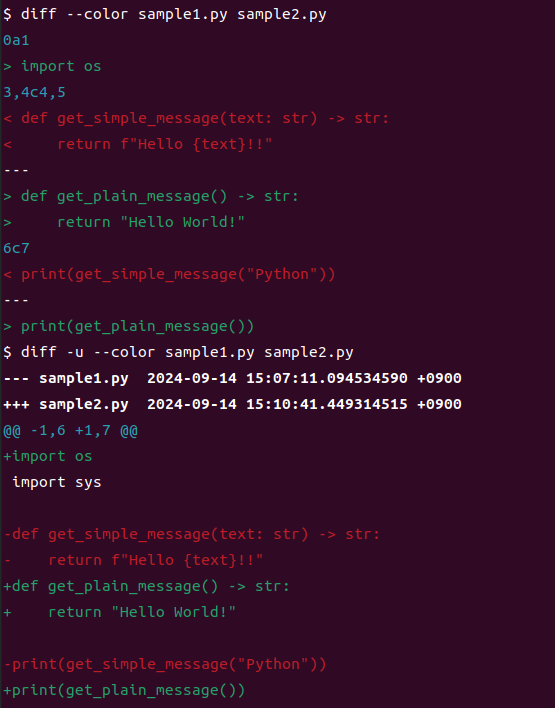
ちなみに、--colorオプションをつけることで後述のcolordiffに近い結果を得ることもできます。
$ diff --color sample1.py sample2.py
$ diff -u --color sample1.py sample2.py
colordiff
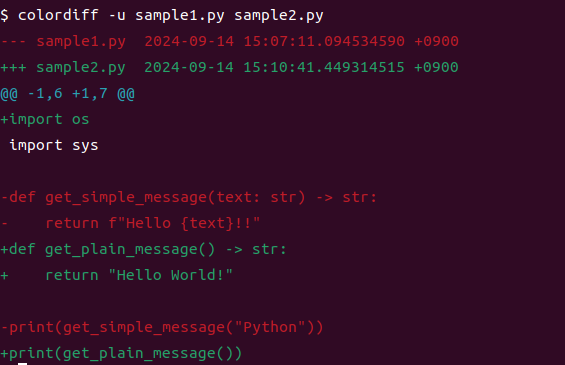
次はcolordiff。diffコマンドと出力は同じですが、色付きになります。
インストール。
$ sudo apt install colordiff
バージョン。
$ colordiff --version
diff (GNU diffutils) 3.8
Copyright (C) 2021 Free Software Foundation, Inc.
License GPLv3+: GNU GPL version 3 or later <https://gnu.org/licenses/gpl.html>.
This is free software: you are free to change and redistribute it.
There is NO WARRANTY, to the extent permitted by law.

作者 Paul Eggert、 Mike Haertel、 David Hayes、
Richard Stallman、および Len Tower。
結果。
$ colordiff sample1.py sample2.py
スクリーンショットにしないとわかりにくいですね。

ユニファイド形式。
$ colordiff -u sample1.py sample2.py
コンテキスト形式。
$ colordiff -c sample1.py sample2.py

sdiff
sdiffは、結果を横に並べて表示するコマンドです。
$ sdiff --version
sdiff (GNU diffutils) 3.8
Copyright (C) 2021 Free Software Foundation, Inc.
License GPLv3+: GNU GPL version 3 or later <https://gnu.org/licenses/gpl.html>.
This is free software: you are free to change and redistribute it.
There is NO WARRANTY, to the extent permitted by law.

作者 Thomas Lord。
結果。
$ sdiff sample1.py sample2.py
                                                              > import os
import sys                                                      import sys

def get_simple_message(text: str) -> str:                     | def get_plain_message() -> str:
    return f"Hello {text}!!"                                  |     return "Hello World!"

print(get_simple_message("Python"))                           | print(get_plain_message())
Difftastic
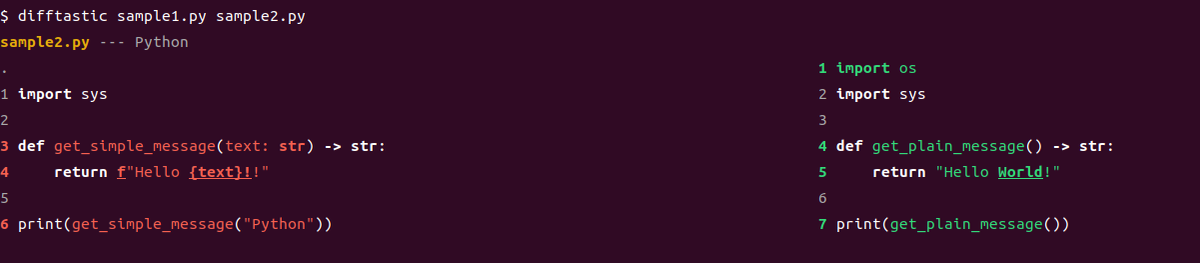
Difftastic。これは、構文にもとづいて差分比較を行うツールです。
インストール。snapを使います。
$ sudo snap install difftastic
バージョン。
$ difftastic --version
Difftastic 0.60.0 (1ac95534f 2024-07-30, built with rustc 1.65.0)
結果。
$ difftastic sample1.py sample2.py
sample2.py --- Python
.                                                                                          1 import os
1 import sys                                                                               2 import sys
2                                                                                          3
3 def get_simple_message(text: str) -> str:                                                4 def get_plain_message() -> str:
4     return f"Hello {text}!!"                                                             5     return "Hello World!"
5                                                                                          6
6 print(get_simple_message("Python"))                                                      7 print(get_plain_message())
色もついています。
対応している言語はこちらを参照。
Languages Supported - Difftastic Manual
Meld
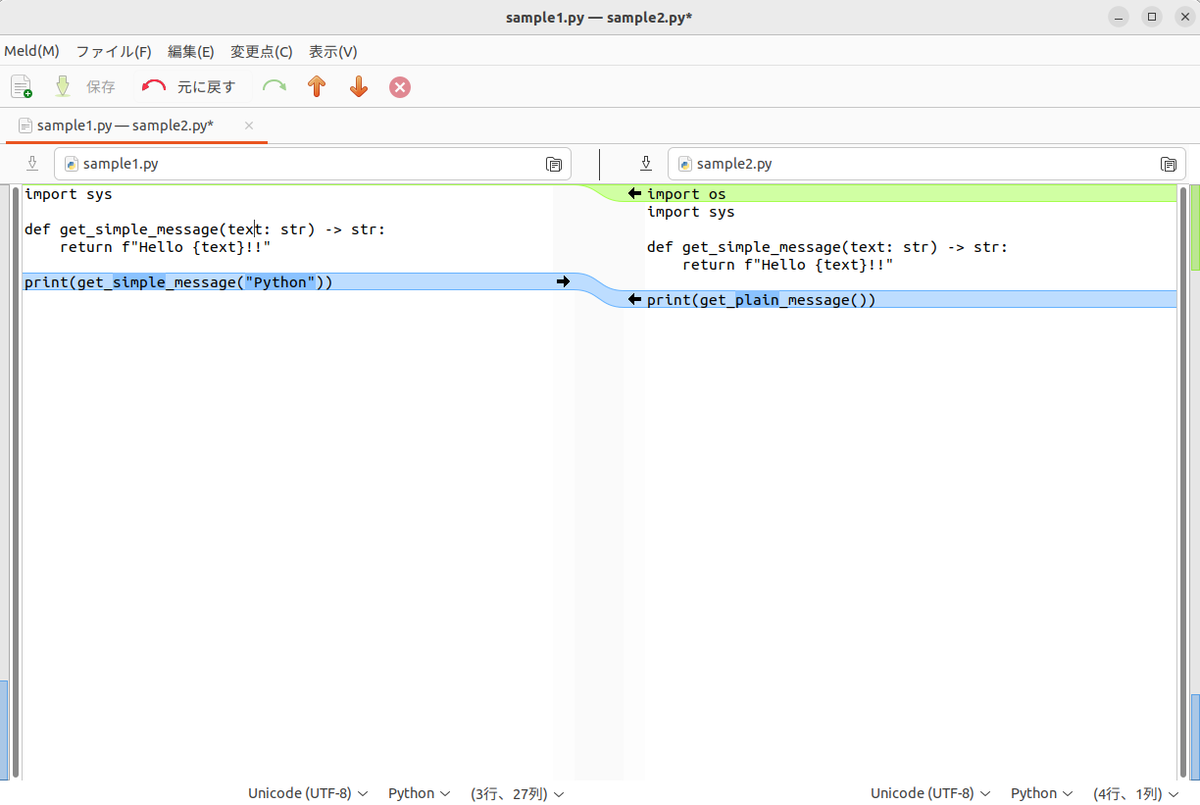
ここからはGUIツールです。Meldは、差分比較およびマージができるGUIツールです。
インストール。
$ sudo apt install meld
バージョン。
$ meld --version
meld 3.20.4
比較してみます。
$ meld sample1.py sample2.py &
結果。

内容をマージして保存することもできます。
KDiff3
KDiff3。
インストール。
$ sudo apt install kdiff3
バージョン。
$ kdiff3 --version
kdiff3 1.9.5 (64 bit)
比較。
$ kdiff3 sample1.py sample2.py &
結果。
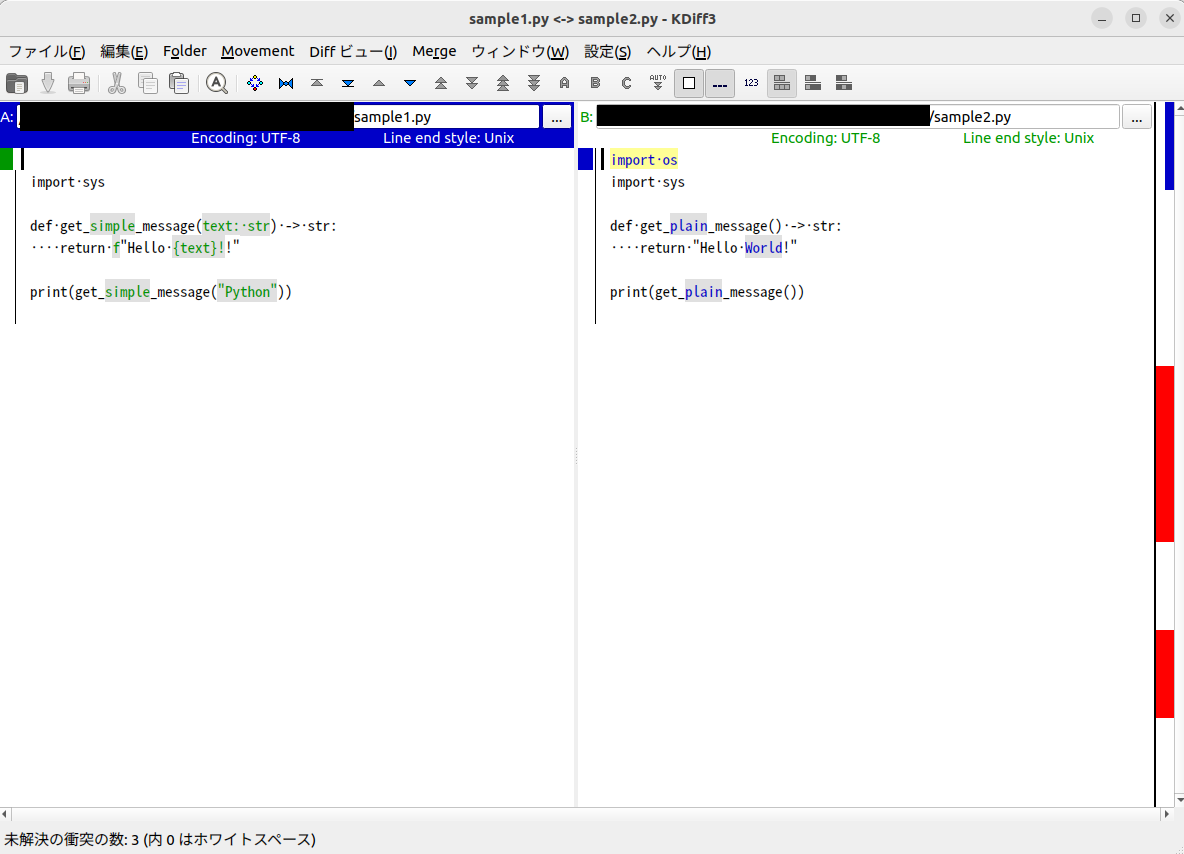
KDiff3もマージ操作ができます。
おわりに
Linuxでファイルの差分を見るツールをいろいろ確認してみました。
ふだんはdiffコマンドを使ってばかりなのですが、内容によっては他のものも使っていきたいと思います。特にソースコードを見る時はDifftastic、
GUIで見たい時はMeldあたりを知っておくと便利なのかなと。
