これは、なにをしたくて書いたもの?
Terraformのコードを書く時はIntelliJ IDEAのTerraform and HCL Pluginを使っていたのですが、Emacsに寄せようかなと思いまして。
LSPを使います。
terraform-mode+lsp-mode+terraform-ls
EmacsでLSPを使うにはlsp-modeです。
LSP Mode - Language Server Protocol support for Emacs - LSP Mode - LSP support for Emacs
EmacsでTerraformを扱うにはterraform-modeです。
GitHub - hcl-emacs/terraform-mode: Major mode of Terraform configuration file
ここにterraform-lsを組み合わせます。
Terraform (terraform-ls) - LSP Mode - LSP support for Emacs
GitHub - hashicorp/terraform-ls: Terraform Language Server
terraform-lsはHashiCorpがリリースしているTerraformのLanguage Serverです。
では、インストールしてみましょう。
環境
今回の環境はこちら。Emacsにlsp-modeとterraform-modeは導入済みとします。
$ emacs --version
GNU Emacs 27.1
Copyright (C) 2020 Free Software Foundation, Inc.
GNU Emacs comes with ABSOLUTELY NO WARRANTY.
You may redistribute copies of GNU Emacs
under the terms of the GNU General Public License.
For more information about these matters, see the file named COPYING.
Terraform。
$ terraform --version
Terraform v1.9.5
on linux_amd64
OSはUbuntu Linux 22.04 LTSです。
$ lsb_release -a
No LSB modules are available.
Distributor ID: Ubuntu
Description:    Ubuntu 22.04.4 LTS
Release:        22.04
Codename:       jammy


$ uname -srvmpio
Linux 5.15.0-119-generic #129-Ubuntu SMP Fri Aug 2 19:25:20 UTC 2024 x86_64 x86_64 x86_64 GNU/Linux
terraform-lsをインストールする
terraform-lsはHashiCorpの提供するaptリポジトリーからインストールできます。
aptリポジトリーを追加しましょう。
$ sudo apt update && sudo apt install gpg
$ wget -O- https://apt.releases.hashicorp.com/gpg | sudo gpg --dearmor -o /usr/share/keyrings/hashicorp-archive-keyring.gpg
$ gpg --no-default-keyring --keyring /usr/share/keyrings/hashicorp-archive-keyring.gpg --fingerprint
$ echo "deb [arch=$(dpkg --print-architecture) signed-by=/usr/share/keyrings/hashicorp-archive-keyring.gpg] https://apt.releases.hashicorp.com $(lsb_release -cs) main" | sudo tee /etc/apt/sources.list.d/hashicorp.list
$ sudo apt update
パッケージ情報の確認。
$ apt show terraform-ls
Package: terraform-ls
Version: 0.34.2-1
Priority: optional
Section:
Maintainer: HashiCorp
Installed-Size: 28.7 MB
Depends: openssl
Homepage: https://github.com/hashicorp/terraform-ls
Download-Size: 19.2 MB
APT-Sources: https://apt.releases.hashicorp.com jammy/main amd64 Packages
Description: Terraform Language Server

N: 追加レコードが 55 件あります。表示するには '-a' スイッチを付けてください。
インストール。
$ sudo apt install terraform-ls
バージョン。
$ terraform-ls version
0.34.2
platform: linux/amd64
go: go1.22.4
compiler: gc
あとはEmacsに設定します。
lsp-modeと補完に使うcompanyの設定はこんな感じにしています。
;; lsp-mode
(use-package lsp-mode
  :init
  ;; set prefix for lsp-command-keymap (few alternatives - "C-l", "C-c l")
  (setq lsp-keymap-prefix "C-c l")
  :commands lsp)
(setq gc-cons-threshold 100000000)
(setq read-process-output-max (* 1024 1024))
(setq lsp-completion-provider :capf)
(setq lsp-idle-delay 0.500)
(use-package lsp-ui :commands lsp-ui-mode)
(setq lsp-ui-imenu-enable t)
(setq lsp-headerline-breadcrumb-enable t)


;; company
(use-package company)
(add-hook 'after-init-hook 'global-company-mode)
(with-eval-after-load 'company
  (setq company-idle-delay 0)
  (setq company-auto-expand t)
  (setq company-minimum-prefix-length 1)
  (setq company-selection-wrap-around t)
  (setq completion-ignore-case t)
  (global-set-key (kbd "C-c <insert>") 'company-complete)
  (define-key company-active-map (kbd "C-n") 'company-select-next)
  (define-key company-active-map (kbd "C-p") 'company-select-previous)
  (define-key company-active-map (kbd "C-s") 'company-filter-candidates))
terraform-modeとlsp-modeの組み合わせはこんな感じで設定。
;; terraform
(use-package terraform-mode)
(add-to-list 'auto-mode-alist '("\.tf$" . terraform-mode))
(use-package lsp-mode
  :ensure t
  :commands (lsp lsp-deferred)
  :hook (terraform-mode . lsp-deferred))
確認。
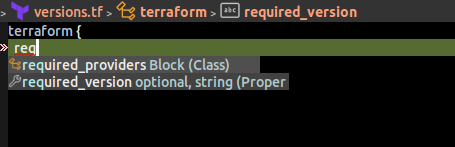
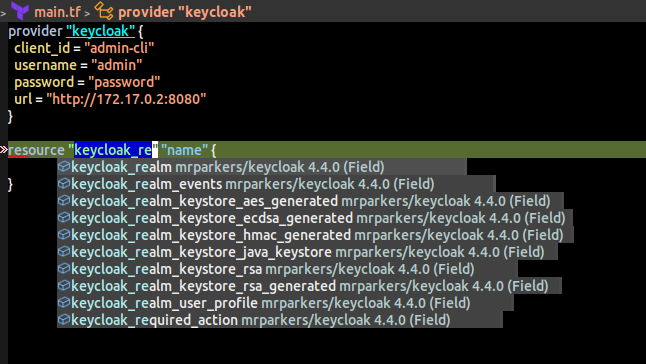
これで使えそうかなと思います。
