これは、なにをしたくて書いたもの?
こちらのエントリーを書いた時に、OpenAI APIにおける主要な概念をまとめてみました。
OpenAI Python APIライブラリーからllama-cpp-pythonで立てたOpenAI API互換のサーバーへアクセスしてみる - CLOVER🍀
このうち、トークンの数え方が気になるというか、tiktokenを使うと自分でも文字列をトークンとして数えられるようなので試しておこうかなと
思いまして。
トークン
あらためて、こちらを確認します。
トークンとは、以下の概念です。
- テキスト生成モデルおよび埋め込みにおける処理単位で、文字列が分解されたもの
- 1単語が1トークンになるわけではない
- Tokenizerで確認可能
- テキスト生成モデルの場合、プロンプトと出力がモデルの最大コンテキスト長を超えてはならない
- (トークンを出力しない)埋め込みの場合、入力はモデルの最大コンテキスト長より短くなくてはならない
- 各テキスト生成モデル、埋め込みの最大コンテキスト長はModelsで確認可能
各モデルを使ったAPIに対する、入出力の上限になるようです。
また、トークンはOpenAI APIの利用料金にも関わってくるので、この点でも気になるところですね。
それで文字列をトークンするとどうなるかは、Tokenizerで確認できるようです。

トークン化のプロセスは、モデルによって異なることが書かれています。といっても、Tokenizerのページを見るとGTP-3.5およびGTP-4では
同じもののようですね。
It's important to note that the exact tokenization process varies between models. Newer models like GPT-3.5 and GPT-4 use a different tokenizer than our legacy GPT-3 and Codex models, and will produce different tokens for the same input text.
一般的な英語のテキストでは、ひとつのトークンは最大4文字、単語の3/4に相当するそうです。100トークンであれば、約75単語という
ことみたいです。
A helpful rule of thumb is that one token generally corresponds to ~4 characters of text for common English text. This translates to roughly ¾ of a word (so 100 tokens ~= 75 words).
トークン化のプログラムを作成したい場合は、tiktokenを使えばよいことがその後に書かれています。
If you need a programmatic interface for tokenizing text, check out our tiktoken package for Python. For JavaScript, the community-supported @dbdq/tiktoken package works with most GPT models.
いくつか試してみましょう。
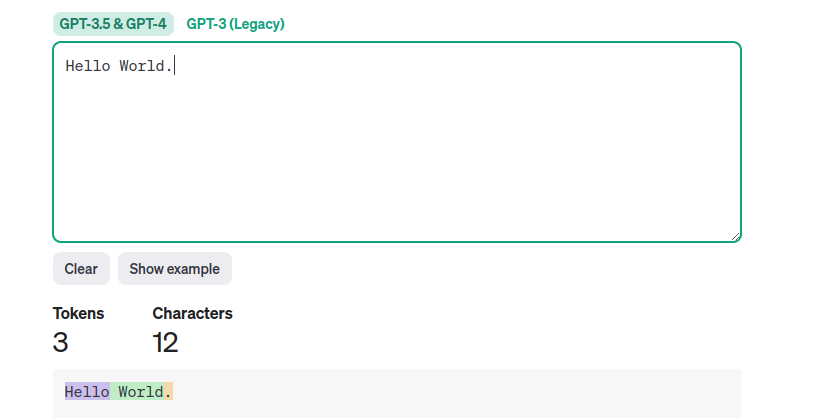

日本語だと、分割位置が微妙なこともあるようですね。
また、トークンのidも確認できるようです。
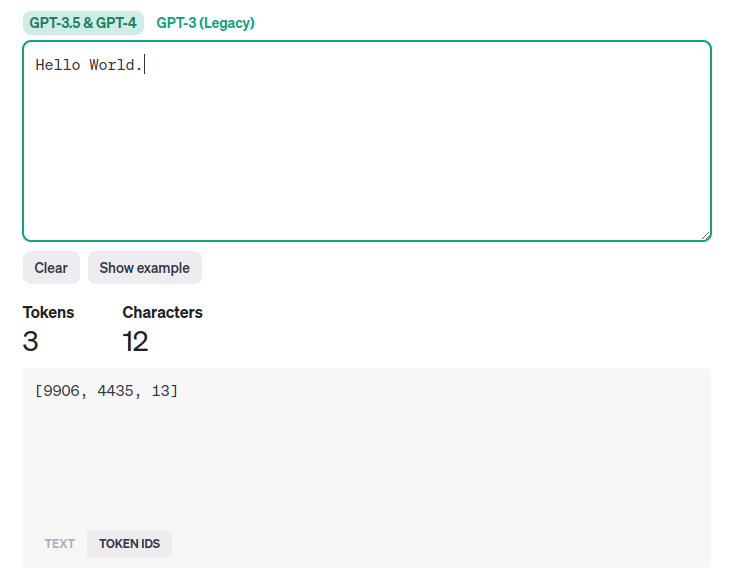
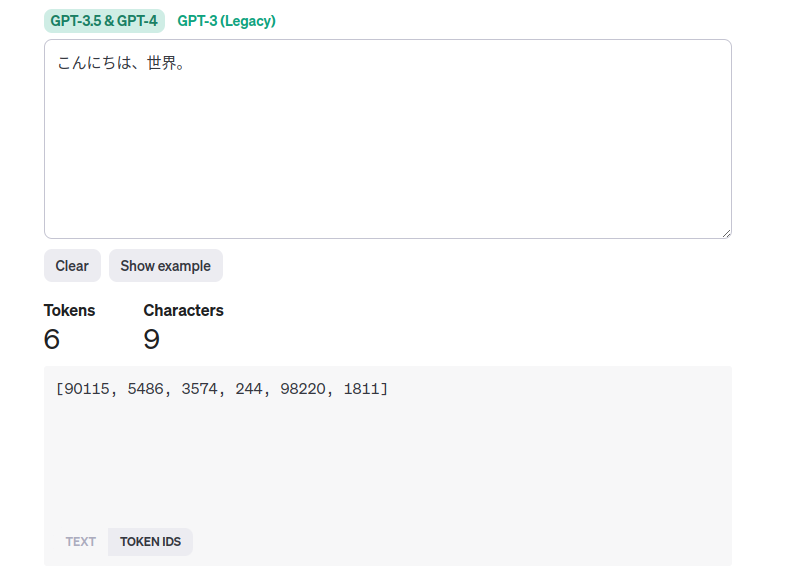
この時点では、idの意味はわかってないのですが。
少し長めの文章として、このページの最初のセクションを丸ごと貼ってみましょう。その後に、Google翻訳で日本語化したものも
トークン化してみます。
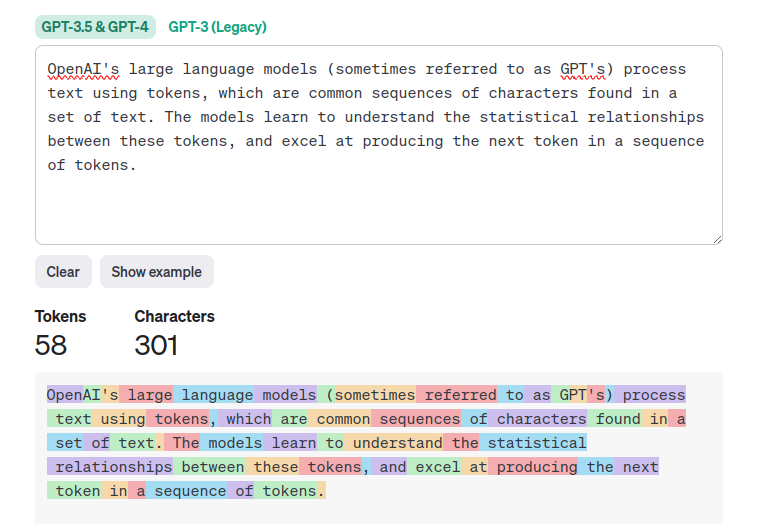

日本語はトークン数が多くなる傾向にあるようです。文字数と見比べると、逆転していますね。
tiktoken
続いて、tiktokenについて。GitHubリポジトリーはこちら。
GitHub - openai/tiktoken: tiktoken is a fast BPE tokeniser for use with OpenAI's models.
現在のバージョンは0.5.2です。
tiktokenは、OpenAIのモデルで使用するBPEトークナイザーとされています。
tiktoken is a fast BPE tokeniser for use with OpenAI's models.
Pythonで実装されていますが、pipでインストールできるのはオープンソースのバージョンだそうです。
The open source version of tiktoken can be installed from PyPI:
オープンソースのバージョン以外に、どういうものがあるのかはわかりませんが。
ソースコード例は、こちら。
https://github.com/openai/openai-cookbook/blob/main/examples/How_to_count_tokens_with_tiktoken.ipynb
この中には、tiktoken以外のトークン化のライブラリーについてのリンクも掲載されています。
BPEトークナイザーがどういうものかは、こちらに書かれています。
tiktoken / What is BPE anyway?
BPEはByte pair encodingの略で、テキストをトークンに変換するものです。以下の性質を持ちます。
- 可逆かつロスレスなので、トークンを元のテキストに変換できる
- トークナイザーのトレーニングデータにない、任意のテキストに対して動作する
- テキストは圧縮され、トークンシーケンスは元のテキストに対応するバイトよりも短くなる。平均して、ひとつのトークンは約4バイトになる
- モデルに共通のサブワードを認識させようとする。たとえば、「ing」は英語で一般的なサブワードであるため、BPEでは多くの場合「encoding」を「encod」と「ing」(「enc」と「oding」などではなく)のようなトークンに分割される。これは、モデルが文法を理解するための助けになる
エンコーディングとモデル
tiktokenでテキストをトークンに変換する(エンコードする)際に、どのモデルがどのエンコーディングに対応するかは
サンプルのページに書かれています。
https://github.com/openai/openai-cookbook/blob/main/examples/How_to_count_tokens_with_tiktoken.ipynb
| エンコーディング名 | モデル名 |
|---|---|
| cl100k_base | gpt-4、gpt-3.5-turbo、text-embedding-ada-002 |
| p50k_base | Codex models、text-davinci-002、text-davinci-003 |
| r50k_base または gpt2 | davinciのようなGPT-3モデル |
このあたりのマッピングは、こちらに書かれていそうです。
https://github.com/openai/tiktoken/blob/0.5.2/tiktoken/model.py#L7-L64
見ていくのはこれくらいにして、簡単に使ってみましょう。
環境
今回の環境はこちら。
$ python3 -V
Python 3.10.12


$ pip3 -V
pip 22.0.2 from /usr/lib/python3/dist-packages/pip (python 3.10)
tiktokenを使ってみる
まずはtiktokenをインストール。
$ pip3 install tiktoken
バージョン。
$ pip3 freeze | grep tiktoken
tiktoken==0.5.2
簡単なサンプルを書いてみます。入力する文字列は、Tokenizerで試したものと同じものにしましょう。
token_sample.py
import tiktoken

encoding = tiktoken.encoding_for_model("gpt-3.5-turbo")

result = encoding.encode("Hello World.")
print(f"input text = Hello World., tokenize result = {result}, token length = {len(result)}")

result = encoding.encode("こんにちは、世界。")
print(f"input text = こんにちは、世界。, tokenize result = {result}, token length = {len(result)}")
モデルを指定して、エンコーディング(Encoding)を取得します。
encoding = tiktoken.encoding_for_model("gpt-3.5-turbo")
あとは文字列を与えてEncoding#encodeメソッドを呼び出し、トークン化します。
result = encoding.encode("Hello World.")
実行してみます。
$ python3 token_sample.py
input text = Hello World., tokenize result = [9906, 4435, 13], token length = 3
input text = こんにちは、世界。, tokenize result = [90115, 5486, 3574, 244, 98220, 1811], token length = 6
トークン化した結果は、Tokenizerでトークンのidで確認した時の値と同じになりましたね。
つまり、トークンというのはこのid(整数)のことを指していることがわかります。
またトークンが含まれたリストの長さはトークン化した時の値と一致しているので、テキストをトークンに変換した時のトークン数は
この数に着目すればよいこともわかりました。
ドキュメントによれば、トークン化したものは元の文字列に戻せるという話でした。これにはEncoding#decodeを使います。
先ほどのプログラムを少し修正。
token_sample.py
import tiktoken

encoding = tiktoken.encoding_for_model("gpt-3.5-turbo")

result = encoding.encode("Hello World.")
print(f"input text = Hello World., tokenize result = {result}, token length = {len(result)}")

decoded = encoding.decode(result)
print(f"decoded = {decoded}")


result = encoding.encode("こんにちは、世界。")
print(f"input text = こんにちは、世界。, tokenize result = {result}, token length = {len(result)}")

decoded = encoding.decode(result)
print(f"decoded = {decoded}")
確認。
$ python3 token_sample.py
input text = Hello World., tokenize result = [9906, 4435, 13], token length = 3
decoded = Hello World.
input text = こんにちは、世界。, tokenize result = [90115, 5486, 3574, 244, 98220, 1811], token length = 6
decoded = こんにちは、世界。
確かに、トークン化した結果から元の文字列に戻せましたね。
シングルトークンをデコードする場合は、Encoding#decode_single_token_bytesを使うのが良いらしいです。Encoding#decodeの方は、
UTF-8境界上にないトークンに対しては損失が大きいそうです。
ちなみに、この時に使っているエンコーディング名はこちらです。
print(f"encoding name = {encoding.name}")
encoding name = cl100k_base
エンコーディング名を指定して使うこともできます。この場合は、tiktoken#get_encodingを使います。
token_sample2.py
import tiktoken

encoding = tiktoken.get_encoding("cl100k_base")

result = encoding.encode("Hello World.")
print(f"input text = Hello World., tokenize result = {result}, token length = {len(result)}")

decoded = encoding.decode(result)
print(f"decoded = {decoded}")


result = encoding.encode("こんにちは、世界。")
print(f"input text = こんにちは、世界。, tokenize result = {result}, token length = {len(result)}")

decoded = encoding.decode(result)
print(f"decoded = {decoded}")

print(f"encoding name = {encoding.name}")
結果。
$ python3 token_sample2.py
input text = Hello World., tokenize result = [9906, 4435, 13], token length = 3
decoded = Hello World.
input text = こんにちは、世界。, tokenize result = [90115, 5486, 3574, 244, 98220, 1811], token length = 6
decoded = こんにちは、世界。
encoding name = cl100k_base
あとは他のエンコーディングとの差異など、簡単にテストで確認してみましょう。
pytestをインストール。
$ pip3 install pytest
バージョン。
$ pip3 freeze | grep pytest
pytest==7.4.3
テストはこんな感じにしました。テストしている内容(というか確認している内容)は、コメントを参照してください。
test_tiktoken.py
import tiktoken

# GPT-3.5-turboとGPT-4が同じエンコーディングになることを確認
def test_gpt35_gpt4_encoding_equals():
    assert tiktoken.encoding_for_model("gpt-3.5-turbo") == tiktoken.encoding_for_model("gpt-4")
    assert tiktoken.encoding_for_model("gpt-4").name == "cl100k_base"

# GPT-3.5-turboとGPT-4が同じエンコーディング結果にtなることを確認
def test_gpt35_gpt4_encoding_result_equals():
    encoding_for_gtp35turbo  = tiktoken.encoding_for_model("gpt-3.5-turbo")
    encoding_for_gtp4 = tiktoken.encoding_for_model("gpt-4")

    for text in ["Hello World.", "こんにちは、世界。"]:
        assert encoding_for_gtp35turbo.encode(text) == encoding_for_gtp4.encode(text)

# エンコーディングごとの差異を確認
def test_each_encodings():
    cl100k_base_encoding = tiktoken.get_encoding("cl100k_base")
    assert cl100k_base_encoding.encode("Hello World.") == [9906, 4435, 13]
    assert cl100k_base_encoding.encode("こんにちは、世界。") == [90115, 5486, 3574, 244, 98220, 1811]

    p50k_base_encoding = tiktoken.get_encoding("p50k_base")
    assert p50k_base_encoding.encode("Hello World.") == [15496, 2159, 13]
    assert p50k_base_encoding.encode("こんにちは、世界。") == [46036, 22174, 28618, 2515, 94, 31676, 23513, 10310, 244, 45911, 234, 16764]

    r50k_base_encoding = tiktoken.get_encoding("r50k_base")
    assert r50k_base_encoding.encode("Hello World.") == [15496, 2159, 13]
    assert r50k_base_encoding.encode("こんにちは、世界。") == [46036, 22174, 28618, 2515, 94, 31676, 23513, 10310, 244, 45911, 234, 16764]
気になってエンコーディングごとの差異も見てみましたが、cl100k_baseとそれ以外で動作に差がありますね。
今回の入力範囲では、p50k_baseとr50k_baseの間の差はわかりませんでした。
もっとも、通常使うのはcl100k_baseの方な気がしますが。
今回は、こんなところでしょう。
おわりに
tiktokenを使って、テキストをトークンに変換してみました。
ドキュメントなどを見ているとざっくり「テキストをトークンにする」といった感じであまり実体がわからない印象でしたが、
こうやってプログラムで動かしてみるとなんとなくわかってきたかな、という気がします。
