実装で試したことを書いていきます。
今回は前処理の部分をいろいろ試していきます。
今回サンプルで使ったカードです。適当にあったカードを使用

前処理
- ガウシアンフィルタ( ぼかす処理 )
- ネガポジ + グレースケール + ニ値化
- グレースケール + ニ値化
調べるといろいろなやり方があるので、確認しながら認識率がいいやり方を探っていきます。
確認方法はmatplotlib.pyplotを使って確認していきます。
import matplotlib.pyplot as plt

plt.imshow(img)
plt.show()
グレースケール + ガウシアンフィルタ( ぼかす処理 ) + Canny法
import cv2
import numpy as np
import matplotlib.pyplot as plt

def find_card_pattern1(image):
    img_HSV = cv2.cvtColor(image, cv2.COLOR_BGR2GRAY)

    # Gaussian Blur
    img_blur = cv2.GaussianBlur(img_HSV, (5, 5), 0)

    # Canny
    img_canny = cv2.Canny(imgBlur, 100, 200)

    # find
    contours, hierarchy = cv2.findContours(img_canny, cv2.RETR_TREE, cv2.CHAIN_APPROX_SIMPLE)

    plt.imshow(cv2.cvtColor(img_canny, cv2.COLOR_BGR2RGB))
    plt.show()


img = cv2.imread("sample.jpg")
find_card_pattern1( img )
ガウシアンフィルタ

Canny法

抽出した輪郭を元の画像に上書き

ネガポジ + グレースケール + ニ値化
import cv2
import numpy as np
import matplotlib.pyplot as plt

def find_card_pattern2(image):
    img_gray = cv2.cvtColor(image, cv2.COLOR_BGR2GRAY)

    # ネガポジ
    img_bitwise = cv2.bitwise_not(img_gray)  # 白黒の反転
    plt.imshow(img_bitwise)
    plt.show()

    # ニ値化
    _thre, img_threshold = cv2.threshold(img_bitwise, 100, 255, cv2.THRESH_BINARY | cv2.THRESH_OTSU)
    plt.imshow(img_threshold)
    plt.show()

    contours, hierarchy = cv2.findContours(img_threshold, cv2.RETR_TREE, cv2.CHAIN_APPROX_SIMPLE)
    return contours, hierarchy


img = cv2.imread("sample.jpg")
find_card_pattern2( img )
ネガポジ

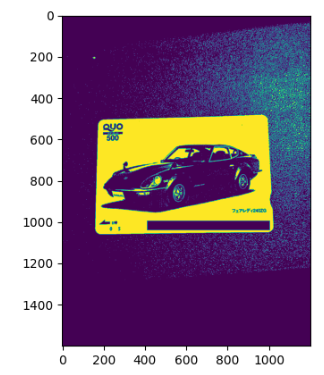
ニ値化

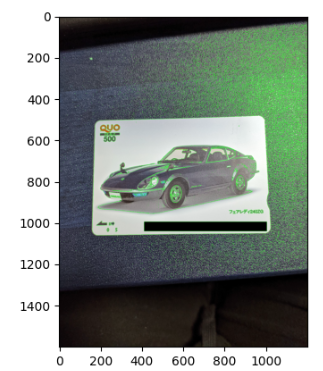
抽出した輪郭を元の画像に上書き

グレースケール + ニ値化
ニ値化の閾値を動的に算出する処理をいれている人がいたので、参考に作成
import cv2
import numpy as np
import matplotlib.pyplot as plt

def find_card_pattern3(image):
    img_gray = cv2.cvtColor(image, cv2.COLOR_BGR2GRAY)

    # 閾値を同的に取得
    threshold = luminance_threshold(img_gray)

    # 二値化
    _, binarized = cv2.threshold(img_gray, threshold, 255, cv2.THRESH_BINARY)

    # find
    contours, hierarchy = cv2.findContours(binarized, cv2.RETR_TREE, cv2.CHAIN_APPROX_SIMPLE)
    return contours, hierarchy


img = cv2.imread("sample.jpg")
find_card_pattern3( img )
ニ値化
抽出した輪郭を元の画像に上書き
参考
まとめ
方法はいろいろとありますが、違いがでることがわかります。
背景がよくないのかノイズが多い認識になることが多いですね。
輪郭を抽出するのみだとノイズが多いことがわかりますね。ちゃんとカードの部分のみ抽出できるようにもう少し処理の追加が必要になりますね。
一つずつ必要な内容がわかってくるので確認しながら作るといいですね。
