この記事でのバージョン
Unity 2022.2.2f1
はじめに
今回は以下のような警告とエラーが出た場合の原因と対処法の紹介です!
 |
[Warning] [07:20:51] Non-secure network connections disabled in Player Settings
[Error] [07:20:51] Job failed with exception: System.Reflection.TargetInvocationException: Exception has been thrown by the target of an invocation. ---> System.InvalidOperationException: Insecure connection not allowed
at (wrapper managed-to-native) UnityEngine.Networking.UnityWebRequest.BeginWebRequest(UnityEngine.Networking.UnityWebRequest)
at UnityEngine.Networking.UnityWebRequest.SendWebRequest () [0x00001] in /Users/bokken/build/output/unity/unity/Modules/UnityWebRequest/Public/UnityWebRequest.bindings.c
原因と対処法
原因は警告にもある通り非セキュアなネットワーク接続(httpでの接続)が行われている事です。
自分の場合はAdmob実装時に導入したExternal Dependency Managerのレポートが原因でした。
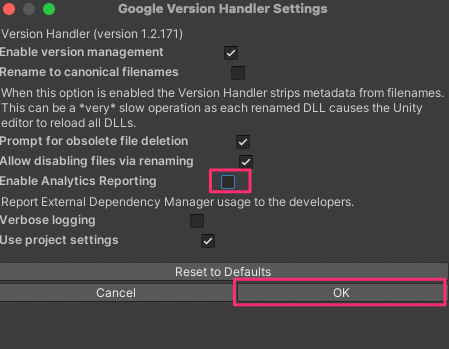
なので、Assets/External Dependency Manager/Version Handler/Settingsから
 |
Enable Analytics Reportingをオフにし、OKを押すと警告もエラーも出なくなりました。
 |
ただ厄介な事に、この設定を保存している
GvhProjectSettings.xmlが勝手に更新される(元に戻る)というバグがあったため、
仕方なくEdit/Project Settings…にある

Allowed downloads over HTTP*をAllowed in development buildsにして、
エディタや開発ビルドではhttpでの接続を許可して対処しました。
(Vesion Handlerなのでエディタ上だけ機能すれば問題ないはず)
 |
