この記事でのバージョン
Unity 2022.3.32f1
はじめに
Unityでゲームを作ってる際に、
「ビルド時に特定のオブジェクトだけ消したい」
「ビルド時にシーンのオブジェクトやコンポーネントをチェックしたい」
というようにビルド時にシーンに対して何か処理を行いたいみたいな事があります。
今回はそんなときに使える、IProcessSceneWithReportのOnProcessSceneの紹介です!
ビルド時にシーンに対して処理を行う
早速、IProcessSceneWithReportの使い方ですが、以下のようにIProcessSceneWithReportを継承し、
callbackOrderとOnProcessSceneを実装するだけでOK。
using UnityEditor.Build;
using UnityEditor.Build.Reporting;
using UnityEngine;
using UnityEngine.SceneManagement;


//IProcessSceneWithReportを継承したサンプルクラス
public class ProcessSceneSample : IProcessSceneWithReport {

  //呼ばれる順番を指定 (小さいほど先に呼ばれる)
  public int callbackOrder => 0;

  //シーンがビルド対象として処理されるときに呼び出される
  public void OnProcessScene(Scene scene, BuildReport report) {
    Debug.Log($"{scene.name}の処理開始");

    //シーンのルートオブジェクト(一番親のオブジェクト)を全て取得
    var rootObjs = scene.GetRootGameObjects();
    Debug.Log($"ルートのオブジェクトの数: {rootObjs.Length}");

    //BuildReportからビルドの情報を参照することも可能
    if (report != null){
      Debug.Log($"ビルドターゲット : {report.summary.platform}, ビルド結果: {report.summary.result}");
    }
  }
}
これをEditorフォルダに入れれば、
 |
ビルド時、ビルドに登録した各シーンごとに処理が実行されます。
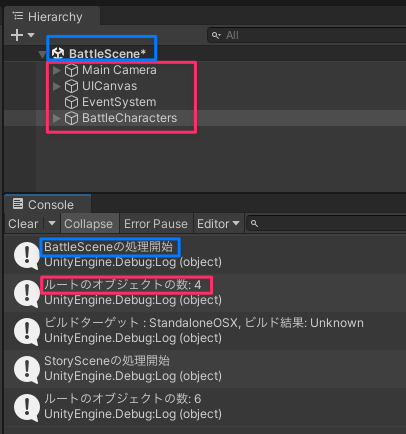 |
