現象
ほぼタイトルで言い切っているけど。spring-batchでメタデータ保存でDBを使わなないようインメモリに格納するMapJobRepositoryFactoryBeanを使う場合が稀に良くある。この状況下で大量のstepを含むjobを実行すると徐々に実行速度が低下していく、という現象に遭遇した。
再現
大量のstepを手軽に再現するため、以下のように無限ループでstepを実行し続ける。つまりJobExecutionDeciderが常に同一値を返し、同一のstepに遷移する。こんな感じ。
 <parent>
        <groupId>org.springframework.boot</groupId>
        <artifactId>spring-boot-starter-parent</artifactId>
        <version>2.1.1.RELEASE</version>
        <relativePath />
    </parent>

    <properties>
        <project.build.sourceEncoding>UTF-8</project.build.sourceEncoding>
        <project.reporting.outputEncoding>UTF-8</project.reporting.outputEncoding>
        <java.version>11</java.version>
    </properties>

    <dependencies>
        <dependency>
            <groupId>org.springframework.boot</groupId>
            <artifactId>spring-boot-starter-batch</artifactId>
        </dependency>
        <dependency>
            <groupId>org.springframework.boot</groupId>
            <artifactId>spring-boot-starter-jdbc</artifactId>
        </dependency>

        <dependency>
            <groupId>com.h2database</groupId>
            <artifactId>h2</artifactId>
        </dependency>

        <dependency>
            <groupId>org.springframework.boot</groupId>
            <artifactId>spring-boot-starter-test</artifactId>
            <scope>test</scope>
        </dependency>
    </dependencies>
package kagamihoge.springbatchslowdown;

import org.springframework.batch.core.Job;
import org.springframework.batch.core.JobExecution;
import org.springframework.batch.core.Step;
import org.springframework.batch.core.StepExecution;
import org.springframework.batch.core.configuration.BatchConfigurationException;
import org.springframework.batch.core.configuration.annotation.DefaultBatchConfigurer;
import org.springframework.batch.core.configuration.annotation.EnableBatchProcessing;
import org.springframework.batch.core.configuration.annotation.JobBuilderFactory;
import org.springframework.batch.core.configuration.annotation.StepBuilderFactory;
import org.springframework.batch.core.explore.JobExplorer;
import org.springframework.batch.core.explore.support.MapJobExplorerFactoryBean;
import org.springframework.batch.core.job.flow.FlowExecutionStatus;
import org.springframework.batch.core.job.flow.JobExecutionDecider;
import org.springframework.batch.core.launch.JobLauncher;
import org.springframework.batch.core.launch.support.RunIdIncrementer;
import org.springframework.batch.core.launch.support.SimpleJobLauncher;
import org.springframework.batch.core.repository.JobRepository;
import org.springframework.batch.core.repository.support.MapJobRepositoryFactoryBean;
import org.springframework.batch.repeat.RepeatStatus;
import org.springframework.beans.factory.annotation.Qualifier;
import org.springframework.context.annotation.Bean;
import org.springframework.context.annotation.Configuration;

@Configuration
@EnableBatchProcessing
public class BatchConfiguration {

    @Bean
    public Job job(JobBuilderFactory jobs, @Qualifier("s1") Step s1, JobExecutionDecider decider) {
        return jobs
                .get("myJob")
                .incrementer(new RunIdIncrementer())
                .start(s1)
                .next(decider)
                  .on("CONTINUE").to(s1)
                 .end()
                .build();
    }

    @Bean(name = "s1")
    public Step step1(StepBuilderFactory steps) {
        return steps.get("step1").tasklet((stepContribution, chunkContext) -> {
            return RepeatStatus.FINISHED;
        }).build();
    }

    @Bean
    public JobExecutionDecider decider() {
        return new JobExecutionDecider() {
            @Override
            public FlowExecutionStatus decide(JobExecution jobExecution, StepExecution stepExecution) {
                return new FlowExecutionStatus("CONTINUE");
            }
        };
    }

    @Bean
    DefaultBatchConfigurer batchConfigurer() {
        return new DefaultBatchConfigurer() {
            private final JobRepository jobRepository;
            private final JobExplorer jobExplorer;
            private final JobLauncher jobLauncher;

            {
                MapJobRepositoryFactoryBean jobRepositoryFactory = new MapJobRepositoryFactoryBean();
                try {
                    this.jobRepository = jobRepositoryFactory.getObject();
                    MapJobExplorerFactoryBean jobExplorerFactory = new MapJobExplorerFactoryBean(jobRepositoryFactory);
                    this.jobExplorer = jobExplorerFactory.getObject();
                    SimpleJobLauncher jobLauncher = new SimpleJobLauncher();
                    jobLauncher.setJobRepository(jobRepository);
                    jobLauncher.afterPropertiesSet();
                    this.jobLauncher = jobLauncher;
                } catch (Exception e) {
                    throw new BatchConfigurationException(e);
                }
            }

            @Override
            public JobRepository getJobRepository() {
                return jobRepository;
            }

            @Override
            public JobExplorer getJobExplorer() {
                return jobExplorer;
            }

            @Override
            public JobLauncher getJobLauncher() {
                return jobLauncher;
            }
        };
    }
}
実行時の様子
以下にjvisualvmのキャプチャを示す。
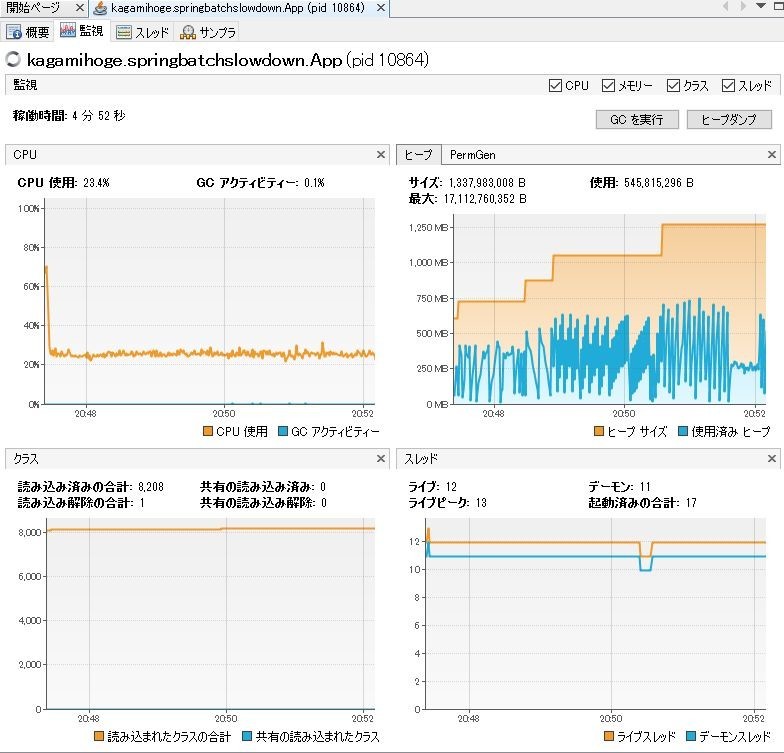
上記はだいたい5分くらい実行したところだが、ヒープサイズがどんどん膨らんでいく。使用済みヒープも徐々に増えてはいるようだが、どうも急激に増えて減ってを繰り返している、ように見える。
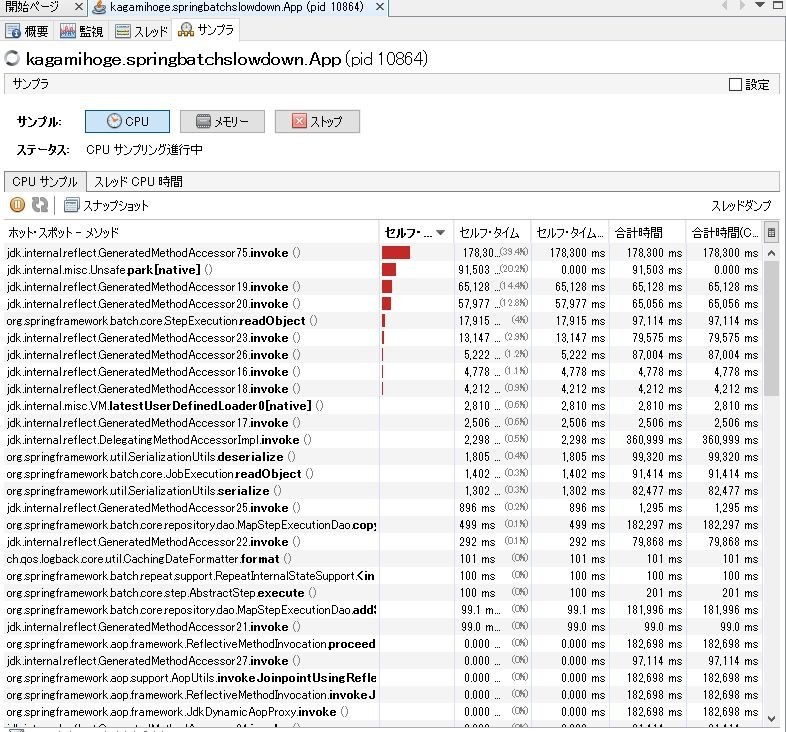
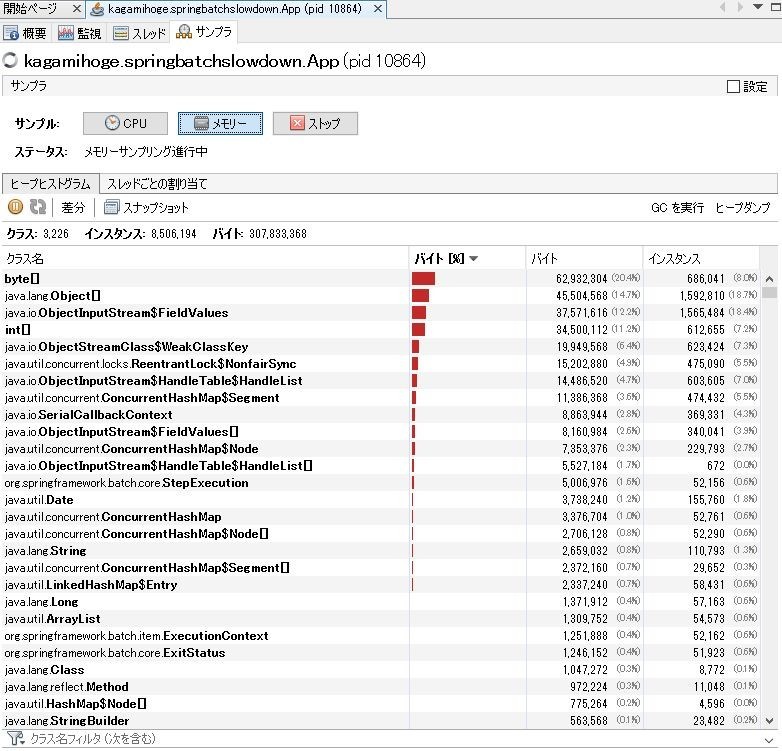
サンプラを見るとbyte[]が多数を占め、CPUを見るとリフレクションが実行時間のうち大半を占めている。
怪しそうなのは、上位にあるStepExecutionObjectとかConcurrentHashMapとか、シリアライズ関連のObjectInputStreamとからへん。なので原因調べるときはその辺から調べていった。
原因
概要
MapJobRepositoryFactoryBeanはjob-executionの格納にMapJobExecutionDaoを使用する。これは内部的にはConcurrentHashMap<Long, JobExecution>()で保存し、また、job-executionに関連付くstep-executionのコレクションを保持している。次に、そのマップ保存時にオリジナルのJobExecutionをコピーするが、その実装がシリアライズandデシリアライズになっている。
詳細
MapJobExecutionDaoは以下のようなプロパティがあり、ここでjobExecution idとJobExecutionのマップを持っている。また、JobExecutionはstep-executionを保持するstepExecutionsのコレクションがある。
public class MapJobExecutionDao implements JobExecutionDao {
    private final ConcurrentMap<Long, JobExecution> executionsById = new ConcurrentHashMap<Long, JobExecution>();
@SuppressWarnings("serial")
public class JobExecution extends Entity {
        ....
    private volatile Collection<StepExecution> stepExecutions = Collections.synchronizedSet(new LinkedHashSet<>());
step実行時は以下のMapStepExecutionDaoがstep-executionの追加処理を行う。以下のように、job-exectuion -> step-executionのコレクションに追加する。なのでstepを大量に実行すれば無限にstep-executionが追加されていく。
public class MapStepExecutionDao implements StepExecutionDao {
        ...
    @Override
    public void updateStepExecution(StepExecution stepExecution) {
Map<Long, StepExecution> executions = executionsByJobExecutionId.get(stepExecution.getJobExecutionId());
         ....
         executions.put(stepExecution.getId(), copy);
ヒープサイズが拡大する点についてはこれで一応説明がつく。
次に、スローダウンの原因について。
MapJobExecutionDaoに話は戻るが、マップ保存の際にJobExecutionインスタンスをコピーする。で、コピーは以下のようにシリアライズ -> デシリアライズで実装している。
   private static JobExecution copy(JobExecution original) {
        JobExecution copy = (JobExecution) SerializationUtils.deserialize(SerializationUtils.serialize(original));
        return copy;
    }
前述のようにstep-executionコレクションはどんどんデカくなっていくので、当然、そのマップをシリアライズ -> デシリアライズする処理もどんどん遅くなっていく。この挙動は徐々にスローダウンする事象と一致する。クッソでかいコレクションをシリアライズ -> デシリアライズするのでゴミもクッソでかくなる。使用済みヒープが急激に増えては減ってはを繰り返すのはこの辺にある、と推測される。
対策
インメモリDBにメタデータを保存させる。
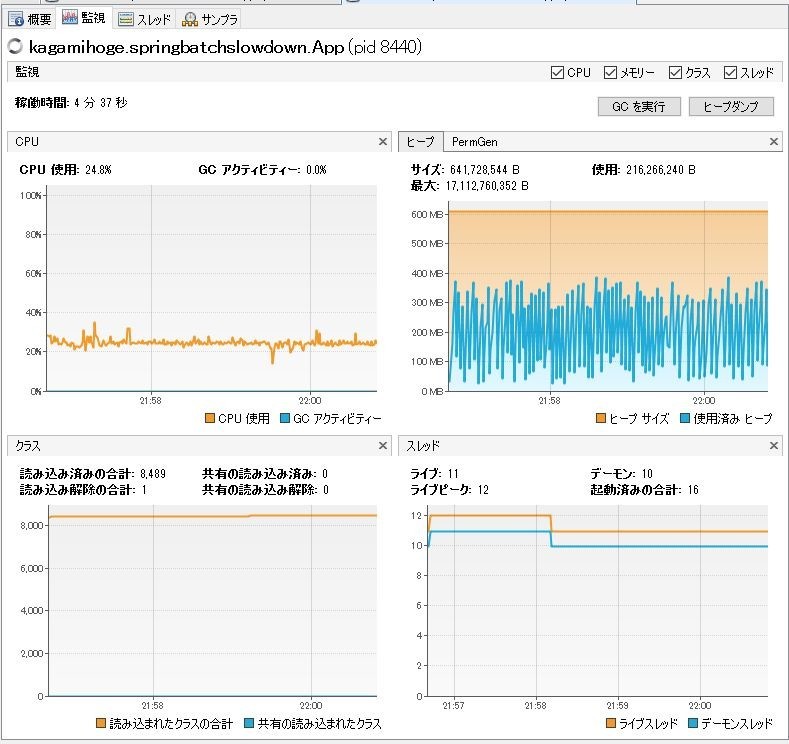
H2でやってみたがスローダウンはしなかった。もっと長時間起動し続けたらどうなるか分からんけど、そんなにもstep大量に実行するような状況とは最早別問題であろう。
