ほどなくライトアップの旅に統合します。情けないライトアップですが、わたくしの試行錯誤をお楽しみください。
forensics
Ph4nt0m 1ntrud3r
A digital ghost has breached my defenses, and my sensitive data has been stolen! 😱💻 Your mission is to uncover how this phantom intruder infiltrated my system and retrieve the hidden flag.
To solve this challenge, you'll need to analyze the provided PCAP file and track down the attack method. The attacker has cleverly concealed his moves in well timely manner. Dive into the network traffic, apply the right filters and show off your forensic prowess and unmask the digital intruder!
Find the PCAP file here Network Traffic PCAP file and try to get the flag.
ということで、PCAPファイルを渡されて解析するようだ。
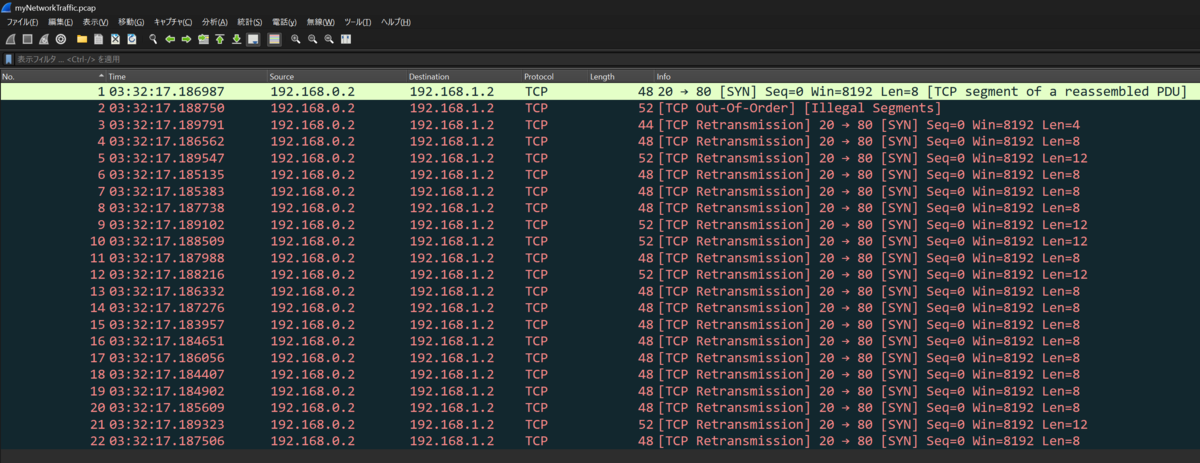
12バイトや8バイトの文字列をやり取りしている。文字列を見ると末尾が=で終わっている。これはbase64ですわな。というわけで、cyberchefに投げる。
そうすると、12バイトの方が可読可能な文字列になった。
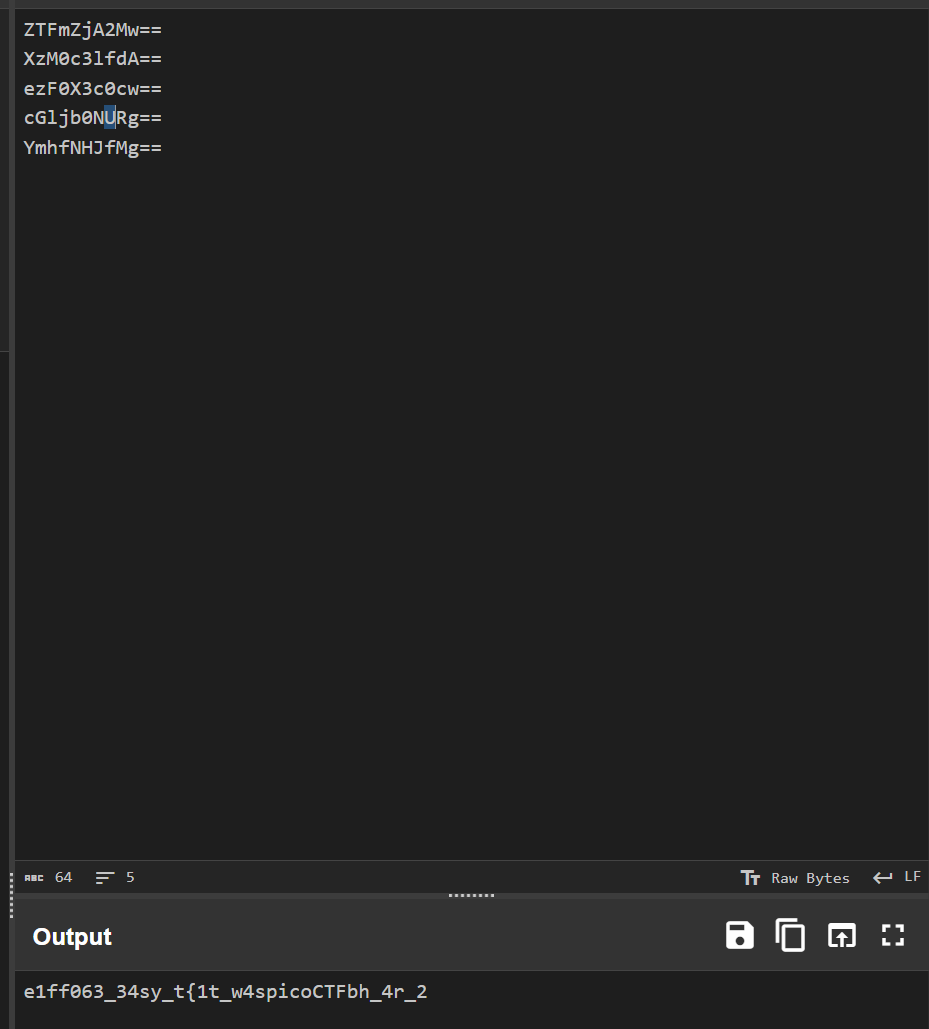
しかし、順番がよくわからない。
ここで、ヒントを確認した。時系列が大切だと書いてある。よって、時間でソートしてみる。
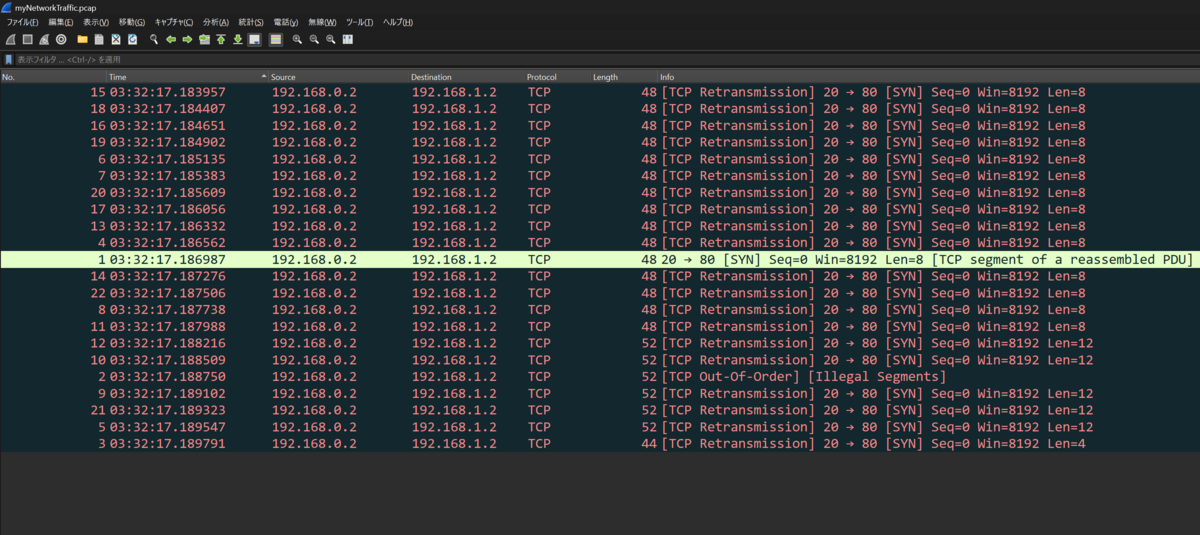
番号と時系列は違うのを知りました。これで12バイトの塊が時系列の最後らへんに集まった。そこをcyberchefに投げたらflagゲット。終了。
Event-Viewing
One of the employees at your company has their computer infected by malware! Turns out every time they try to switch on the computer, it shuts down right after they log in. The story given by the employee is as follows:
They installed software using an installer they downloaded online
They ran the installed software but it seemed to do nothing
Now every time they bootup and login to their computer, a black command prompt screen quickly opens and closes and their computer shuts down instantly.
See if you can find evidence for the each of these events and retrieve the flag (split into 3 pieces) from the correct logs!
Download the Windows Log file here
ということで、ログファイルを解析する。まず、ツールを使って解析し、evtxファイルのログをcsvにする。さて、イベントログから解析していく。
シャットダウンのイベントIDは1074である。検索すると4件あった。それらを調べると
{"EventData":{"Data":[{"@Name":"param1","#text":"C:\\Windows\\system32\\shutdown.exe (DESKTOP-EKVR84B)"},{"@Name":"param2","#text":"DESKTOP-EKVR84B"},{"@Name":"param3","#text":"No title for this reason could be found"},{"@Name":"param4","#text":"0x800000ff"},{"@Name":"param5","#text":"shutdown"},{"@Name":"param6","#text":"dDAwbF84MWJhM2ZlOX0="},{"@Name":"param7","#text":"DESKTOP-EKVR84B\\user"}]}}が2024/7/15 17:01:05と2024/7/15 17:02:35のログから見つけた。param6にbase64されている文字列からこれがキーワードだと推測した。
よって、2024/7/15 17:01:05より前の時間で感染したことになる。
次にどんなものをインストールしたのかを調べていく。
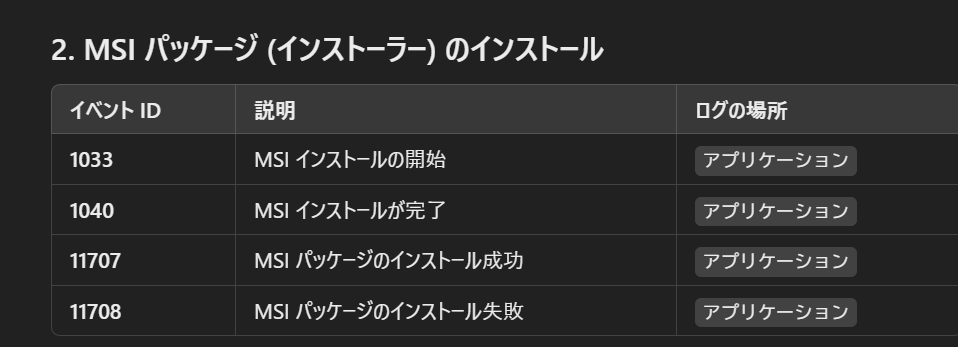
chatGPTに聞くと11707がインストールの成功を意味しているようだ。ここを探していく。
インストールされたものの名前を見た時にmicrosoftやvsは正規っぽいがProduct: Totally_Legit_Software -- Installation completed successfully., (NULL), (NULL), (NULL), (NULL), (NULL)このインストールが気になる。あんまり知らないファイル名である。このログの下にイベントID1033のイベントがあり、その文字列が{"EventData":{"Data":"Totally_Legit_Software, 1.3.3.7, 0, 0, cGljb0NURntFdjNudF92aTN3djNyXw==, (NULL)","Binary":"7B-33-44-33-43-33-38-33-33-2D-44-45-44-36-2D-34-30-32-32-2D-42-35-41-31-2D-45-37-46-33-37-37-38-39-43-33-39-30-7D-30-30-30-30-37-36-35-33-37-62-39-37-30-32-33-39-66-39-61-30-37-35-30-63-34-31-62-38-38-36-34-66-64-61-63-39-30-30-30-30-30-30-30-30"}}base64を見つけた。このツールがおかしいということが分かった。2024/7/15 15:55:58のインストールである。
では、最後にこのファイルを実行したログを探す。Totally_Legit_Softwareを探しているとレジストリを書き換えているログが見つかった。これがシャットダウンの原因のようだ。
{"EventData":{"Data":[{"@Name":"SubjectUserSid","#text":"S-1-5-21-3576963320-1344788273-4164204335-1001"},{"@Name":"SubjectUserName","#text":"user"},{"@Name":"SubjectDomainName","#text":"DESKTOP-EKVR84B"},{"@Name":"SubjectLogonId","#text":"0x5A428"},{"@Name":"ObjectName","#text":"\\REGISTRY\\MACHINE\\SOFTWARE\\Microsoft\\Windows\\CurrentVersion\\Run"},{"@Name":"ObjectValueName","#text":"Immediate Shutdown (MXNfYV9wcjN0dHlfdXMzZnVsXw==)"},{"@Name":"HandleId","#text":"0x208"},{"@Name":"OperationType","#text":"%%1904"},{"@Name":"OldValueType","#text":"-"},{"@Name":"OldValue","#text":"-"},{"@Name":"NewValueType","#text":"%%1873"},{"@Name":"NewValue","#text":"C:\\Program Files (x86)\\Totally_Legit_Software\\custom_shutdown.exe"},{"@Name":"ProcessId","#text":"0x1BD0"},{"@Name":"ProcessName","#text":"C:\\Program Files (x86)\\Totally_Legit_Software\\Totally_Legit_Software.exe"}]}}
ということで3つの断片を探すことに成功。でも、もしもbase64のヒントがなければ見つけられていないので、イベントIDを覚えていくことも重要に思う。
Bitlocker-1
Jacky is not very knowledgable about the best security passwords and used a simple password to encrypt their BitLocker drive. See if you can break through the encryption! Download the disk image here
ビットロッカーを初めて聞いた。なんぞ?
知識(ビットロッカー)
ビットロッカー
BitLockerとは、Microsoftが開発したディスク暗号化機能の一つで、Windows Vista以降のOSに搭載されています。この機能は、コンピューターのデータを保護するために、ハードディスクやUSBメモリなどのストレージデバイスに保存されている情報を暗号化することができます。これにより、デバイスが紛失や盗難にあった場合でも、悪意のある第三者がデータにアクセスすることを防ぐことができます。(引用:(BitLockerとは?重要性や注意点、設定方法をわかりやすく解説!))つまり、渡されたディスクイメージはビットロッカーで暗号化されているということでしょうね。
サイトを調べていると(bitlocker2john を使って BitLocker 暗号化ボリュームの情報を抽出する方法)というサイトに解析方法が載っていた。 John the Ripper を利用する感じなのかな。
知識( John the Ripper )
John the Ripper
パスワードクラッキングツール。(【Kali linux】John the Ripperを使ってみる) 公式からダウンロードしてもbitlocker2johnが見当たらなかったので'─# apt install john'をしたらできた。暗号化されているイメージファイルを解析するにはbitlocker2john -iでファイルのハッシュ情報を確認できるようだ。
└─# bitlocker2john -i bitlocker-1.dd
Encrypted device bitlocker-1.dd opened, size 100MB

Signature found at 0x3
Version: 8
Invalid version, looking for a signature with valid version...
・・
User Password hash:
$bitlocker$0$16$cb4809fe9628471a411f8380e0f668db$1048576$12$d04d9c58eed6da010a000000$60$68156e51e53f0a01c076a32ba2b2999afffce8530fbe5d84b4c19ac71f6c79375b87d40c2d871ed2b7b5559d71ba31b6779c6f41412fd6869442d66d
Hash type: User Password with MAC verification (slower solution, no false positives)
・・
人間が可読できる情報ではないようだ。(bitlocker2john を使って BitLocker 暗号化ボリュームの情報を抽出する方法)を参考にしているが、どうやら上記の情報をファイルにしてjohn the ripperに解析させるという流れのようだ。
やってみる
結果
└─# john --show encrypted_drive_hash.txt
Created directory: /root/.john
0 password hashes cracked, 2 left
クラックできず。デフォルトではだめなのかな。(John the RipperでOSユーザのパスワードをクラッキングする)どうやらjohnコマンドで解析したのちに--showオプションをつけないといけないようだ。というわけでおpしょんを外して再実行。時間がかかっている。いい感じかな?めちゃながい。休憩しよ。
Proceeding with incremental:ASCIIが現れてから、かれこれ5時間待ったが実行が終わらない。違うんですね。WriteUp見る。(picoCTF2025 writeup/a>)。
まずbitlocker2john -i bitlocker-1.ddで出力されたものすべてを解析にかけるわけではないのですね。(John the RipperでOSユーザのパスワードをクラッキングする)でも、
クラッキングしたいユーザの情報のみを記載しているファイルを用意します。
と書いてありますわ。
でも、上記方法でもできるようなサイトもあるので、使用する辞書ファイルが悪い可能性もありますね。
※後々検証したらユーザの情報だけじゃなくてもクラッシュできました。やはり必要なのは良質なrockyou.txtファイル!
john the ripperでなくて、hashcatを使用することも可能とある。パスワードクラックはこの二つなのかな。(CTFのWebセキュリティにおけるPassword Cracking, ハッシュ, 暗号化)
また、rockyou.txtもさまざまあるが、wordlist(wordlists)がよさそうだ。
といいつつ、うまくいかない。
└─# john --wordlist=/usr/share/wordlists/rockyou.txt encrypted_drive_hash.txt
Note: This format may emit false positives, so it will keep trying even after finding a possible candidate.
Using default input encoding: UTF-8
Loaded 1 password hash (BitLocker, BitLocker [SHA-256 AES 32/64])
Cost 1 (iteration count) is 1048576 for all loaded hashes
Will run 16 OpenMP threads
Crash recovery file is locked: /root/.john/john.rec
この下のエラーが出てくる。chat GPTに聞くと削除したらいいじゃねと出てきたので、削除してみる。
└─# john --wordlist=/usr/share/wordlists/rockyou.txt encrypted_drive_hash.txt
Note: This format may emit false positives, so it will keep trying even after finding a possible candidate.
Using default input encoding: UTF-8
Loaded 1 password hash (BitLocker, BitLocker [SHA-256 AES 32/64])
Cost 1 (iteration count) is 1048576 for all loaded hashes
Will run 16 OpenMP threads
Press 'q' or Ctrl-C to abort, almost any other key for status
jacqueline       (?)
1g 0:00:03:18 0.07% (ETA: 2025-05-14 22:32) 0.005033g/s 57.49p/s 57.49c/s 57.49C/s warrior1..polito
Session aborted
総じてうまくいきましたね。時間かかったー。jacquelineがパスワードなのかな。
みんなdislockerを利用しているので、私も使おうと思っていますが、autopsyが好きなので、そっちでできるならその方法もやりたい。
- autopsy
[f:id:k_yukichi:20250511202244p:plain]
bitlockerのパスワードを入力する欄があるので、先のパスワードを入力してみた。進めたらflag.txtを見つけた。終了。
※次回hashcatとdislockerを利用します。
考察
john the ripperを利用してみた。パスワードクラックでは辞書の質がが大切だと感じた。johnのデフォルトの辞書でだめなら他のを試すべき。総当たりとか博打過ぎる。(今回ここで傍観してました。)
エラーが出てきたときは失敗しただけで終えず、エラーの原因を探るべき。正解の道でもエラーは全然出るぞ。
ツール(john the ripper等)の使い方を理解してから使う。使い方違うと時間だけ過ぎるぞ。
RED
RED, RED, RED, RED
Download the image: red.png
ということで、真っ赤な四角形の画像を取得した。まずは初手行きましょう。
└─# file red.png
red.png: PNG image data, 128 x 128, 8-bit/color RGBA, non-interlaced
通常のpngデータである。
└─# strings red.png
IHDR
tEXtPoem
Crimson heart, vibrant and bold,
Hearts flutter at your sight.
Evenings glow softly red,
Cherries burst with sweet life.
Kisses linger with your warmth.
Love deep as merlot.
Scarlet leaves falling softly,
Bold in every stroke.x
IDATx
IEND
stringsコマンドを打ったら何やら出てきた。ポエム?意味を見てもあんまし。なにかしらがハイディングしているかも?
ま、(Aperi'Solve)にぶち込んだ。そしたら、
[f:id:k_yukichi:20250312171759p:plain]
Zstegに怪しい文字列発見。zstegは調べるとステガノグラフィーを検出するツールのようだ。
知識(Zsteg)
Zsteg
ステガノグラフィーを検出するツール(CTFにおけるステガノグラフィ入門とまとめ)ということで、ステガノグラフィーがあったということですね。
[f:id:k_yukichi:20250312172433p:plain]
画像の最下位ビットに注目すると隠されていたようだ。終了。
Bitlocker-2
Jacky has learnt about the importance of strong passwords and made sure to encrypt the BitLocker drive with a very long and complex password. We managed to capture the RAM while this drive was opened however. See if you can break through the encryption!
Download the disk image here and the RAM dump here
ということで、bitlockされているイメージファイルとメモリダンプされたファイルが渡されているようだ。
メモリ解析は久しぶりだ。調べているとメモリ解析にはVolatility3というツールがいいようだ。
(CTFのフォレンジックにおけるメモリフォレンジックまとめ [Volatility 3, Volatility 2])を確認して、windows.info.Infoを調べてみたが、何かうまくいってないような。
└─# file /home/yukichi/mount/pico/Bitlocker-2/memdump.mem
/home/yukichi/mount/pico/Bitlocker-2/memdump.mem: data
初心に戻って初手fileコマンド。でもdataとしか出てこない。RAM Dumpであることはわかっているのに。OSが特定できていないのが、原因なのだろうか?
脳筋プレーstringsコマンドを眺めてみた。C:\Windows\System32\iertutil.dllという記載あり。windows環境のメモリかな。と言いつつ実行結果を待ってみた。
Kernel Base     0xf80062600000
DTB     0x1ad000
Symbols file:///home/yukichi/mount/tools/volatility3/volatility3/symbols/windows/ntkrnlmp.pdb/89284D0CA6ACC8274B9A44BD5AF9290B-1.json.xz
Is64Bit True
IsPAE   False
layer_name      0 WindowsIntel32e
memory_layer    1 FileLayer

Volatility was unable to read a requested page:
Page error 0xf80063200b30 in layer layer_name (Page Fault at entry 0x1832100002064 in page entry)

        * Memory smear during acquisition (try re-acquiring if possible)
        * An intentionally invalid page lookup (operating system protection)
        * A bug in the plugin/volatility3 (re-run with -vvv and file a bug)

No further results will be produced
やっぱりうまくいかないようだ。
