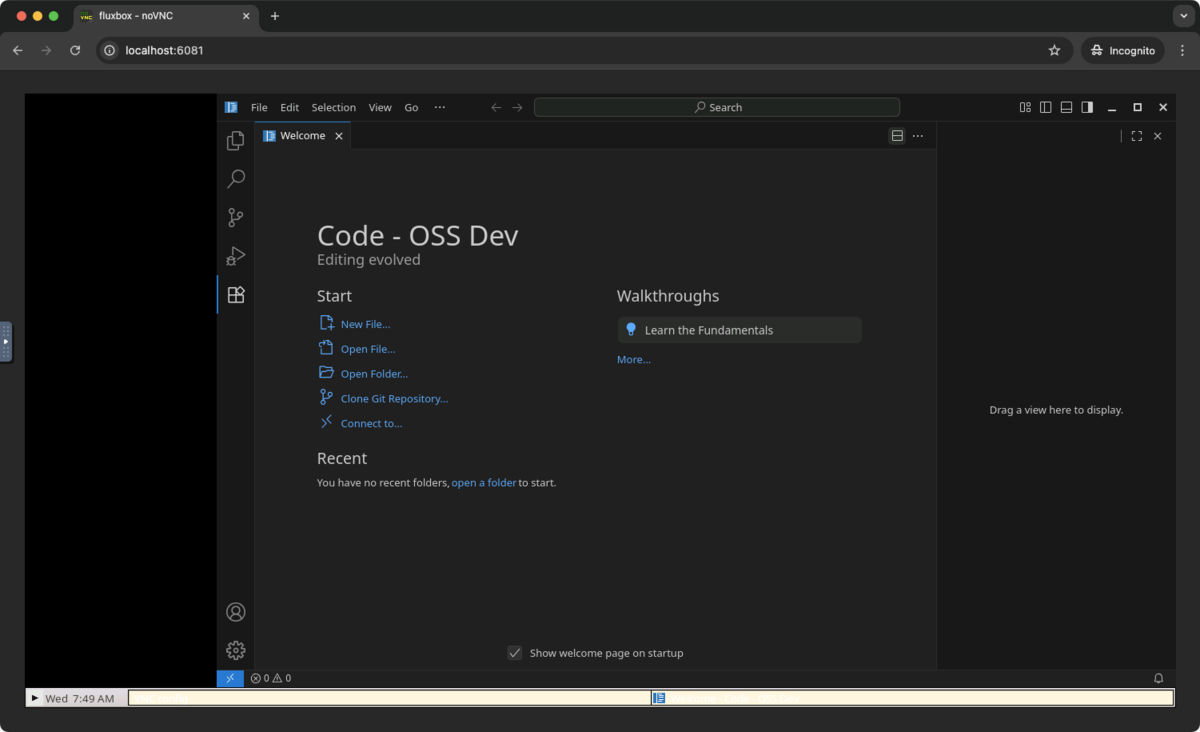
はじめに
VS Code本体の不具合をデバッグするために、VS Code本体をビルドしてみました。
ローカル環境を汚したくなかったため、今回はDev Containerを利用しました。 さすが本家本元のVS Codeだけあって、Dev Containerの設定ファイルはVS CodeのGitリポジトリ内にしっかりと用意されていました。
基本的には、vscode/.devcontainer/README.md の Quick start - local と Try it の章に記載されている手順通りに進めれば問題ありません。
しかし、実際に作業を進める中で、これだけでは情報が足りないと感じた点が3つありました。
本記事では、それぞれのポイントについて簡単に説明していきます。
環境
- macOS Sequoia 15.5
- Colima v0.8.1
- ※ Dockerコンテナの実行環境としてDocker Desktop for MacではなくColimaを使用しています
- ビルド対象のVS Code: 2025/08/13時点のmainブランチの最新コミット (開発中の1.104.0)
ポイント1: DockerのCPUとメモリの設定
READMEに記載されている通り、最低でもCPUは4コア、メモリは8GB必要になります。
Macのメモリに余裕があったため、少し多めに12GBを設定してみました。
colima start --cpu 4 --memory 12
ちなみに colima start で何もオプションを指定せずデフォルトのまま実行するとCPUは2コアでメモリは2GBになり、Dev Containerの起動中にエラーが発生してしまいました。
ポイント2: Node.jsがメモリ不足で異常終了する
README.md通りに bash scripts/code.sh を実行すると、 FATAL ERROR: Reached heap limit Allocation failed - JavaScript heap out of memory というエラーが出て異常終了してしまいました。
node ➜ /workspaces/vscode $ bash scripts/code.sh
[略]
[07:09:29] Finished compile-extension:typescript-language-features after 18845 ms
[07:09:29] Starting compile-extensions ...
[07:09:29] Finished compile-extensions after 0 ms

<--- Last few GCs --->

[12444:0xfba9634e0000]    30522 ms: Scavenge (interleaved) 2030.4 (2085.2) -> 2024.5 (2085.7) MB, pooled: 5 MB, 5.64 / 0.00 ms  (average mu = 0.344, current mu = 0.166) allocation failure;
[12444:0xfba9634e0000]    30563 ms: Scavenge (interleaved) 2031.3 (2085.7) -> 2025.1 (2103.0) MB, pooled: 0 MB, 31.18 / 0.00 ms  (average mu = 0.344, current mu = 0.166) allocation failure;


<--- JS stacktrace --->

FATAL ERROR: Reached heap limit Allocation failed - JavaScript heap out of memory
----- Native stack trace -----

 1: 0xde8cc8 node::OOMErrorHandler(char const*, v8::OOMDetails const&) [gulp compile]
 2: 0x1176bdc v8::Utils::ReportOOMFailure(v8::internal::Isolate*, char const*, v8::OOMDetails const&) [gulp compile]
 3: 0x1176d8c v8::internal::V8::FatalProcessOutOfMemory(v8::internal::Isolate*, char const*, v8::OOMDetails const&) [gulp compile]
 4: 0x139b65c  [gulp compile]
 5: 0x13b35d0 v8::internal::Heap::CollectGarbage(v8::internal::AllocationSpace, v8::internal::GarbageCollectionReason, v8::GCCallbackFlags) [gulp compile]
 6: 0x1389ef8 v8::internal::HeapAllocator::AllocateRawWithLightRetrySlowPath(int, v8::internal::AllocationType, v8::internal::AllocationOrigin, v8::internal::AllocationAlignment) [gulp compile]
 7: 0x138ad30 v8::internal::HeapAllocator::AllocateRawWithRetryOrFailSlowPath(int, v8::internal::AllocationType, v8::internal::AllocationOrigin, v8::internal::AllocationAlignment) [gulp compile]
 8: 0x1365e50 v8::internal::Factory::NewFillerObject(int, v8::internal::AllocationAlignment, v8::internal::AllocationType, v8::internal::AllocationOrigin) [gulp compile]
 9: 0x177f7fc v8::internal::Runtime_AllocateInYoungGeneration(int, unsigned long*, v8::internal::Isolate*) [gulp compile]
10: 0x1c8f9d4  [gulp compile]
Aborted (core dumped)
この問題は次のように環境変数でメモリ上限を増やすことで解決できました。
NODE_OPTIONS="--max_old_space_size=4096" bash scripts/code.sh
ポイント3: 権限エラーで異常終了する
メモリ不足問題を解決したら、今度は The SUID sandbox helper binary was found, but is not configured correctly. Rather than run without sandboxing I'm aborting now. You need to make sure that /workspaces/vscode/.build/electron/chrome-sandbox is owned by root and has mode 4755. というエラーが出て異常終了してしまいました。
node ➜ /workspaces/vscode $ NODE_OPTIONS="--max_old_space_size=4096" bash scripts/code.sh

> code-oss-dev@1.104.0 electron
> node build/lib/electron


> code-oss-dev@1.104.0 compile
> node ./node_modules/gulp/bin/gulp.js compile

[07:38:36] Using gulpfile /workspaces/vscode/gulpfile.js
[07:38:36] Starting 'compile'...
[07:38:36] Starting monaco-typecheck ...
[07:38:36] Starting clean-out ...
[07:38:36] Starting clean-extension-configuration-editing ...
[中略]
[07:39:48] [github] ms-vscode.js-debug ✔︎
[14715:0813/073948.531017:FATAL:sandbox/linux/suid/client/setuid_sandbox_host.cc:169] The SUID sandbox helper binary was found, but is not configured correctly. Rather than run without sandboxing I'm aborting now. You need to make sure that /workspaces/vscode/.build/electron/chrome-sandbox is owned by root and has mode 4755.
Trace/breakpoint trap (core dumped)
[15490:0100/000000.546063:ERROR:content/zygote/zygote_linux.cc:660] write: Broken pipe (32)
/workspaces/vscode/.build/electron/chrome-sandbox の所有者とパーミッションを確認してみます。
node ➜ /workspaces/vscode $ ls -la /workspaces/vscode/.build/el/workspaces/vscode/.build/electron/chrome-sandbox
-rwsr-xr-x 1 node node 56968 Jan  1  1980 /workspaces/vscode/.build/electron/chrome-sandbox
所有者がrootでなければならないのに対し、実際はnodeになっていました。
一方、パーミッションは rwsr-xr-x (4755) に既になっているので問題なさそうです。
次のコマンドで所有者を root に変更します。
sudo chown root:root /workspaces/vscode/.build/electron/chrome-sandbox
これで無事Dev Container上でVS Codeが起動しました。