やりたいこと
- iLOやiDRACを使って、リモートからOSをインストールしたい
- URL経由でISOイメージファイルをサーバに仮想的にマウントしたい
- インストール対象と同じLAN内にあるUbuntu 18.04.2サーバをWebサーバにしてISOファイルを配信したい
- でも、このためだけに余計なパッケージをインストールしたくない
環境
Ubuntu 18.04.2 LTS Server
方針
twistd3で簡易Webサーバを立てる
twistd3を使う
配信したいファイルがあるディレクトリに移動して、次のコマンドを実行する。twistd3コマンドは標準でインストールされているようだが、無ければ sudo apt install python3-twisted でインストールする。
twistd3 web --port tcp:8080 --path .
8080/TCPでWebサーバが待ち受けている。
$ netstat -lntp
(Not all processes could be identified, non-owned process info
 will not be shown, you would have to be root to see it all.)
Active Internet connections (only servers)
Proto Recv-Q Send-Q Local Address           Foreign Address         State       PID/Program name
tcp        0      0 0.0.0.0:8080            0.0.0.0:*               LISTEN      1512/python3
tcp        0      0 127.0.0.53:53           0.0.0.0:*               LISTEN      -
tcp        0      0 0.0.0.0:22              0.0.0.0:*               LISTEN      -
tcp6       0      0 :::22                   :::*                    LISTEN      -
http://サーバのIPアドレス:8080/ にアクセスすると、カレントディレクトリにあるファイルのリストが表示される。ファイル名をクリックすると、そのファイルをダウンロードできる。
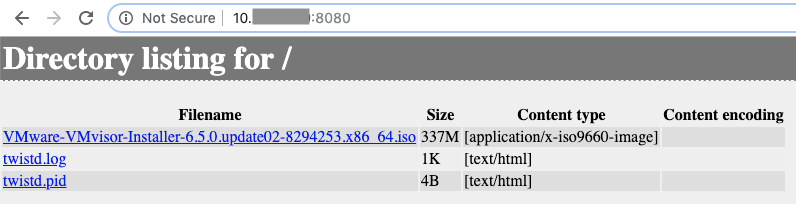
カレントディレクトリにはtwistd.logとtwistd.pidが作成され、twistd.logにアクセスログが記録されていく。
この方法でISOファイルを配信して、iLOの仮想メディアでこのURLを指定すると、次のようなアクセスログが記録される。ステータスコードが206 (Partial Content) になっているので、ISOファイルを分割して少しずつ送信しているのだろう。
2019-05-19T15:33:45+0000 [twisted.python.log#info] 10.XX.XX.XX - - [19/May/2019:15:33:45 +0000] "GET /VMware-VMvisor-Installer-6.5.0.update02-8294253.x86_64.iso HTTP/1.1" 206 256 "-" "-"
2019-05-19T15:33:45+0000 [twisted.python.log#info] 10.XX.XX.XX - - [19/May/2019:15:33:45 +0000] "GET /VMware-VMvisor-Installer-6.5.0.update02-8294253.x86_64.iso HTTP/1.1" 206 61440 "-" "-"
2019-05-19T15:33:45+0000 [twisted.python.log#info] 10.XX.XX.XX - - [19/May/2019:15:33:45 +0000] "GET /VMware-VMvisor-Installer-6.5.0.update02-8294253.x86_64.iso HTTP/1.1" 206 61440 "-" "-"
2019-05-19T15:33:46+0000 [twisted.python.log#info] 10.XX.XX.XX - - [19/May/2019:15:33:45 +0000] "GET /VMware-VMvisor-Installer-6.5.0.update02-8294253.x86_64.iso HTTP/1.1" 206 61440 "-" "-"
2019-05-19T15:33:46+0000 [twisted.python.log#info] 10.XX.XX.XX - - [19/May/2019:15:33:46 +0000] "GET /VMware-VMvisor-Installer-6.5.0.update02-8294253.x86_64.iso HTTP/1.1" 206 61440 "-" "-"
2019-05-19T15:33:46+0000 [twisted.python.log#info] 10.XX.XX.XX - - [19/May/2019:15:33:46 +0000] "GET /VMware-VMvisor-Installer-6.5.0.update02-8294253.x86_64.iso HTTP/1.1" 206 524288 "-" "-"
2019-05-19T15:33:55+0000 [twisted.python.log#info] 10.XX.XX.XX - - [19/May/2019:15:33:54 +0000] "GET /VMware-VMvisor-Installer-6.5.0.update02-8294253.x86_64.iso HTTP/1.1" 206 61440 "-" "-"
2019-05-19T15:33:55+0000 [twisted.python.log#info] 10.XX.XX.XX - - [19/May/2019:15:33:55 +0000] "GET /VMware-VMvisor-Installer-6.5.0.update02-8294253.x86_64.iso HTTP/1.1" 206 524288 "-" "-"
ダメだったやり方
twistd3の前にPython3のhttp.serverモジュールで試してみたが、ISOファイルのサイズが大きすぎるのかBrokenPipeErrorが出てしまい、仮想メディアとしてマウントできなかった。
$ python3 -m http.server 8000
Serving HTTP on 0.0.0.0 port 8000 (http://0.0.0.0:8000/) ...
10.XX.XX.XX - - [19/May/2019 15:13:58] "GET /VMware-VMvisor-Installer-6.5.0.update02-8294253.x86_64.iso HTTP/1.1" 200 -
----------------------------------------
Exception happened during processing of request from ('10.XX.XX.XX', 56405)
Traceback (most recent call last):
  File "/usr/lib/python3.6/socketserver.py", line 317, in _handle_request_noblock
    self.process_request(request, client_address)
  File "/usr/lib/python3.6/socketserver.py", line 348, in process_request
    self.finish_request(request, client_address)
  File "/usr/lib/python3.6/socketserver.py", line 361, in finish_request
    self.RequestHandlerClass(request, client_address, self)
  File "/usr/lib/python3.6/socketserver.py", line 721, in __init__
    self.handle()
  File "/usr/lib/python3.6/http/server.py", line 418, in handle
    self.handle_one_request()
  File "/usr/lib/python3.6/http/server.py", line 406, in handle_one_request
    method()
  File "/usr/lib/python3.6/http/server.py", line 639, in do_GET
    self.copyfile(f, self.wfile)
  File "/usr/lib/python3.6/http/server.py", line 800, in copyfile
    shutil.copyfileobj(source, outputfile)
  File "/usr/lib/python3.6/shutil.py", line 82, in copyfileobj
    fdst.write(buf)
  File "/usr/lib/python3.6/socketserver.py", line 800, in write
    self._sock.sendall(b)
BrokenPipeError: [Errno 32] Broken pipe
----------------------------------------
