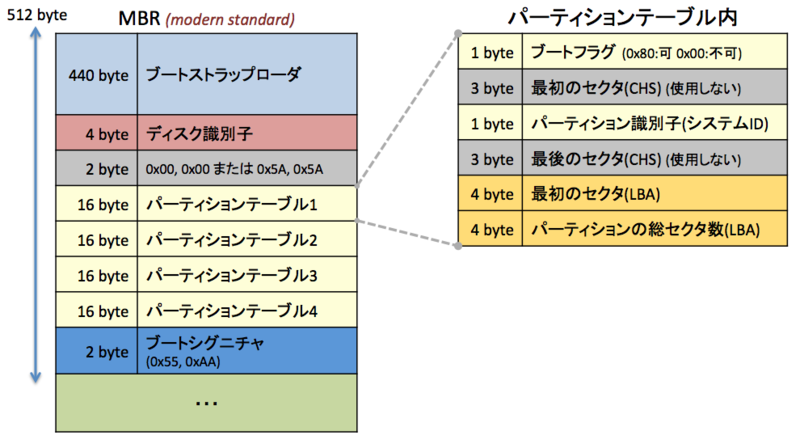
GPT は名前の通り、128ビットのGUIDによりディスクを識別できるのだが、実は MBR の場合でもディスク固有の値として32ビットの値がMBR(セクタ0)のオフセット 440 - 443 に書き込まれている。
fdisk コマンドでも「Disk identifier」として出力され、以下の例では「e64d8f76」がそれだ。
# fdisk -l /dev/sdd

Disk /dev/sdd: 1073 MB, 1073741824 bytes
34 heads, 61 sectors/track, 1011 cylinders
Units = cylinders of 2074 * 512 = 1061888 bytes
Sector size (logical/physical): 512 bytes / 512 bytes
I/O size (minimum/optimal): 512 bytes / 512 bytes
Disk identifier: 0xe64d8f76

   Device Boot      Start         End      Blocks   Id  System
/dev/sdd1               1         100      103669+  83  Linux
/dev/sdd2             101         200      103700   83  Linux
なお、確認に使用しているのは CentOS 6.4 x86_64 である。
どこにこの Disk identifer は格納されているのか?
この Disk identifier だが、恥ずかしながら私はずっと「なにか適当な数字」ぐらいにしか思っていなかった。その理由は MBR の形式をずっと以下の図の通りと認識していたからだ。
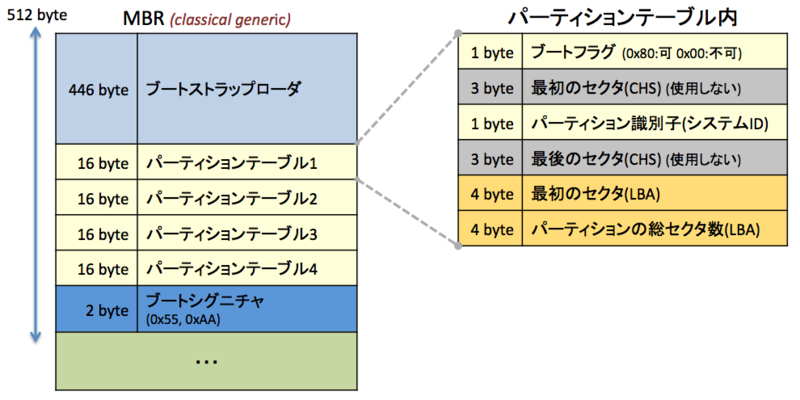
実際に日本語のWikipediaにおける「マスターブートレコード」ではこの構造が記載されており、「0(先頭)〜445(446バイト)にブートストラップローダ、446〜509(64バイト)にパーティションテーブル、510〜511(2バイト)にブートシグニチャがある。」とも明言されている。これによれば Disk identifer などといういかにも永続的なものを書いておく余地などない。書いておくことができない永続的な情報があるわけがない、そう思っているから見えていなかったといってもよい(無いと思っているものは目の前にあっても見えない、とか言いますよね)。
ところが、英語のWikipediaにおける「Master boot record」では上記の図の形式を「Structure of a classical generic MBR」だとして説明している。そして、「Structure of modern standard MBR」として以下の図の形式を説明している。つまり、現在の標準的な(といってもそのMBR自体がレガシーになっていくが) MBR の形式ではオフセット 440 - 445 の扱いが決定的に変わっているのである。そしてこの場所こそが Disk identifer が書き込まれている場所だ。
Disk identifer が fdisk 実行時に生成されることの確認
パーティションを削除したあとにディスクをクリアする(先頭64セクタのみ)。
# dd if=/dev/zero of=/dev/sdd bs=512 count=64
64+0 records in
64+0 records out
32768 bytes (33 kB) copied, 0.0694129 s, 472 kB/s
パーティションテーブルもなく、Disk identifer は 00000000 になっている。
# fdisk -l /dev/sdd

Disk /dev/sdd: 1073 MB, 1073741824 bytes
34 heads, 61 sectors/track, 1011 cylinders
Units = cylinders of 2074 * 512 = 1061888 bytes
Sector size (logical/physical): 512 bytes / 512 bytes
I/O size (minimum/optimal): 512 bytes / 512 bytes
Disk identifier: 0x00000000
fdisk を実行し、パーティションは作らずに保存する。
実行直後の p (print) で既に Disk identifier が表示されているのは、fdisk のメモリ上ではもう MBR(セクタ0) のイメージが生成済みだからだろう。
# fdisk /dev/sdd
Device contains neither a valid DOS partition table, nor Sun, SGI or OSF disklabel
Building a new DOS disklabel with disk identifier 0x3907301d.
Changes will remain in memory only, until you decide to write them.
After that, of course, the previous content won't be recoverable.

Warning: invalid flag 0x0000 of partition table 4 will be corrected by w(rite)

WARNING: DOS-compatible mode is deprecated. It's strongly recommended to
         switch off the mode (command 'c') and change display units to
         sectors (command 'u').

Command (m for help): p

Disk /dev/sdd: 1073 MB, 1073741824 bytes
34 heads, 61 sectors/track, 1011 cylinders
Units = cylinders of 2074 * 512 = 1061888 bytes
Sector size (logical/physical): 512 bytes / 512 bytes
I/O size (minimum/optimal): 512 bytes / 512 bytes
Disk identifier: 0x3907301d

   Device Boot      Start         End      Blocks   Id  System

Command (m for help): w
The partition table has been altered!

Calling ioctl() to re-read partition table.
Syncing disks.
fdisk -l で表示してみると、Disk identifer がしっかり書き込まれていることが確認できた。
dd でもちょうどオフセット 440 - 443 に書き込まれていることがわかる。何もパーティションを作成しない初期の MBR(セクタ0) のイメージはこの Disk identifer と末尾2バイトのブートシグニチャのみということのようだ。
# fdisk -l /dev/sdd

Disk /dev/sdd: 1073 MB, 1073741824 bytes
34 heads, 61 sectors/track, 1011 cylinders
Units = cylinders of 2074 * 512 = 1061888 bytes
Sector size (logical/physical): 512 bytes / 512 bytes
I/O size (minimum/optimal): 512 bytes / 512 bytes
Disk identifier: 0x3907301d

   Device Boot      Start         End      Blocks   Id  System

# dd if=/dev/sdd bs=512 count=1 2>/dev/null | hexdump -C
00000000  00 00 00 00 00 00 00 00  00 00 00 00 00 00 00 00  |................|
*
000001b0  00 00 00 00 00 00 00 00  1d 30 07 39 00 00 00 00  |.........0.9....|
000001c0  00 00 00 00 00 00 00 00  00 00 00 00 00 00 00 00  |................|
*
000001f0  00 00 00 00 00 00 00 00  00 00 00 00 00 00 55 aa  |..............U.|
00000200
fdisk を使用した Disk identifier の書き換え
fdisk にはエキスパートモードというものがあり、そのモードに切り替えるの Disk identifer を書き換えることができる。
ただし、Disk identifer の書き換えのみでは fdisk が変更として扱わず、MBR に実際に書き込みを行わないようである。そのため、適当なパーティションのシステム識別子を一旦書き換えて戻す(変更フラグを立てさせるだけ)という一見無駄なオペレーションも行う。もちろんパーティションの一時作成・削除でもよい。
元々の Disk identifer は「1c1f80db」である。
# fdisk -l /dev/sdd

Disk /dev/sdd: 1073 MB, 1073741824 bytes
34 heads, 61 sectors/track, 1011 cylinders
Units = cylinders of 2074 * 512 = 1061888 bytes
Sector size (logical/physical): 512 bytes / 512 bytes
I/O size (minimum/optimal): 512 bytes / 512 bytes
Disk identifier: 0x1c1f80db

   Device Boot      Start         End      Blocks   Id  System
/dev/sdd1               1         100      103669+  83  Linux
fdisk を起動し、エキスパートモードに入る。
# fdisk /dev/sdd

WARNING: DOS-compatible mode is deprecated. It's strongly recommended to
         switch off the mode (command 'c') and change display units to
         sectors (command 'u').

Command (m for help): m
Command action
   a   toggle a bootable flag
   b   edit bsd disklabel
   c   toggle the dos compatibility flag
   d   delete a partition
   l   list known partition types
   m   print this menu
   n   add a new partition
   o   create a new empty DOS partition table
   p   print the partition table
   q   quit without saving changes
   s   create a new empty Sun disklabel
   t   change a partition's system id
   u   change display/entry units
   v   verify the partition table
   w   write table to disk and exit
   x   extra functionality (experts only)

Command (m for help): x

Expert command (m for help): m
Command action
   b   move beginning of data in a partition
   c   change number of cylinders
   d   print the raw data in the partition table
   e   list extended partitions
   f   fix partition order
   g   create an IRIX (SGI) partition table
   h   change number of heads
   i   change the disk identifier
   m   print this menu
   p   print the partition table
   q   quit without saving changes
   r   return to main menu
   s   change number of sectors/track
   v   verify the partition table
   w   write table to disk and exit
Disk identifer の書き換えのため i を入力し、新しい Disk identifier として「0xe64d8f76」を入力する(ここでは16進数を表す0xを付ける必要がある)。
Expert command (m for help): i
New disk identifier (current 0x1c1f80db): 0xe64d8f76
Disk identifier: 0xe64d8f76
r を入力し、エキスパートを終了する。p にて確認すると Disk identifier は変更されている(まだ fdisk のメモリ上のみ)。
ここで w で書き込みを要求しても書き込みをしてくれないので、パーティション1のシステム識別子を 83 → 8e → 83 に書き換えてから w を実行する。
Expert command (m for help): r

Command (m for help): p

Disk /dev/sdd: 1073 MB, 1073741824 bytes
34 heads, 61 sectors/track, 1011 cylinders
Units = cylinders of 2074 * 512 = 1061888 bytes
Sector size (logical/physical): 512 bytes / 512 bytes
I/O size (minimum/optimal): 512 bytes / 512 bytes
Disk identifier: 0xe64d8f76

   Device Boot      Start         End      Blocks   Id  System
/dev/sdd1               1         100      103669+  83  Linux

Command (m for help): t
Selected partition 1
Hex code (type L to list codes): 8e
Changed system type of partition 1 to 8e (Linux LVM)

Command (m for help): t
Selected partition 1
Hex code (type L to list codes): 83
Changed system type of partition 1 to 83 (Linux)

Command (m for help): w
The partition table has been altered!

Calling ioctl() to re-read partition table.
Syncing disks.
無事に Disk identifier が書き換えられた。
# fdisk -l /dev/sdd

Disk /dev/sdd: 1073 MB, 1073741824 bytes
34 heads, 61 sectors/track, 1011 cylinders
Units = cylinders of 2074 * 512 = 1061888 bytes
Sector size (logical/physical): 512 bytes / 512 bytes
I/O size (minimum/optimal): 512 bytes / 512 bytes
Disk identifier: 0xe64d8f76

   Device Boot      Start         End      Blocks   Id  System
/dev/sdd1               1         100      103669+  83  Linux
