「Spring Securityでユーザ認証を実装してみる」では、Spring Securityで簡単なユーザ認証を実装した。 ここでは作成したアプリケーションについて、認証処理の挙動に関するテストコードを記述してみる。
環境
Windows 10 Pro、Java SE 8、Spring Framework 4.3.7.RELEASE(Spring Boot 1.5.2.RELEASE)
>systeminfo
OS 名:                  Microsoft Windows 10 Pro
OS バージョン:          10.0.14393 N/A ビルド 14393
OS ビルドの種類:        Multiprocessor Free
システムの種類:         x64-based PC
プロセッサ:             1 プロセッサインストール済みです。
                        [01]: Intel64 Family 6 Model 69 Stepping 1 GenuineIntel ~1596 Mhz

>java -version
java version "1.8.0_121"
Java(TM) SE Runtime Environment (build 1.8.0_121-b13)
Java HotSpot(TM) 64-Bit Server VM (build 25.121-b13, mixed mode)
spring-securty-testを依存ライブラリに追加する
Spring Bootの場合、テスト用ライブラリが標準で含まれている。 しかし、Spring Securityを使う場合は、CSRFトークン付きのPOSTや認証状態のセットを行うためにspring-security-testを依存ライブラリに追加する必要がある。
MavenのCentral Repositoryを検索すると、spring-security-testの最新版が4.2.2.RELEASEであることがわかる。
- g:“org.springframework.security” AND a:“spring-security-test” - The Central Repository Search Engine
プロジェクトにspring-security-test 4.2.2.RELEASEを追加するには次のようにする。
- 「demo [boot]」を右クリックして、「Maven」→「Add Dependency」を選択
- ダイアログの各フィールドに以下の文字列を入力してOK
- GroupId: org.springframework.security
- ArtifactId: spring-security-test
- Version: 4.2.2.RELEASE
簡単なテストコードを書いてみる
Spring Bootでは、JUnitを用いてテストを記述する。
また、テストコードはsrc/test/java以下で管理する。
実際にテストコードを書いてみると次のようになる。
package com.example;

import static org.hamcrest.CoreMatchers.containsString;
import static org.springframework.security.test.web.servlet.request.SecurityMockMvcRequestPostProcessors.anonymous;
import static org.springframework.security.test.web.servlet.request.SecurityMockMvcRequestPostProcessors.csrf;
import static org.springframework.security.test.web.servlet.request.SecurityMockMvcRequestPostProcessors.user;
import static org.springframework.security.test.web.servlet.setup.SecurityMockMvcConfigurers.springSecurity;
import static org.springframework.test.web.servlet.request.MockMvcRequestBuilders.get;
import static org.springframework.test.web.servlet.request.MockMvcRequestBuilders.post;
import static org.springframework.test.web.servlet.result.MockMvcResultMatchers.content;
import static org.springframework.test.web.servlet.result.MockMvcResultMatchers.redirectedUrl;
import static org.springframework.test.web.servlet.result.MockMvcResultMatchers.status;
import static org.springframework.test.web.servlet.result.MockMvcResultMatchers.view;

import org.junit.Before;
import org.junit.Test;
import org.junit.runner.RunWith;
import org.springframework.beans.factory.annotation.Autowired;
import org.springframework.boot.test.autoconfigure.web.servlet.AutoConfigureMockMvc;
import org.springframework.boot.test.context.SpringBootTest;
import org.springframework.test.context.junit4.SpringRunner;
import org.springframework.test.web.servlet.MockMvc;
import org.springframework.test.web.servlet.setup.MockMvcBuilders;
import org.springframework.transaction.annotation.Transactional;
import org.springframework.web.context.WebApplicationContext;

@RunWith(SpringRunner.class)
@SpringBootTest
@AutoConfigureMockMvc
@Transactional
public class AuthControllerTests {

    @Autowired
    private WebApplicationContext context;

    private MockMvc mvc;

    @Autowired
    private UserService userService;

    @Before
    public void setup() {
        mvc = MockMvcBuilders
                .webAppContextSetup(context)
                .apply(springSecurity())
                .build();

        userService.registerUser("testuser", "iamatestuser", "testuser@localhost");
    }

    @Test
    public void shouldAnonymousBeRedirected() throws Exception {
        this.mvc.perform(get("/messages").with(anonymous()))
                .andExpect(status().isFound())
                .andExpect(redirectedUrl("http://localhost/login"));
    }

    @Test
    public void shouldNewUserBeAbleToSignupAndLogin() throws Exception {
        this.mvc.perform(post("/signup").with(csrf())
                                        .param("username", "testuser2")
                                        .param("password", "iamatestuser")
                                        .param("mailAddress", "testuser2@localhost"))
                .andExpect(status().isFound())
                .andExpect(redirectedUrl("/messages"));

        this.mvc.perform(post("/login").with(csrf())
                .param("username", "testuser2")
                .param("password", "iamatestuser"))
                .andExpect(status().isFound())
                .andExpect(redirectedUrl("/"));

        this.mvc.perform(get("/messages").with(user("testuser2")))
                .andExpect(status().isOk())
                .andExpect(view().name("messages"));
    }

    @Test
    public void shouldSignupWithDuplicateUsernameFail() throws Exception {
        this.mvc.perform(post("/signup").with(csrf())
                                        .param("username", "testuser")
                                        .param("password", "duplicateusername")
                                        .param("mailAddress", "foobar@localhost"))
                .andExpect(status().isOk())
                .andExpect(content().string(containsString("already used")));
    }

    @Test
    public void shouldSignupWithDuplicateMailAddressFail() throws Exception {
        this.mvc.perform(post("/signup").with(csrf())
                                        .param("username", "testuser2")
                                        .param("password", "duplicatemailaddress")
                                        .param("mailAddress", "testuser@localhost"))
                .andExpect(status().isOk())
                .andExpect(content().string(containsString("already used")));
    }

    @Test
    public void shouldLoginWithNonExistUserFail() throws Exception {
        this.mvc.perform(post("/login").with(csrf())
                                       .param("username", "nonexistuser")
                                       .param("password", "iamatestuser"))
                .andExpect(status().isFound())
                .andExpect(redirectedUrl("/login-error"));
    }

    @Test
    public void shouldLoginWithWrongPasswordFail() throws Exception {
        this.mvc.perform(post("/login").with(csrf())
                                       .param("username", "testuser")
                                       .param("password", "wrongpassword"))
                .andExpect(status().isFound())
                .andExpect(redirectedUrl("/login-error"));
    }

    @Test
    public void shouldLoginWithJPQLInjectionFail() throws Exception {
        this.mvc.perform(post("/login").with(csrf())
                                       .param("username", "testuser' OR ''='")
                                       .param("password", "jpqlinjection"))
                .andExpect(status().isFound())
                .andExpect(redirectedUrl("/login-error"));
    }

}
上のコードでは、次のような内容をテストしている。
- shouldAnonymousBeRedirected(): 非ログインユーザがログイン画面にリダイレクトされること
- shouldNewUserBeAbleToSignupAndLogin(): 新規ユーザがアカウント登録・ログインできること
- shouldSignupWithDuplicateUsernameFail(): すでに存在するユーザ名でのアカウント登録が失敗すること
- shouldSignupWithDuplicateMailAddressFail(): すでに存在するメールアドレスでのアカウント登録が失敗すること
- shouldLoginWithNonExistUserFail(): 存在しないユーザ名でのログインが失敗すること
- shouldLoginWithWrongPasswordFail(): 誤ったパスワードでのログインが失敗すること
- shouldLoginWithJPQLInjectionFail(): JPQL injection攻撃による不正ログインが失敗すること
MockMvcを用いることで、エンドポイントへのリクエストとそれに対するレスポンスをテストすることができる。 @Beforeはすべてのテストメソッド(@Test)の前に実行される。 また、@Afterが存在する場合はすべてのテストメソッドの後に実行される。
また、クラスに@Transactionalをつけることで、@Before、@Test、@Afterのサイクルが終わるたびにDBへの変更がrollbackされる。
テスト中でDBへの変更が加えられるような場合、指定しておくとよい。
Annotating a test method with @Transactional causes the test to be run within a transaction that will, by default, be automatically rolled back after completion of the test. If a test class is annotated with @Transactional, each test method within that class hierarchy will be run within a transaction.
テストを実行してみる
テストを実行するには次のようにする。
- 「demo [boot]」を右クリックして「Run As」→「4 JUnit Test」を選択
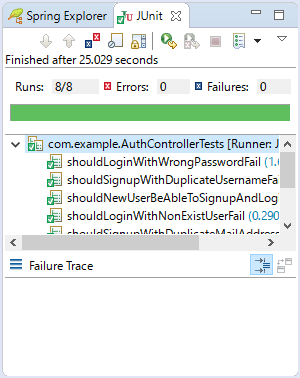
実行すると、右下のペインにJUnitのテスト結果が表示される。