「ReactにReduxを組み合わせて使ってみる」では、ReactとReduxで簡単な文字数カウンタを作った。 ここでは、Electronを使ってこれをGUIアプリにしてみる。 また、Windows用にパッケージングを行い、Windows上でも動かしてみる。
環境
Ubuntu 14.04.4 LTS 64bit版
$ uname -a
Linux vm-ubuntu64 3.19.0-25-generic #26~14.04.1-Ubuntu SMP Fri Jul 24 21:16:20 UTC 2015 x86_64 x86_64 x86_64 GNU/Linux

$ lsb_release -a
No LSB modules are available.
Distributor ID: Ubuntu
Description:    Ubuntu 14.04.4 LTS
Release:        14.04
Codename:       trusty

$ nodejs --version
v4.4.2

$ npm --version
2.15.0
Electronで動かしてみる
まず、「ReactにReduxを組み合わせて使ってみる」と同様の手順でJavaScriptアプリケーションを作成する。
次に、ビルド済みのElectronモジュールをインストールする。
$ npm install --save-dev electron-prebuilt
次に、index.jsにメインウィンドウを表示するコードを書く。
'use strict';

const electron = require('electron');
const app = electron.app;  // Module to control application life.
const BrowserWindow = electron.BrowserWindow;  // Module to create native browser window.

// Keep a global reference of the window object, if you don't, the window will
// be closed automatically when the JavaScript object is garbage collected.
var mainWindow = null;

// Quit when all windows are closed.
app.on('window-all-closed', function() {
  // On OS X it is common for applications and their menu bar
  // to stay active until the user quits explicitly with Cmd + Q
  if (process.platform != 'darwin') {
    app.quit();
  }
});

// This method will be called when Electron has finished
// initialization and is ready to create browser windows.
app.on('ready', function() {
  // Create the browser window.
  mainWindow = new BrowserWindow({width: 800, height: 600});

  // and load the index.html of the app.
  mainWindow.loadURL('file://' + __dirname + '/index.html');

  // Open the DevTools.
  // mainWindow.webContents.openDevTools();

  // Emitted when the window is closed.
  mainWindow.on('closed', function() {
    // Dereference the window object, usually you would store windows
    // in an array if your app supports multi windows, this is the time
    // when you should delete the corresponding element.
    mainWindow = null;
  });
});
packages.jsonを編集し、npmからelectronを実行するコマンドを追加する。
{
  "name": "helloredux",
  "version": "1.0.0",
  "description": "",
  "main": "index.js",
  "scripts": {
    "test": "echo \"Error: no test specified\" && exit 1",
    "build": "rm -rf scripts/*.js && webpack",
    "watch": "rm -rf scripts/*.js && webpack -w",
    "electron": "electron ."
  },
  "keywords": [],
  "author": "",
  "license": "ISC",
  "devDependencies": {
    "babel-core": "^6.7.6",
    "babel-loader": "^6.2.4",
    "babel-preset-es2015": "^6.6.0",
    "babel-preset-react": "^6.5.0",
    "electron-packager": "^6.0.2",
    "electron-prebuilt": "^0.37.5",
    "webpack": "^1.12.15"
  },
  "dependencies": {
    "react": "^15.0.1",
    "react-dom": "^15.0.1",
    "react-redux": "^4.4.5",
    "redux": "^3.4.0"
  }
}
Ubuntu ServerなどからX転送して表示する場合には、GUIアプリ用のライブラリ一式をインストールしておく必要がある。
$ sudo apt-get install gnome-core
npmからelectronを実行すると、GUIアプリが起動する。
$ npm run electron
このときのスクリーンショットを次に示す。
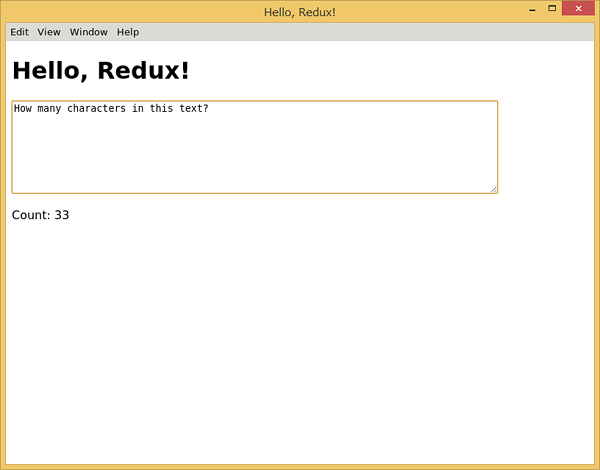
適当にテキストボックスに文字列を入力すると、入力するたびに文字数カウンタが更新されることが確認できる。
Windows用にパッケージングしてみる
作成したElectronアプリを他のプラットフォーム用にパッケージングするには、electron-packagerモジュールを使うと簡単である。 electron-packgerモジュールをインストールするには次のようにする。
$ npm install --save-dev electron-packager
packages.jsonを編集し、npmからelectron-packagerコマンドを追記する。
ここでは、Windowsの32bitおよび64bit用のみをパッケージングするようにオプションを指定している。
また、webpackやbabel関連のモジュールは動作に必要ないため、--ignoreオプションで除外しておく。
なお、electron-packager、electron-prebuiltは標準で除外されるため明示的な除外は不要である。
{
  "name": "helloredux",
  "version": "1.0.0",
  "description": "",
  "main": "index.js",
  "scripts": {
    "test": "echo \"Error: no test specified\" && exit 1",
    "build": "rm -rf scripts/*.js && webpack",
    "watch": "rm -rf scripts/*.js && webpack -w",
    "electron": "electron .",
    "electron-packager": "electron-packager . --platform=win32 --arch=all --ignore='node_modules/(webpack|babel-.*)'"
  },
  "keywords": [],
  "author": "",
  "license": "ISC",
  "devDependencies": {
    "babel-core": "^6.7.6",
    "babel-loader": "^6.2.4",
    "babel-preset-es2015": "^6.6.0",
    "babel-preset-react": "^6.5.0",
    "electron-packager": "^6.0.2",
    "electron-prebuilt": "^0.37.5",
    "webpack": "^1.12.15"
  },
  "dependencies": {
    "react": "^15.0.1",
    "react-dom": "^15.0.1",
    "react-redux": "^4.4.5",
    "redux": "^3.4.0"
  }
}
npmからelectron-packgerコマンドを実行すると、各プラットフォーム用のディレクトリが作成される。
$ npm run electron-packager
zipコマンド等で圧縮ファイルを作り、Windowsに転送する。
$ zip -r helloredux-win32-x64.zip helloredux-win32-x64/
転送した圧縮ファイルを展開し、中に含まれるhelloredux.exeを実行するとGUIアプリが起動する。 このときのスクリーンショットを次に示す。
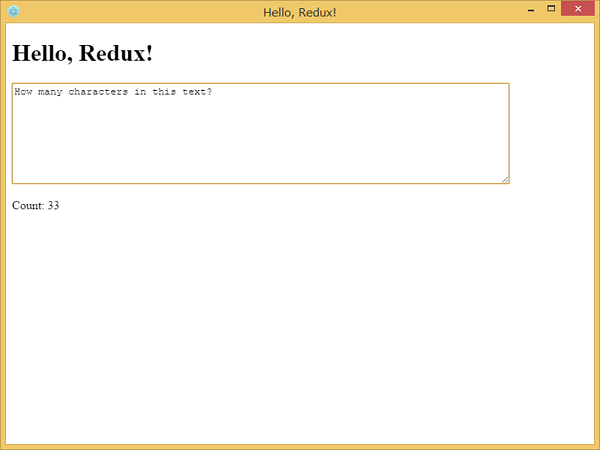
Linuxの場合と同じようにアプリが動作することが確認できる。
ElectronではNode.js用のモジュールを使うことができるため、ファイルシステムへのアクセスやプロセスの実行などさまざまなことをマルチプラットフォームで行うことができる。
