だいぶニッチな要件ですが、公式ドキュメントに記載を見つけられず試行錯誤したのでメモ。
前提
Step Function では、 Amazon States Language でフローを定義します。
パスは $で始まる文字列 となる JsonPath 構文で記述し、ドット表記とブラケット表記が利用できます。
ドキュメント内の例は殆どドット表記で記載されています。
You can access object fields using only dot (.) and square bracket ([ ]) notation.
json-path/JsonPath: Java JsonPath implementation
JsonPath expressions can use the dot–notation
$.store.book[0].title
or the bracket–notation
$['store']['book'][0]['title']
また、データ処理を行うための組み込み関数がいくつか用意されています。
Intrinsic functions - AWS Step Functions
結論
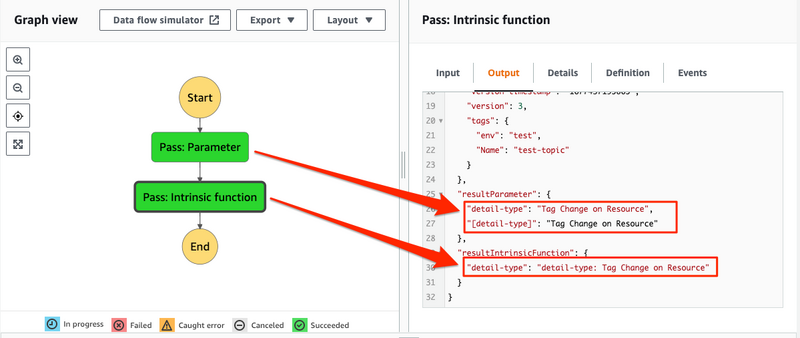
Parameters では、両表記 "$.detail-type", $['detail-type'] が利用可能です。
Intrinsic functions (組み込み関数) 内でも利用できますが、ハイフンを含む場合は、ブラケット表記 $['detail-type'] のみ利用可能 です。
詳細
例題
AWS の各種 Event に含まれる datail-type を Step Function (StateMachine) で使用します。
"$.detail-type"、$['detail-type'] の二通りの記述方式で、単純参照と組み込み関数の利用を試します。
関数は値を利用して新たな文字列を生成する States.Format を利用します。
成功例
input データから値を抽出する簡単な StateMachine で確認します。
{
  "Comment": "hyphen check",
  "StartAt": "Pass: Parameter",
  "States": {
    "Pass: Parameter": {
      "Type": "Pass",
      "Parameters": {
        "detail-type.$": "$.detail-type",
        "[detail-type].$": "$['detail-type']"
      },
      "ResultPath": "$.resultParameter",
      "Next": "Pass: Intrinsic function"
    },
    "Pass: Intrinsic function": {
      "Type": "Pass",
      "Parameters": {
        "detail-type.$": "States.Format('detail-type: {}', $['detail-type'])"
      },
      "ResultPath": "$.resultIntrinsicFunction",
      "End": true
    }
  }
}
失敗例
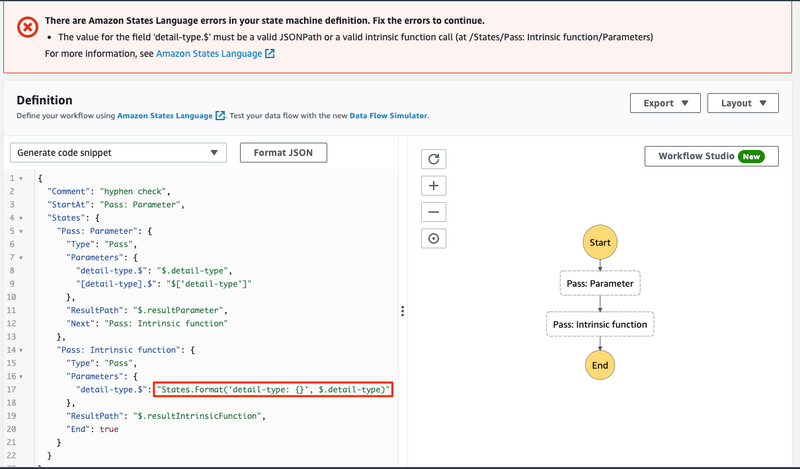
抜粋です。 States.Format の $['detail-type'] が $.detail-type になっています。
"detail-type.$": "States.Format('detail-type: {}', $.detail-type)"
書式エラーとなり、保存できません。
There are Amazon States Language errors in your state machine definition. Fix the errors to continue.