Datadog公式のツール dog 使用方法まとめ monitor 編です。

目次
monitor Modes
Monitor 操作を行います。
| サブコマンド | 説明 |
|---|---|
| post | モニター作成 |
| update | モニター更新 |
| show | モニター情報出力 |
| show_all | モニター一覧出力 |
| delete | モニター削除 |
| mute_all | 全モニターの mute |
| unmute_all | 全モニターの unmute |
| mute | モニターの mute |
| unmute | モニターの unmute |
post
モニターを作成します。
usage: dog monitor post [-h] [--name NAME] [--message MESSAGE]
                        [--options OPTIONS]
                        type query
positional arguments:
| 引数 | 説明 |
|---|---|
| type | モニター種類。"metric alert"、"service check"、"event alert" のいずれかを指定。 |
| query | クエリ文字列。 type により指定項目が異なる。 |
query に関しては、dog のヘルプには詳細記載が無いため、API Reference などで確認します。 記載方法は多岐に渡るため今回詳細は割愛します。
恐らくダッシュボード上でグラフを生成して、Edit から JSON 参照するのが最も簡単に作成する方法だと思います。 メトリクスのグラフはジェネレータのような Metric Explorer が用意されていますが、一旦グラフを生成しないと JSON の参照ができません。
optional arguments:
| ロングオプション | 説明 |
|---|---|
| –name | モニター件名 |
| –message | 通知時のメッセージ |
| –options | モニターオプション。 共通オプションと type 固有オプションが存在。 JSON文字列で指定。 |
options に関しても、dog のヘルプには詳細記載が無いため、API Reference などで確認します。 設定項目が多いため今回詳細は割愛します。
実行例
オプション無し
JSONで返却されます。 件名にはクエリ文字列が入ります。
metric alert
$ dog monitor post "metric alert" 'avg(last_5m):max:system.cpu.user{*} by {host} >= 50' | jq '.'
{
  "multi": true,
  "name": "**system.cpu.user** over ***** was **>= 50.0** on average during the **last 5m**.",
  "tags": [],
  "deleted": null,
  "type": "metric alert",
  "created_at": NNNNNNNNNN000,
  "created": "yyyy-MM-ddThh:mm:dd.050779+00:00",
  "org_id": XXXX3,
  "modified": "yyyy-MM-ddThh:mm:dd.050779+00:00",
  "options": {
    "notify_audit": false,
    "locked": false,
    "silenced": {},
    "require_full_window": true,
    "new_host_delay": 300,
    "notify_no_data": false
  },
  "overall_state_modified": null,
  "overall_state": "No Data",
  "query": "avg(last_5m):max:system.cpu.user{*} by {host} >= 50",
  "message": "",
  "creator": {
    "email": "user@example.com",
    "handle": "user@example.com",
    "id": XXXXX8,
    "name": "User Name"
  },
  "id": XXXXXX1
}

service check
dog monitor post "service check" '"datadog.agent.up".over("*").by("host").last(5).count_by_status()'

event alert
$ dog monitor post "event alert" 'events("sources:users priority:all").rollup("count").last("5m") > 0'

name オプション
モニター名を指定します。
dog monitor post --name "MonitorTest1" "metric alert" 'avg(last_5m):max:system.cpu.user{*} by {host} >= 50'

message オプション
モニター通知文を指定します。
$ dog monitor post --message "alert message to @hoge@example.com" "metric alert" 'avg(last_5m):max:system.cpu.user{*} by {host} >= 50' | jq '.'

options オプション
mute 状態(Forever)で登録する場合の例です。共通オプションの silenced を指定します。
$ dog monitor post --name "MonitorTest4" --message "Test4: alert message to @hoge@example.com" --options '{"silenced": "{\"*\": null}"}' "metric alert" 'avg(last_5m):max:system.cpu.user{*} by {host} >= 50'

ファイル形式
ファイル形式での読込は未対応のため、実行時には展開する必要があります。
$ cat param.json
{"no_data_timeframe": 300}
$ dog monitor post --name "MonitorTest4" --message "Test4: alert message to @hoge@example.com" --options "$(cat param.json)" "metric alert" 'avg(last_5m):max:system.cpu.user{*} by {host} >= 50'
update
モニターを更新します。post とほぼ同じ構文で、対象の MonitorId を指定します。
usage: dog monitor update [-h] [--name NAME] [--message MESSAGE]
                          [--options OPTIONS]
                          monitor_id type query
変更がない場合でも type,query の指定は必須です。(idのみにして欲しい所ではあります)
実行例
モニター件名を更新する例です。
$ monitor_id=XXXXXXX
$ dog monitor update --name "UpdateMonitorTest" ${monitor_id} "metric alert" 'avg(last_5m):max:system.cpu.user{*} by {host} >= 50'
- 実行前後比較
$ diff monitor.json.before monitor.json.after
3c3
<   "name": "**system.cpu.user** over ***** was **>= 50.0** on average during the **last 5m**.",
---
>   "name": "UpdateMonitorTest",
10c10
<   "modified": "yyyy-MM-ddThh:mm:dd.286774+00:00",
---
>   "modified": "yyyy-MM-ddThh:mm:dd.597438+00:00",
show
指定 monitor_id の情報を出力します。
usage: dog monitor show [-h] monitor_id
実行例
JSON 形式で出力されます。
$ monitor_id=XXXXXXX
$ dog monitor show ${monitor_id} | jq '.'
{
  "multi": true,
  "name": "UpdateMonitorTest",
  "tags": [],
  "deleted": null,
  "type": "metric alert",
  "created_at": NNNNNNNNNN000,
  "created": "yyyy-MM-ddThh:mm:dd.050779+00:00",
  "org_id": XXXX3,
  "modified": "yyyy-MM-ddThh:mm:dd.597438+00:00",
  "options": {
    "notify_no_data": false,
    "notify_audit": false,
    "locked": false,
    "new_host_delay": 300,
    "silenced": {}
  },
  "overall_state_modified": "yyyy-MM-ddThh:mm:dd.971827+00:00",
  "overall_state": "OK",
  "query": "avg(last_5m):max:system.cpu.user{*} by {host} >= 50",
  "message": "",
  "creator": {
    "email": "user@example.com",
    "handle": "user@example.com",
    "id": XXXXX8,
    "name": "User Name"
  },
  "id": XXXXXX5
}
show_all
全モニター情報を出力します。タグ等による絞り込みは未サポートです。(APIではタグによる絞り込みが可能なようです)
usage: dog monitor show_all [-h]
実行例
整形された状態で出力されます。tsv形式に似ていますが、区切りタブの数が異なったりと完全なtsvにはなっていません。
raw オプションを使用して JSON で出力した方が扱いやすいと思います。
$ dog monitor show_all
XXXXXX7     MonitorTest1    {u'notify_audit': False, u'locked': False, u'silenced': {}, u'require_full_window': True, u'new_host_delay': 300, u'notify_no_data': False} XXXX3   avg(last_5m):max:system.cpu.user{*} by {host} >= 50  metric alert
XXXXXX4 alert message to @hoge@example.com  **system.cpu.user** over ***** was **>= 50.0** on average during the **last 5m**.    {u'notify_audit': False, u'locked': False, u'silenced': {}, u'require_full_window': True, u'new_host_delay': 300, u'notify_no_data': False} XXXX3   avg(last_5m):max:system.cpu.user{*} by {host} >= 50  metric alert
・・・略
# raw オプション
#dog --raw monitor show_all
delete
指定 monitor_id を削除します。
usage: dog monitor delete [-h] monitor_id
実行例
レスポンスはありません。(raw オプションを付けても同様です)
$ monitor_id=XXXXXX5
$ dog monitor delete ${monitor_id}
$ dog monitor show ${monitor_id}
ERROR: Monitor not found
$ monitor_id=XXXXXX7
$ dog --raw monitor delete ${monitor_id}
$ dog --raw monitor show ${monitor_id}
ERROR: Monitor not found
mute_all | unmute_all
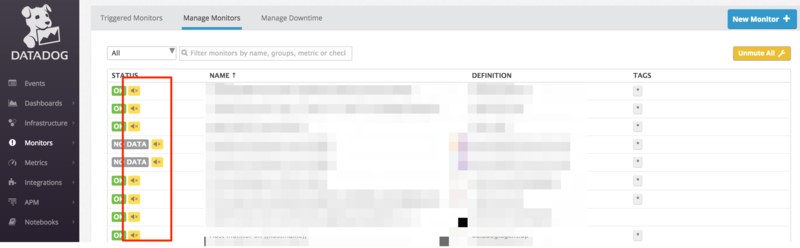
全モニターを mute | unmute (無効化 | 無効化解除)します。
影響が大きいコマンドなので基本利用しない方が良いかと思います。
Monitor 画面右上の Mute All" ボタン押下時と同様の動作です。
# mute_all
usage: dog monitor mute_all [-h]
# unmute_all
usage: dog monitor unmute_all [-h]
実行例
mute_all
$ dog monitor mute_all | jq '.'
{
  "recurrence": null,
  "end": null,
  "parent_id": null,
  "monitor_id": null,
  "start": NNNNNNNNN3,
  "disabled": false,
  "canceled": null,
  "creator_id": XXXXX8,
  "scope": [
    "*"
  ],
  "active": true,
  "timezone": "UTC",
  "message": null,
  "monitor_name": null,
  "id": XXXXXXXX4,
  "updater_id": null
}
unmute_all
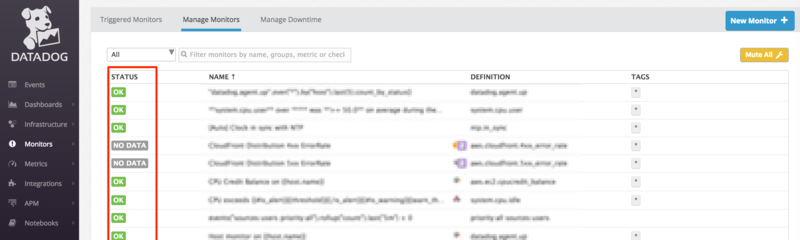
レスポンスはありません。(raw オプションを付けても同様です)
$ dog monitor unmute_all | jq '.'
$
通知
実行者と全員(@all)に通知されます。

mute | unmute
moniter_id 指定で mute | unmute (無効化 | 無効化解除)します。
# mute
usage: dog monitor mute [-h] [--scope SCOPE] [--end END] monitor_id
# unmute
usage: dog monitor unmute [-h] [--scope SCOPE] [--all_scopes] monitor_id
optional arguments:
| ロングオプション | 説明 |
|---|---|
| –scope | 適用対象タグ |
| –end | muteのみ。終了日時を指定。POSIX timestamp |
| –all_scopes | unmuteのみ。全スコープを対象とする |
実行例
mute|unmute
いずれも JSON 形式でのレスポンスです。
$ monitor_id=XXXXXX5
$ dog monitor mute ${monitor_id} | jq '.'
{
  "multi": true,
  "name": "MonitorTest4",
  "tags": [],
  "deleted": null,
  "created_at": NNNNNNNNNN000,
  "created": "yyyy-MM-ddThh:mm:dd.596409+00:00",
  "org_id": XXXX3,
  "modified": "yyyy-MM-ddThh:mm:dd.596409+00:00",
  "options": {
    "notify_audit": false,
    "locked": false,
    "silenced": {
      "*": null
    },
    "no_data_timeframe": 300,
    "require_full_window": true,
    "new_host_delay": 300,
    "notify_no_data": false
  },
  "overall_state_modified": "yyyy-MM-ddThh:mm:dd.037144+00:00",
  "overall_state": "OK",
  "query": "avg(last_5m):max:system.cpu.user{*} by {host} >= 50",
  "message": "Test4: alert message to @hoge@example.com",
  "type": "metric alert",
  "id": XXXXXX5
}
scope オプション
$ monitor_id=XXXXXX1
$ dog monitor mute --scope "host:i-XXXXXX" ${monitor_id} | jq '.'
mute 設定状況は [Monitors] → [Manage Downtime] で確認できます。

mute→unmuteでscopeを変える事は不可
全体を mute 後、 特定の scope のみを unmute することはできませんでした。
$ monitor_id=XXXXXX1
$ dog monitor unmute --scope "host:i-XXXXXX" ${monitor_id} | jq '.'
ERROR: metric alert "CPU Credit Balance on {{host.name}}" is already unmuted on host:i-XXXXXX
end オプション(mute)
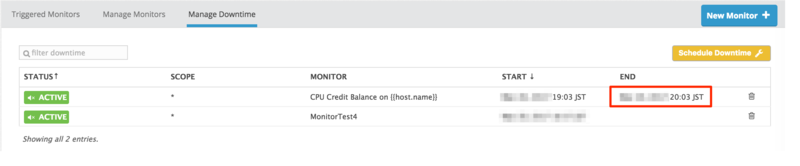
mute終了時刻を指定します。
monitor_id= XXXXXX1
dog monitor mute --end $(date -v 1h +'%s') ${monitor_id} | jq '.'
all_scopes オプション(unmute)
個別の scope が設定されている mute 状態 monitor 全てを unmute します。
- 実行前の状態
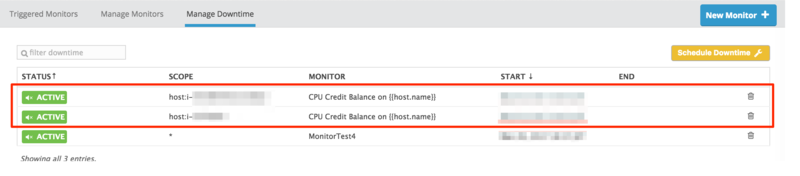
オプション無しだとエラーが返りますが、 all_scopes を付与することによりまとめて unmute (無効化解除) が行えます。
$ monitor_id=XXXXXX1
$ dog monitor unmute ${monitor_id} | jq '.'
ERROR: metric alert "CPU Credit Balance on {{host.name}}" is already unmuted
$ dog monitor unmute --all_scopes ${monitor_id} | jq '.'
実行時エラー
- mute(unmute) 済みを mute(unmute)
ERROR: metric alert "MonitorTest4" is already muted
ERROR: metric alert "MonitorTest4" is already unmuted
- 存在しない monitor_id 指定
ERROR: Monitor not found
Query と Option については別の機会に整理したいと思います。
