アセットを右クリックした際に Reveal In Finder / Show in Explorer を選べば ファイラーが開きます
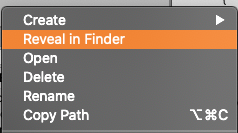
これをスクリプトから呼び出したい場合は EditorUtility.RevealInFinder を利用する
ファイルを指定した場合は ファイルを選択した状態でファイラーを開けますが
ディレクトリを指定した場合は親ディレクトリが選択した状態でファイラーが開いてしまいます
// ルートからのパス と Assets からのパス 両方指定できる
EditorUtility.RevealInFinder(Application.temporaryCachePath);
EditorUtility.RevealInFinder("Assets/");

// Assets の親ディレクトリを選択した状態で開く
EditorUtility.RevealInFinder("Assets/");

// Sample.unity ファイルが選択状態で開く
EditorUtility.RevealInFinder("Assets/Sample.unity");
