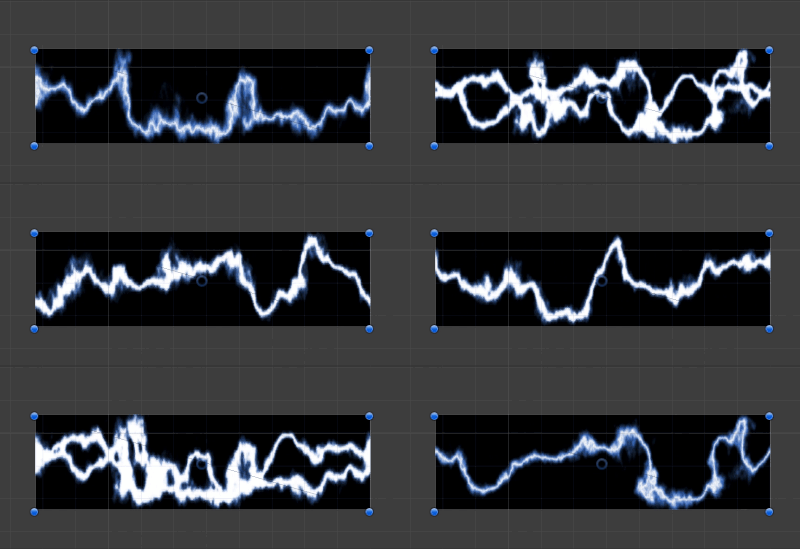
画像はこちらのを利用させていただく
Lightning Bolt Effect for Unity | Particles/Effects | Unity Asset Store
縦横の分割数と、1枚あたりの時間を指定して利用する

そうするとこのように Shader で SpriteAnimation ができます
Shader "Unlit/SpriteAnimation"
{
    Properties
    {
        [NoScaleOffset]
        _MainTex ("Texture", 2D) = "white" {}

        _Width ("Width Separate", int) = 2
        _Height ("Height Separete", int) = 2
        _Sec ("Change Sec", float) = 0.1
    }
    SubShader
    {
        Tags { "RenderType"="Opaque" }

        Pass
        {
            CGPROGRAM
            #pragma vertex vert
            #pragma fragment frag

            #include "UnityCG.cginc"

            struct appdata
            {
                float4 vertex : POSITION;
                float2 uv : TEXCOORD0;
            };

            struct v2f
            {
                float2 uv : TEXCOORD0;
                float4 vertex : SV_POSITION;
            };

            sampler2D _MainTex;
            float4 _MainTex_ST;
            float _Width;
            float _Height;
            float _Sec;

            v2f vert (appdata v)
            {
                v2f o;
                o.vertex = UnityObjectToClipPos(v.vertex);
                float2 xy = 1.0 / float2(_Width, _Height);

                float index = floor(_Time.y / _Sec % (_Width * _Height));
                o.uv = TRANSFORM_TEX(v.uv, _MainTex) * xy + float2(index % _Width, index % _Height) * xy;

                return o;
            }

            fixed4 frag (v2f i) : SV_Target
            {
                return tex2D(_MainTex, i.uv);
            }
            ENDCG
        }
    }
}
