Editor クラスの OnInspectorGUI を EditorWindow OnGUI を呼び出すことで
Inspector の UI を表示することができます
そのためには ScriptableObject の Editor を取得する必要があり
それは下記メソッドで取得できます
public static UnityEditor.Editor CreateEditor(UnityEngine.Object targetObject);
サンプル
今回利用する ScriptableObject は以下です
表示するのは int と string のシンプルな構成
public class SampleScriptableObject : ScriptableObject
{
    public int IntValue;
    public string StringValue;
}
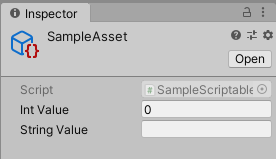
貼らなくてもわかると思いますがこうなります
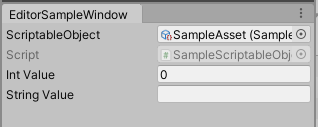
これを下記 EditorWindow を利用して表示してみると
Inspector と同じ UI が表示されています
using UnityEditor;
using UnityEngine;

public class EditorSampleWindow : EditorWindow
{
    private Editor _editor;
    private ScriptableObject _target;

    private void OnGUI()
    {
        EditorGUI.BeginChangeCheck();
        _target = (ScriptableObject) EditorGUILayout.ObjectField("ScriptableObject", _target, typeof(ScriptableObject));
        if (EditorGUI.EndChangeCheck())
        {
            _editor = Editor.CreateEditor(_target);
        }

        if (_editor == null)
            return;

        _editor.OnInspectorGUI();
    }
}
