◆ESP32-S3-DevKit-1-N16R8のボードにSPI接続の2.8インチLCDを接続し
以前作っていた漢字表示対応ニュース表示を作ってみました。
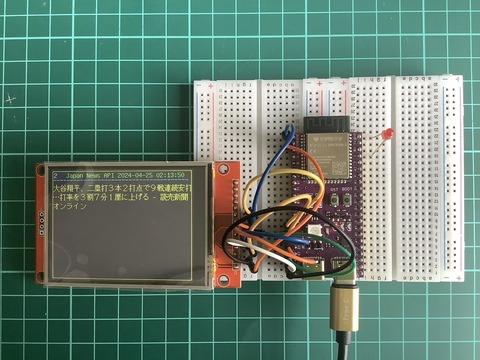

詳しくは、下記ブログ内記事を参照して下さい。
1.2.8'LCDに対応して「User_Setup.h」を編集します。
//コメントを取り他のドライバをコメントアウトする。
①ドライバーICの設定(45行近辺)
#define ILI9341_DRIVER // Generic driver for common displays
②画面サイズの設定
#define TFT_WIDTH 240 // ST7789 240 x 240 and 240 x 320
#define TFT_HEIGHT 320 // ST7789 240 x 320
➂SPIのピン番号の設定
//ESP32-S3 Devkit 2.8' LCD用 2024/04/26 追記
#define TFT_MISO 9
#define TFT_MOSI 13
#define TFT_SCLK 12
#define TFT_CS 10 // Chip select control pin
#define TFT_DC 11 // Data Command control pin
#define TFT_RST 14 // Reset pin (could connect to RST pin)
#define TFT_BL -1 // LED back-light
#define TOUCH_CS -1 // Chip select pin (T_CS) of touch screen
2.LCDとの接続

3.スケッチは、下記の物を流用します。
ESP32-1732S019_efont_TFT_eSPI_NewsAPI.ino ①LEDのGPIO番号を変更します。
15行 #define LED 1 //21
②サイズの変更します。
//2.8'LCD 320 x 240
20行 #define SCREEN_WIDTH 320 // tft display width, in pixels
21行 #define SCREEN_HEIGHT 240 // tft display height, in pixels
➂枠サイズを変更します。
149行 Rect(0,0,319,239,Yellow);//枠表示
220行 Rect(0,0,319,239,Yellow);//枠表示
以上で、動作可能です。
3.実行画面

以上


