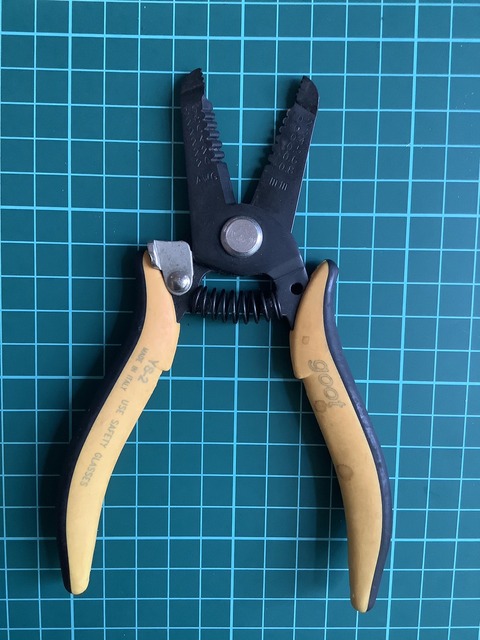
・マルチワイヤーストリッパー PAW-01 を入手し使ってみた
◆電子工作をやっていて色々な線の被覆を剥くのに今まで単線用の
工具を使っていました。
今回複線(フラットケーブル)でも剥ける工具を入手しましたので
使ってみました。使用感は良好でした。
1.外観とパッケージ
①表
②裏
➂保証書
◆これからこれを使うことで、作業が捗りそうです。
私は、ヨドバシで購入しましたが、アマゾンの方が安いようです。
以上


//atoms3_usb_host_keybord_to_i2c.ino v20230706
//http://gijin77.blog.jp/archives/37426889.html
//USBキーボードをカードキーボードに変換(CardKB v1.1)
#include <M5AtomS3.h>
#include "EspUsbHost.h"
#include <Wire.h>
#define SDA_PIN 2
#define SCL_PIN 1
uint8_t keyPressed=0;
uint8_t KEY=0;
class MyEspUsbHost : public EspUsbHost {
void onKeyboardKey(uint8_t ascii, uint8_t keycode, uint8_t modifier) {
KEY=ascii;keyPressed=1;
if (' ' <= ascii && ascii <= '~') {
M5.Lcd.printf("%c", ascii);
} else if (ascii == '\r') {
M5.Lcd.println();
}
};
};
MyEspUsbHost usbHost;
void requestEvent() {
if (keyPressed == 1) {
Wire.write(KEY);
keyPressed = 0;
} else {
Wire.write(0);
}
}
void setup() {
M5.begin(true, false, false, false); // Init M5AtomS3
M5.Lcd.setRotation( 3 );
M5.Lcd.clear();
M5.Lcd.setTextSize(2);
M5.Lcd.println("EspUsbHostKeybord to I2C" );
usbHost.begin();
usbHost.setHIDLocal(HID_LOCAL_Japan_Katakana);
Wire.onRequest(requestEvent);
Wire.setPins(SDA_PIN, SCL_PIN);
Wire.begin(0x5f);
}
void loop() {
M5.update(); // Read the press state of the key
if (M5.Btn.wasReleased() || M5.Btn.pressedFor(1000)) {
M5.Lcd.clear();
M5.Lcd.setCursor(0,0);
}
usbHost.task();
}

//atoms3lite_usb_host_keybord_to_i2c.ino v20230706
//http://gijin77.blog.jp/archives/37426889.html
//USBキーボードをカードキーボードに変換(CardKB v1.1)
#include <FastLED.h>
#include <M5AtomS3.h>
#include "EspUsbHost.h"
#include <Wire.h>
#define SDA_PIN 2
#define SCL_PIN 1
#define PIN_SW 41 // 本体釦 atoms3lite
#define PIN_LED 35 // 本体フルカラーLEDの使用端子(G21)
#define NUM_LEDS 1 // 本体フルカラーLEDの数
uint8_t keyPressed=0;
uint8_t KEY=0;
CRGB leds[NUM_LEDS];
class MyEspUsbHost : public EspUsbHost {
void onKeyboardKey(uint8_t ascii, uint8_t keycode, uint8_t modifier) {
KEY=ascii;keyPressed=1;
leds[0] = CRGB(0, 0, 255);
FastLED.show();
delay(100);
leds[0] = CRGB(0, 0, 0);
FastLED.show();
};
};
MyEspUsbHost usbHost;
void requestEvent() {
if (keyPressed == 1) {
Wire.write(KEY);
keyPressed = 0;
} else {
Wire.write(0);
}
}
void setup() {
M5.begin(true, false, false, false); // Init M5AtomS3
FastLED.addLeds<WS2812B, PIN_LED, GRB>(leds, NUM_LEDS);
for( int i=0;i<2;i++) {
leds[0] = CRGB(255, 0, 0); // 白色(赤, 緑, 青)※3色それぞれの明るさを0〜255で指定
FastLED.show();
delay(1000);
leds[0] = CRGB(0, 255, 0); // 白色(赤, 緑, 青)※3色それぞれの明るさを0〜255で指定
FastLED.show();
delay(1000);
leds[0] = CRGB(0, 0, 255); // 白色(赤, 緑, 青)※3色それぞれの明るさを0〜255で指定
FastLED.show();
delay(1000);
}
leds[0] = CRGB(0, 0, 0);
FastLED.show();
usbHost.begin();
usbHost.setHIDLocal(HID_LOCAL_Japan_Katakana);
Wire.onRequest(requestEvent);
Wire.setPins(SDA_PIN, SCL_PIN);
Wire.begin(0x5f);
}
void loop() {
usbHost.task();
}


//atoms3_usb_host_keybord.ino v20230703
//http://gijin77.blog.jp/archives/37402177.html
#include <M5AtomS3.h>
#include "EspUsbHost.h"
class MyEspUsbHost : public EspUsbHost {
void onKeyboardKey(uint8_t ascii, uint8_t keycode, uint8_t modifier) {
if (' ' <= ascii && ascii <= '~') {
M5.Lcd.printf("%c", ascii);
} else if (ascii == '\r') {
M5.Lcd.println();
}
};
};
MyEspUsbHost usbHost;
void setup() {
M5.begin(true, false, false, false); // Init M5AtomS3
M5.Lcd.setRotation( 3 );
M5.Lcd.clear();
M5.Lcd.setTextSize(2);
M5.Lcd.println("EspUsbHostKeybord" );
usbHost.begin();
usbHost.setHIDLocal(HID_LOCAL_Japan_Katakana);
}
void loop() {
M5.update(); // Read the press state of the key
if (M5.Btn.wasReleased() || M5.Btn.pressedFor(1000)) {
M5.Lcd.clear();
M5.Lcd.setCursor(0,0);
}
usbHost.task();
}