この記事は はてなエンジニア Advent Calendar 2025 の12日目です。
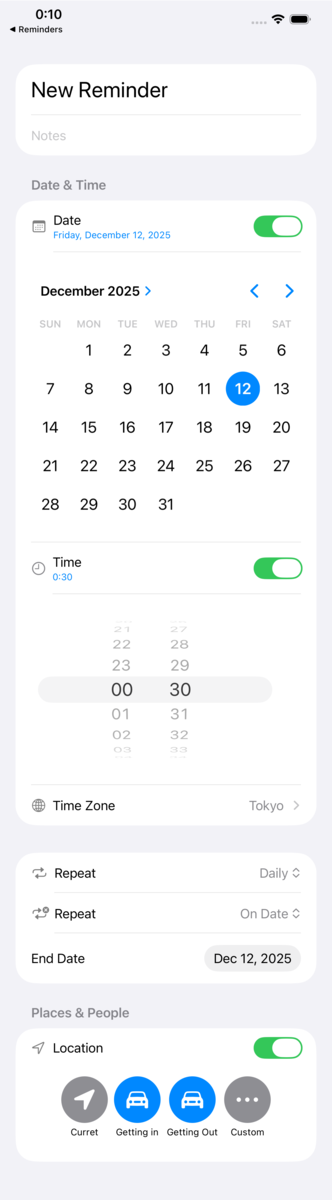
最近SwiftUIで様々な行を実装したので、Remindersの編集画面をどこまで再現できるか試した。
のがこちらです。右は本家。
| 作った方 | 本家 |
|---|---|
 |
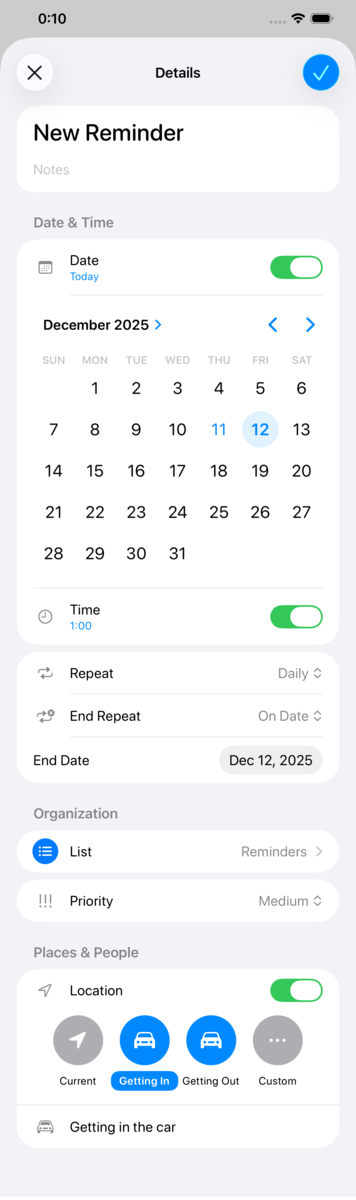 |
自明なところは省いたので多少違うけど、まあいいんじゃないか。
コード解説
全文
struct ReminderView: View {
    var body: some View {
        NavigationStack {
            Form {
                Section {
                    TextField("Title", text: .constant("New Reminder"))
                        .font(.title)
                    TextField("Notes", text: .constant(""))
                }

                Section("Date & Time") {
                    LabeledContent {
                        Toggle(isOn: .constant(true)) {
                            VStack(alignment: .leading) {
                                Text("Date")
                                // FIXME: 本家は .relative(presentation:) とのいいとこ取りみたいな挙動になっていた
                                Text(Date().formatted(date: .complete, time: .omitted))
                                    .font(.caption)
                                    .foregroundStyle(.blue)
                            }
                        }
                    } label: {
                        Image(systemName: "calendar")
                            .foregroundStyle(.secondary)
                    }

                    DatePicker("date", selection: .constant(Date()), displayedComponents: .date)
                        .datePickerStyle(.graphical)

                    Button {} label: {
                        LabeledContent {
                            Toggle(isOn: .constant(true)) {
                                VStack(alignment: .leading) {
                                    Text("Time")
                                    Text(Date().formatted(date: .omitted, time: .shortened))
                                        .font(.caption)
                                        .foregroundStyle(.blue)
                                }
                            }
                        } label: {
                            Image(systemName: "clock")
                                .tint(.secondary)
                        }
                    }

                    DatePicker("time", selection: .constant(Date()), displayedComponents: .hourAndMinute)
                        .datePickerStyle(.wheel)
                        .labelsHidden()

                    NavigationLink {
                        List {
                            Text("London")
                            Text("Tokyo")
                        }
                    } label: {
                        LabeledContent {
                            Text("Tokyo")
                        } label: {
                            HStack {
                                Image(systemName: "globe")
                                    .foregroundStyle(.secondary)
                                Text("Time Zone")
                            }
                        }
                    }
                }

                Section {
                    LabeledContent {
                        Picker("Repeat", selection: .constant("Daily")) {
                            Text("Never").tag("Never")
                            Divider()
                            Text("Daily").tag("Daily")
                        }
                    } label: {
                        Image(systemName: "repeat")
                            .foregroundStyle(.secondary)
                    }

                    LabeledContent {
                        Picker("Repeat", selection: .constant("On Date")) {
                            Text("Never").tag("Never")
                            Divider()
                            Text("On Date").tag("On Date")
                        }
                    } label: {
                        Image(systemName: "repeat.badge.xmark")
                            .foregroundStyle(.secondary)
                    }

                    DatePicker("End Date", selection: .constant(Date()), displayedComponents: .date)
                    .datePickerStyle(.compact)
                }

                Section("Places & People") {
                    VStack {
                        LabeledContent {
                            Toggle(isOn: .constant(true)) {
                                VStack(alignment: .leading) {
                                    Text("Location")
                                }
                            }
                        } label: {
                            Image(systemName: "location")
                                .foregroundStyle(.secondary)
                        }

                        HStack {
                            VStack {
                                Image(systemName: "location.fill")
                                    .resizable()
                                    .aspectRatio(contentMode: .fit)
                                    .foregroundStyle(.white)
                                    .padding()
                                    .frame(width: 60, height: 60)
                                    .background(Circle().fill(.gray))
                                Text("Curret")
                                    .font(.caption)
                            }
                            VStack {
                                Image(systemName: "car.fill")
                                    .resizable()
                                    .aspectRatio(contentMode: .fit)
                                    .foregroundStyle(.white)
                                    .padding()
                                    .frame(width: 60, height: 60)
                                    .background(Circle().fill(.blue))
                                Text("Getting in")
                                    .font(.caption)
                            }
                            VStack {
                                Image(systemName: "car.fill")
                                    .resizable()
                                    .aspectRatio(contentMode: .fit)
                                    .foregroundStyle(.white)
                                    .padding()
                                    .frame(width: 60, height: 60)
                                    .background(Circle().fill(.blue))
                                Text("Getting Out")
                                    .font(.caption)
                            }
                            VStack {
                                Image(systemName: "ellipsis")
                                    .resizable()
                                    .aspectRatio(contentMode: .fit)
                                    .foregroundStyle(.white)
                                    .padding()
                                    .frame(width: 60, height: 60)
                                    .background(Circle().fill(.gray))
                                Text("Custom")
                                    .font(.caption)
                            }
                        }
                        .padding()
                    }
                }
            }
        }
    }
}
Form
ListかFormか悩んだけど、ドキュメントを読むとListは"A container that presents rows of data"*1, Formは"A container for grouping controls used for data entry"*2ということだったのでFormにした。
LabeledContent
これもLabelと悩んだが、Labelの"A standard label for user interface items, consisting of an icon with a title"*3とLabeledContentの"A container for attaching a label to a value-bearing view"*4だったら、詳細に用途が書いてあってそれに当てはまるLabeledContentかな〜。普通に置いたときのアイコンのサイズが本家と近かったのも理由。
基本的にはこう使った。LabeledCnotentをButtonやNavigationLinkのlabelに入れることもできる。
LabeledCnotent {
    Toggle()
} label: {
    Image()
}
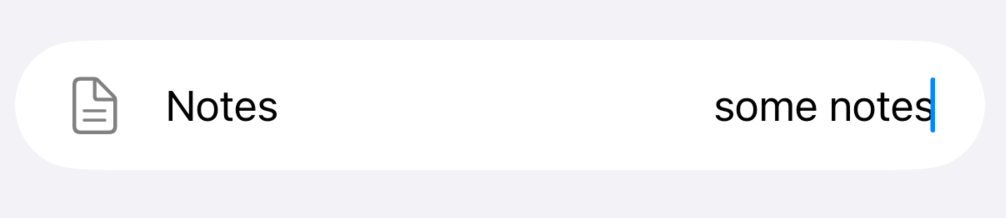
今回は使っていないが、TextFieldの場合は右寄せにするのが気に入っている。
LabeledContent {
    TextField()
        .multilineTextAlignment(.trailing)
} label: {
    Label {
        Text()
    } icon: {
        Image()
    }
}
Picker
頻出したのがPicker類で、DatePickerは引数のdisplayedComponentsやmodifierのdatePickerStyle(_:)を使って色々できる。特に時間用のwheelは、2列にしたり無限ループにしたりが面倒なので再発明の必要が無くて助かる。
PickerのcontentにDividerを入れられるのは便利だがよく忘れる。今回は思い出せてよかった。
その他様々なmodifier
formatted(_:)は便利*5。Dateのところだけ再現できなかったのが悔しい。本家では、±1日の範囲ではformatted(.relative(presentation:))、その範囲外ではformatted(date:time:)みたいな挙動をしていた。
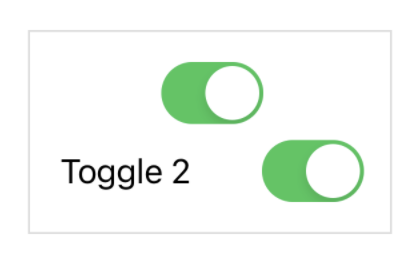
labelsHidden()を使うとaccessibilityを確保しつつラベルを隠せる。今回は時間用のDatePickerで使った。ドキュメントにある画像を見ると用途がわかりやすい。
 https://developer.apple.com/documentation/swiftui/view/labelshidden()
やってみると結構できたけど、細かいところまで再現するのは大変だな〜〜。終わり。
*1:https://developer.apple.com/documentation/swiftui/list
*2:https://developer.apple.com/documentation/swiftui/form
*3:https://developer.apple.com/documentation/swiftui/label
*4:https://developer.apple.com/documentation/swiftui/labeledcontent
*5:そろそろ FormatStyle by treastrain / Tanaka Ryoga | トーク | iOSDC Japan 2025 #iosdc - fortee.jp も
