1行まとめ
macOS Big Sur からMontereyにアプデしたらgccでコンパイルエラーが出るようになったけどxcode-select --installコマンド打ったら治った。
環境
gccコマンドはエイリアスでちゃんとbrewでインストールしたものを呼ぶように設定してある:
% which gcc
gcc: aliased to gcc-11
詳しいインストール手順は下記記事にまとめています:
エラー内容〜解決まで
一週間ぶりにC言語のプログラムをgccでコンパイルしようとしたらエラーが出た:
% gcc hoge.c
In file included from test6.c:1:
/usr/local/Cellar/gcc/11.2.0/lib/gcc/11/gcc/x86_64-apple-darwin20/11.2.0/include-fixed/stdio.h:78:10: fatal error: _stdio.h: No such file or directory
   78 | #include <_stdio.h>
      |          ^~~~~~~~~~
compilation terminated.
#includeしているstdio.hが見つからないぞ?って言われてる。
メッセージ中に/usr/local/Cellar/gcc/11.2.0/lib/gcc/11/gcc/x86_64-apple-darwin20/11.2.0/include-fixed/stdio.hとパスが書かれているので確認してみると、普通に存在している。
gcc自体はエラーなく使える。例えば:
% gcc -v
Using built-in specs.
COLLECT_GCC=gcc-11
COLLECT_LTO_WRAPPER=/usr/local/Cellar/gcc/11.2.0/libexec/gcc/x86_64-apple-darwin20/11.2.0/lto-wrapper
Target: x86_64-apple-darwin20
Configured with: ../configure --prefix=/usr/local/Cellar/gcc/11.2.0 --libdir=/usr/local/Cellar/gcc/11.2.0/lib/gcc/11 --disable-nls --enable-checking=release --enable-languages=c,c++,objc,obj-c++,fortran,d --program-suffix=-11 --with-gmp=/usr/local/opt/gmp --with-mpfr=/usr/local/opt/mpfr --with-mpc=/usr/local/opt/libmpc --with-isl=/usr/local/opt/isl --with-zstd=/usr/local/opt/zstd --with-pkgversion='Homebrew GCC 11.2.0' --with-bugurl=https://github.com/Homebrew/homebrew-core/issues --enable-libphobos --build=x86_64-apple-darwin20 --with-system-zlib --disable-multilib --without-build-config --with-native-system-header-dir=/usr/include --with-sysroot=/Library/Developer/CommandLineTools/SDKs/MacOSX.sdk
Thread model: posix
Supported LTO compression algorithms: zlib zstd
gcc version 11.2.0 (Homebrew GCC 11.2.0)
とまあ、仕方ないのでgccをbrewで再インストールしようとすると、またもやエラーが:
% brew reinstall gcc
Error: gcc: the bottle needs the Apple Command Line Tools to be installed.
  You can install them, if desired, with:
    xcode-select --install

You can try to install from source with:
  brew install --build-from-source gcc
Please note building from source is unsupported. You will encounter build
failures with some formulae. If you experience any issues please create pull
requests instead of asking for help on Homebrew's GitHub, Twitter or any other
official channels.
メッセージによるとxcode-select --installを実行しろって書いてあるので、そうする:
xcode-select --install
すると、ポップアップが表示されるので、UI操作でインストールを済ませる。
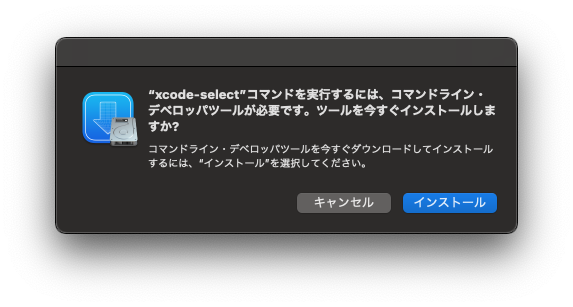
結構時間がかかった。
このあと、もう一度Cプログラムのコンパイルを実行すると、エラー無くコンパイルが成功した!
エラーの原因
よくわからんけど、先週にはできていたことができなくなっていたので、この間の出来事が原因なのは明らか。
で、この一週間の間にしたことといえば、macOSのメジャーアップデートぐらいだ。
Big Surのうちにgccをインストールしていて、Montereyにしてから初めてgcc hoge.cを実行したらエラーが出た。
まあとりあえずxcode-select --installコマンド打つだけで治ったので良かった。
本質的な原因はよくわからない。
以上!
